Page 9
STAT
IM
2000/2000S Service Guide
96-108639 Rev 3.0
1. Identifying STAT
IM
2000 Units
STATIM 2000/2000S/2000 G4 Service Guide
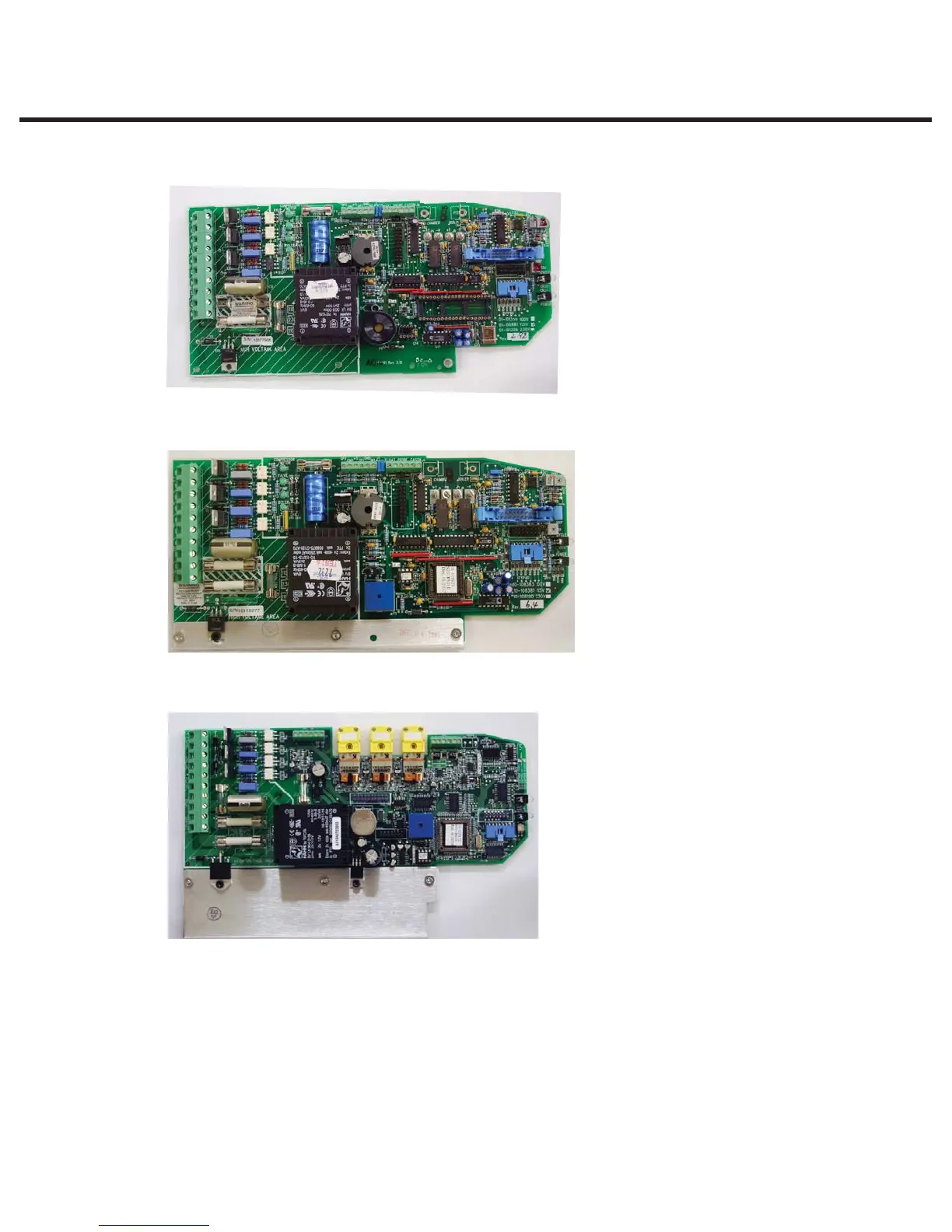
Revision 2.x/5.x type board (1995 – 2004):
Revision 6.x type board (2004 - 2007):
Revision 7.x type board (2007 to present):
Typical features:
t Revision number bottom right hand
side.
t Rectangular microprocessor plus
EPROM
t ‘W1’ jumper for calibration
t Blue ‘pressure interface/printer’
connector
Typical features:
t Revision number bottom right hand
side.
t Square microprocessor plus EPROM
t ‘W1’ jumper for calibration
t Blue ‘pressure interface/printer’
connector
Typical features:
t Up to revision 7.30, the revision
number is on the top right hand side
(printed vertically)
t From revision 7.4 onwards, the
revision number is on the bottom left
hand side (printed horizontally) under
the connector J1
t Square microprocessor plus EPROM
t NO ‘W1’ jumper for calibration
t NO Blue ‘pressure interface/printer’
connector
t All components integrated on single
board
t Surface mount type component.
t ‘Push in’ yellow thermocouple
connectors.



 To Next Page