The position of the safety laser scanner is fixed. The safety laser scanner is
mount
ed horizontally (for hazardous area protection) or vertically (for hazardous
point protection and access protection).
Display language
The display of the safety laser scanner outputs notifications and states. Multiple lan‐
guages are available for the display.
b
Select a language that the operator understands.
✓
The safety laser scanner outputs the notifications in the set language.
Display alignment
If y
ou mount the safety laser scanner with the optics cover downward, you can rotate
the orientation of the display through 180°. The preview shows the selected orientation
of the display.
b
Choose the Normal or Upside down option to specify the display orientation.
✓
The preview shows the display’s orientation.
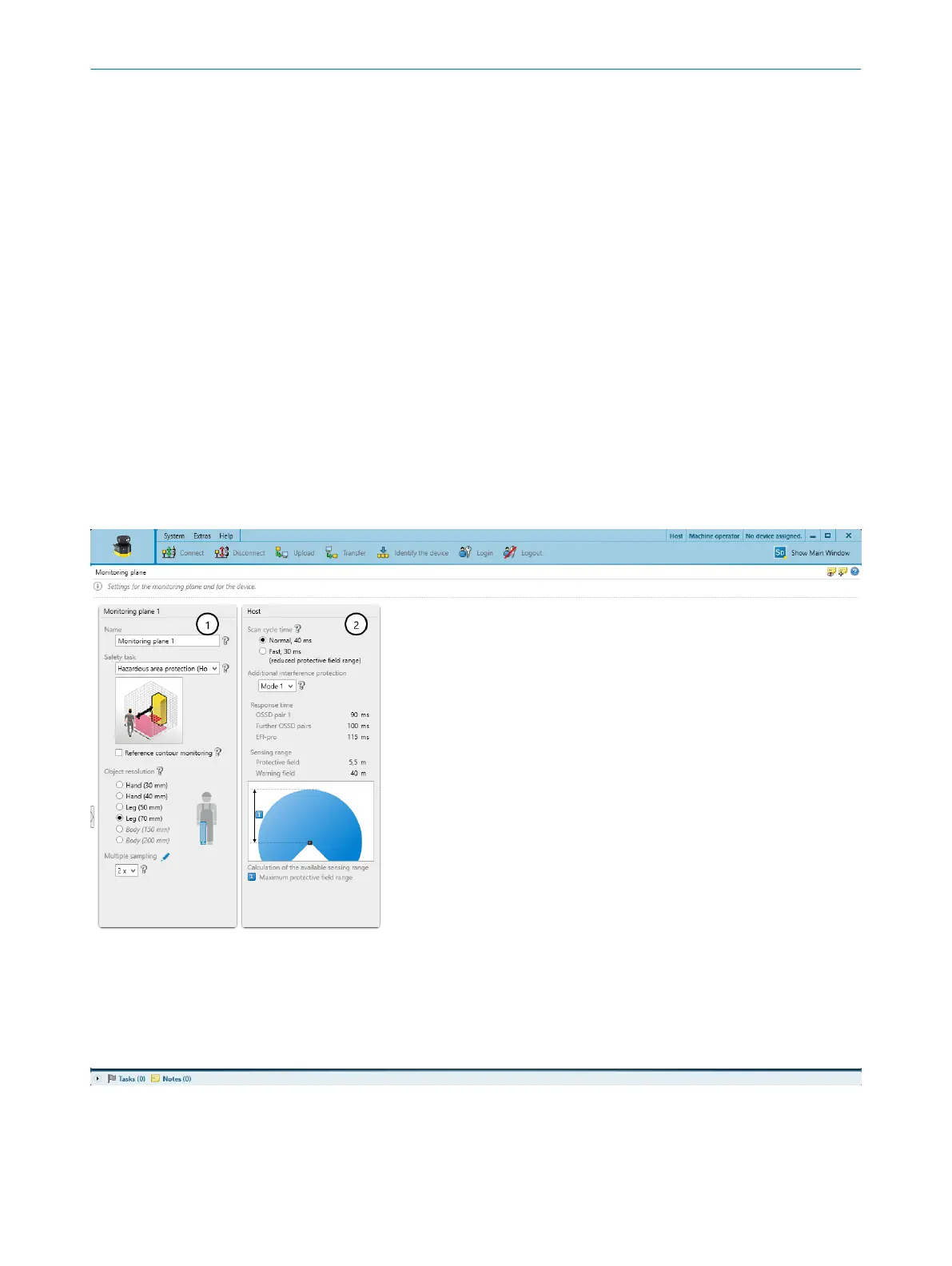
7.9 Monitoring plane
Overview
Figure 69: Monitoring plane
1
Parameters for the monitoring plane
2
Parameters for the safety laser scanner
CONFIGURATION 7
8025424/1ELL/2022-01-21 | SICK O P E R A T I N G I N S T R U C T I O N S | microScan3 Pro I/O
111
Subject to change without notice














 To Next Page