X35 Monitor Air Seeder Setup
6.16
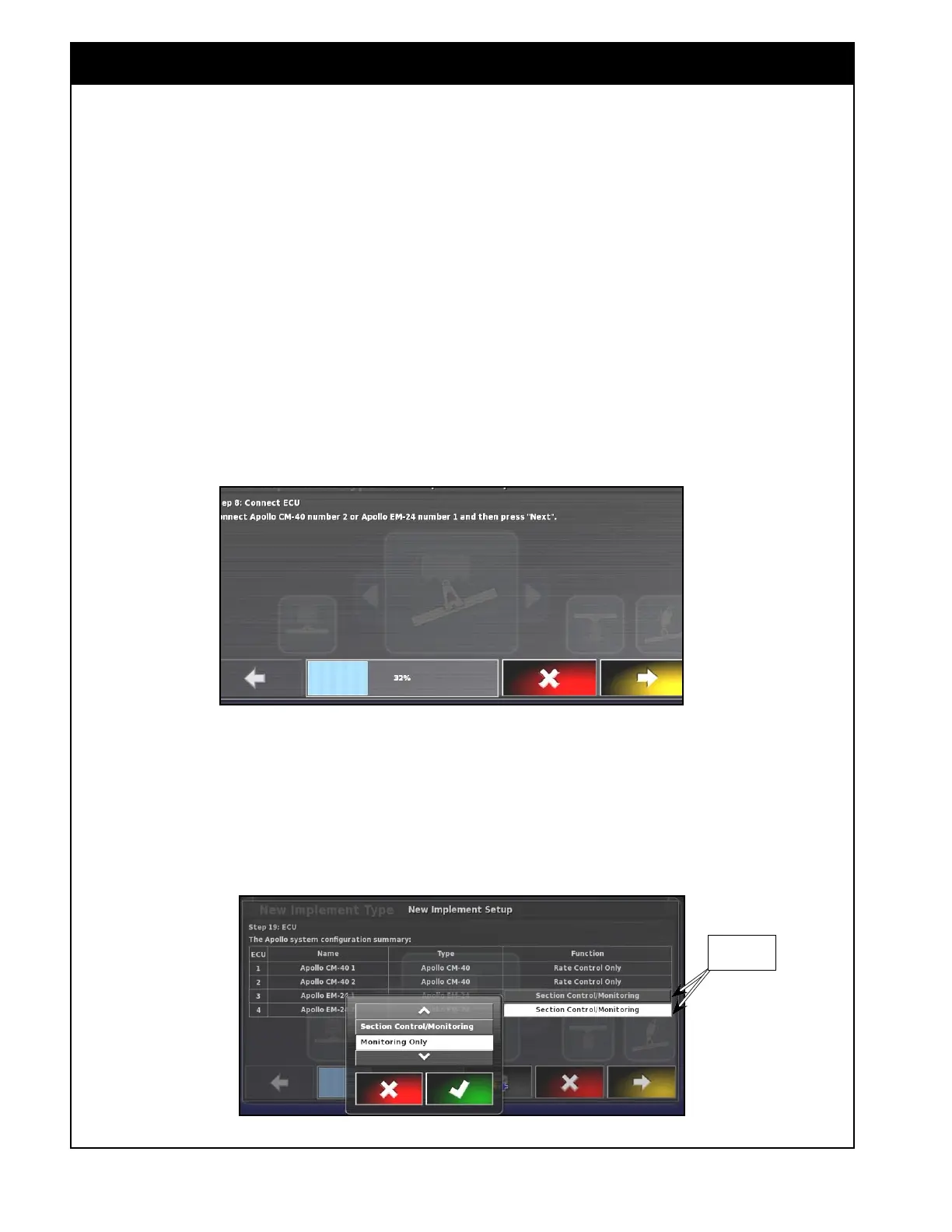
Figure 6.20 - Connect next ECU
f. If there are additional ECUs present for
this system, select the add ECU button on
the Apollo system configuration summary
window.
i. The X35 will prompt you to connect
the next ECU, refer to
Figure 6.20.
Connect ECU connector and select
Next.
ii. The X35 will try to detect the
connected ECU and will display
a confirmation once the ECU is
detected. Then the updated Apollo
system configuration summary will
be displayed.
iii. Repeat this step until all ECUs are
connected and detected.
g. Auto Section control and Blockage
Monitoring are connected to the same type
of ECU: Apollo EM-24.
i. For these ECUs functions need to be
set.
Figure 6.21 - ECU Functions
ii. Refer to Figure 6.21. For each
Apollo EM-24 ECU select the cell in
the Function column.
iii. a Pop up menu will be displayed.
iv. For ASC select Section Control/
Monitoring. For Blockage Monitoring
select Monitoring Only.
Select This



 To Next Page