4: INSTALLATION
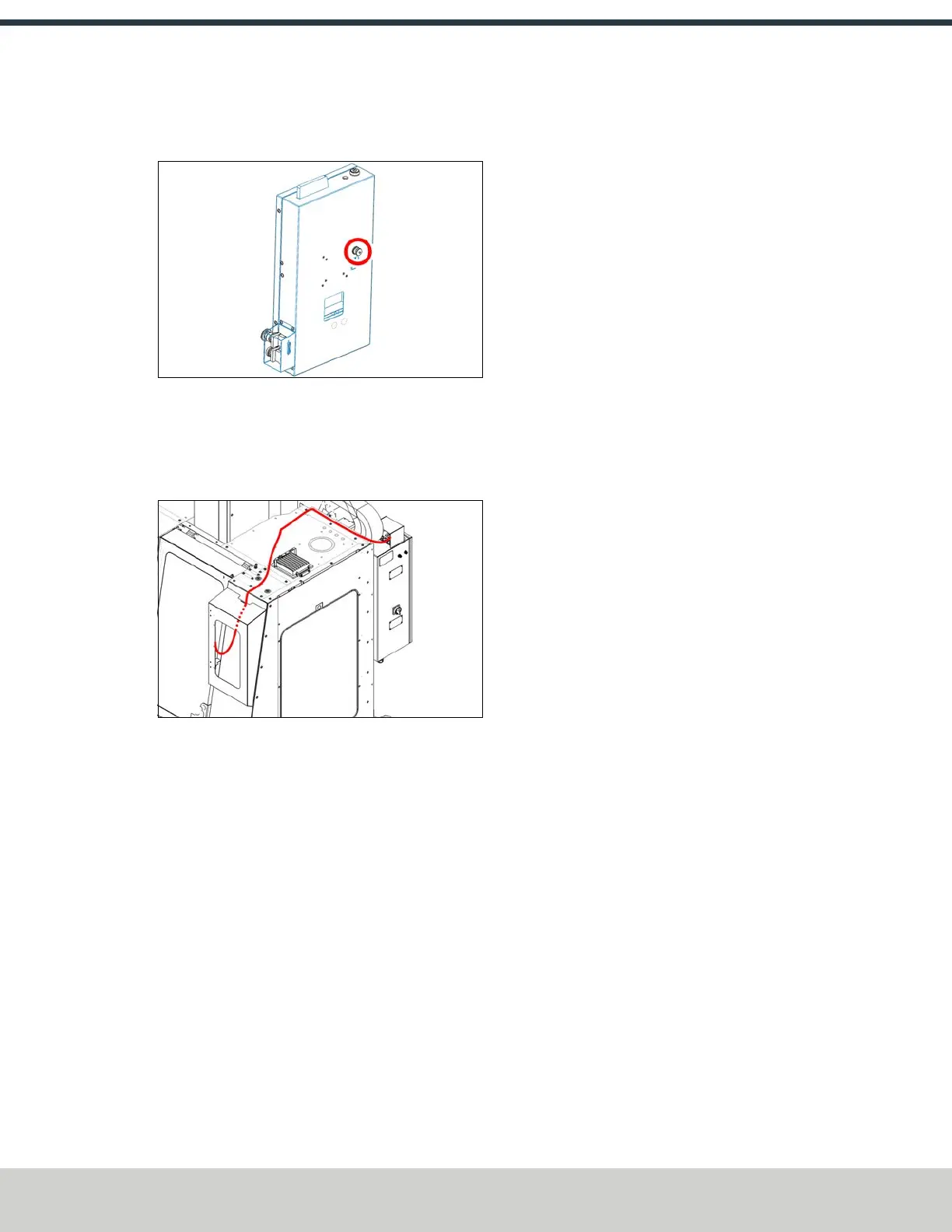
8. Connect the emergency stop cable to the XS3 connector
on the back of the operator console.
Figure 4-78: XS3 connector on the operator console.
9. Route the power, data, and emergency stop cables
through the opening in the back of the operator console
and route them across the top right enclosure panel to
the machine's electrical cabinet.
Figure 4-79: Cable routing.
10. Make the following connections at the top of the
machine's electrical cabinet:
l Connect the power cable to the Console +Controller
Power connector.
l Connect the data cable to the Controller
Communications connector.
l Connect the emergency stop cable to the Emergency
Stop connector.
11. Install the console cable cover (PN51382) on the top
right panel with one M6 × 1 - 40 screw (PN51544),
securing the cables from the operator console
underneath.
12. Install the mouse pad panel to the side of the keyboard
tray with the two screws preinstalled on the panel.
13. Identify the keyboard and the mouse. Place them on the
console trays, and then route the USB cables through the
cutout to the operator console's display. Connect both to
the USB ports.
14. Close the operator console’s front panel. Then, fasten
using the three fasteners that you previously set aside.
15. Identify the WiFi dongle. Connect it to the front of the
operator console.
16. Identify the operator pendant.
17. Connect the operator pendant’s cable to the operator
console, and stow the operator pendant on its bracket.
4.5.2 Set Up the PathPilot Controller
Before operating your machine, configure in PathPilot the date,
time, keyboard language.
Specify the Date and Time
1. From the PathPilot interface, on the Main tab, in the
MDI Line DRO field, type ADMIN DATE. Then select the
Enter key.
The Time and Date Settings dialog box displays.
2. Complete the fields in the Time and Date Settings dialog
box, and then select Close.
Specify the Keyboard Language
By default, the keyboard language is set to English.
To specify a different keyboard language:
1. From the PathPilot interface, on the Main tab, in the
MDI Line DROfield, type ADMIN KEYBOARD. Then
select the Enter key.
The Keyboard Preferences dialog box displays.
2. Select the Layouts tab and select the desired language.
If the language you want is not listed, select Add to
specify the language. Then, select Close.
Update PathPilot
We're constantly updating PathPilot to bring you more
features. Before operating your machine, update to the latest
version.
1. Confirm that the PathPilot controller is powered on and
out of Reset mode.
©Tormach® 2024
Specifications subject to change without notice.
Page 61 UM10811: 1500MX Operator's Manual (Version 0424A)
For the most recent version, see tormach.com/support



 To Next Page