4: INSTALLATION
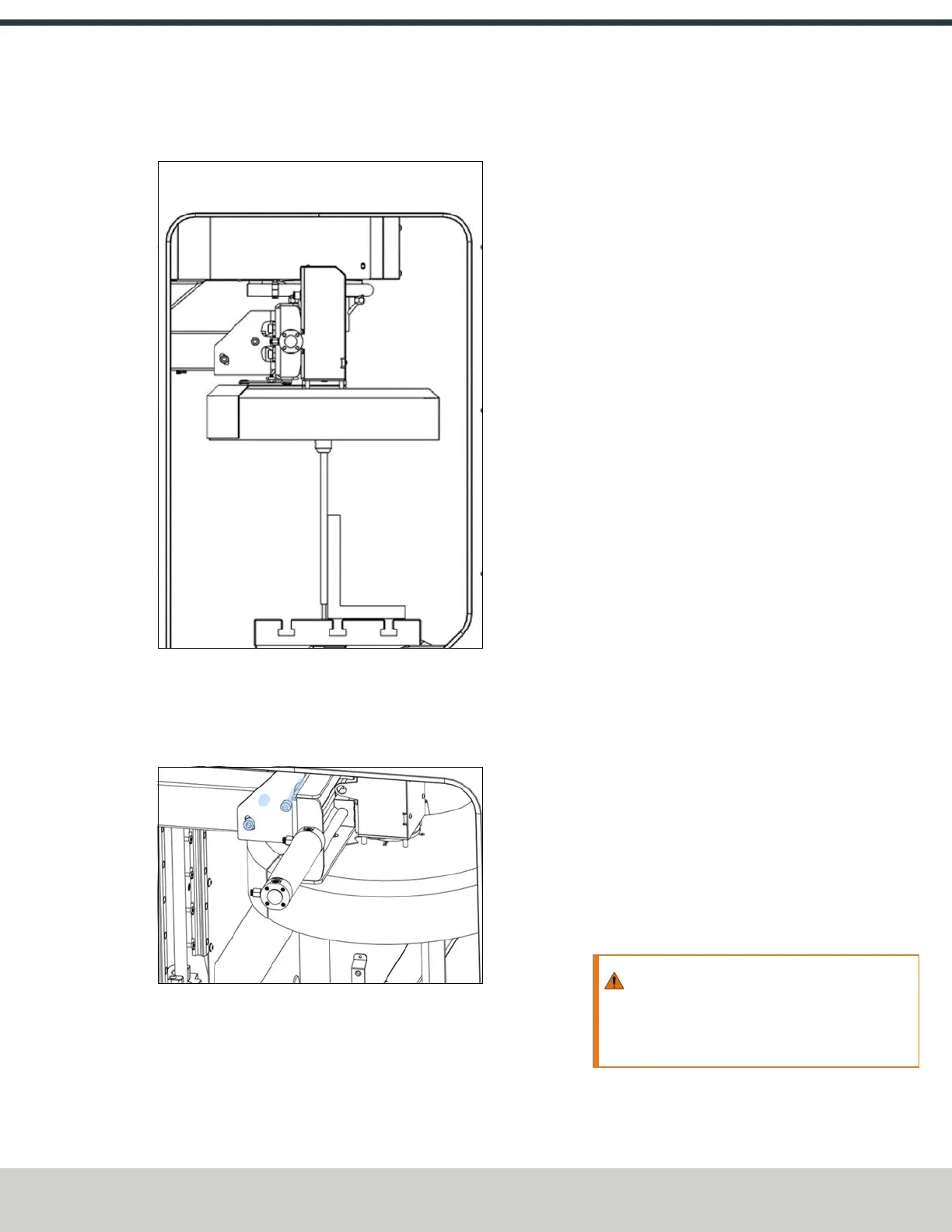
6. Verify that the rod is perpendicular to the machinist's
square in the Y-axis.
Figure 4-134: Verifying the perpendicularity of the
tool holder with the Y-axis.
7. If the ATC isn't correctly aligned to the Y-axis, adjust the
angle by loosening the screws shown in the following
image.
Figure 4-135: Screws used to adjust the alignment of
the Y-axis.
8. Adjust the jack screw to adjust the ATC level with a 13
mm wrench.
9. Align the ATC to the Y-axis and, when finished, re-
tighten the screws that you loosened in Step 8.
Adjust the Tool Alignment and Set the Tool Tray Height
and Encoder Position
1. If you haven't already done so, load a tool into the
spindle.
2. Manually rotate the spindle two revolutions by hand.
The encoder has now been oriented.
3. Disconnect the air from the machine.
4. While manually advancing the tool tray toward the
spindle, align the fork with the tool. Complete the
following steps in the order listed:
a. Slowly jog the Z-axis up or down until the groove in
the fork aligns with the groove in the tool holder.
b. Determine if the tray must move clockwise or
counterclockwise to align the fork with the tool
holder. From the PathPilot interface, in the ATC tab,
either select -- to step the tool tray counterclockwise
or ++ to step the tool tray clockwise.
c. Fully seat the ATC to its tray load position, verifying
that the tool and its drive dog slots are fully inserted
into the fork.
5. On the ATC tab, select Set TC POS.
The tool change position has now been set.
6. Select Set TC M19. Then, in the dialog box that displays,
select OK.
Follow the on-screen instructions to set the spindle's
tool change rotation position:
a. Rotate the spindle clockwise in the fork by hand.
Then, select OK.
b. Rotate the spindle counterclockwise in the fork by
hand. Then, select OK.
c. The tool change rotation position has now been set.
In the dialog box that displays, select OK.
7. Manually move the ATC back to the retracted position.
WARNING! Crush Hazard: If the ATC isn't
completely retracted, it could move once the
air is reconnected. When you reconnect the air,
you must keep your hands away from the ATC.
8. Reconnect the air.
©Tormach® 2024
Specifications subject to change without notice.
Page 77 UM10811: 1500MX Operator's Manual (Version 0424A)
For the most recent version, see tormach.com/support



 To Next Page