Using theControl Box and Lightbars 2
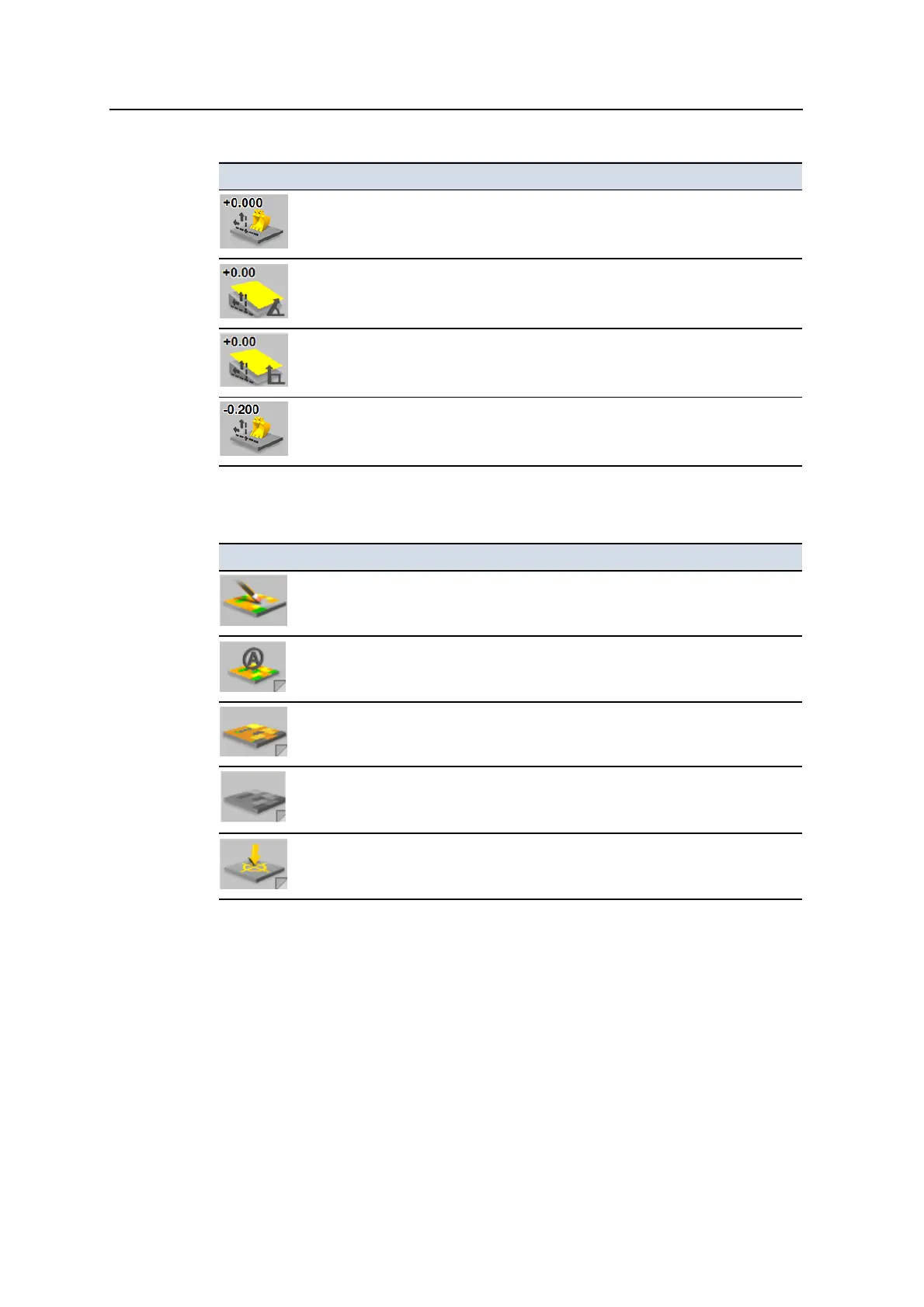
Icon Functionality
Vertical Offset:Layered Lift
– Press to open the
Vertical Offset
dialog.
Vertical Offset:Perpendicular Lift
– Press to open the
Vertical Offset
dialog.
Vertical Offset:Vertical Lift
– Press to open the
Vertical Offset
dialog.
Vertical Offset:Reference Surface
– Press to open the
Vertical Offset
dialog.
Mapping/Recording softkey icons
Icon Functionality
Reset Map
– Press to open the
Reset Map
dialog. By default, this softkey is
only displayed in Manager Mode.
Mapping:Auto
– Map data is recorded when the machine is considered to be
working. Press to change map recording to the
On
mode.
Mapping:On
– Map data is recording continuously. Press to stop recording map
data.
Mapping:Off
– Map data is not recording. Press to change map recording to the
Auto
mode.
Record Point – Record a point, when point recording is active.
Softkey labels
The text on a softkey label can show the following details:
l A description of the operation that is performed when you press the softkey
once.
l The setting that is currently selected. The text on the softkey label changes
when you press the softkey to switch between options. The top line of the
GCS900 Grade Control System for Excavators Operator's Manual 29



 To Next Page