2-24
Installation > Installing the optional parts
[CONFIDENTIAL]
4
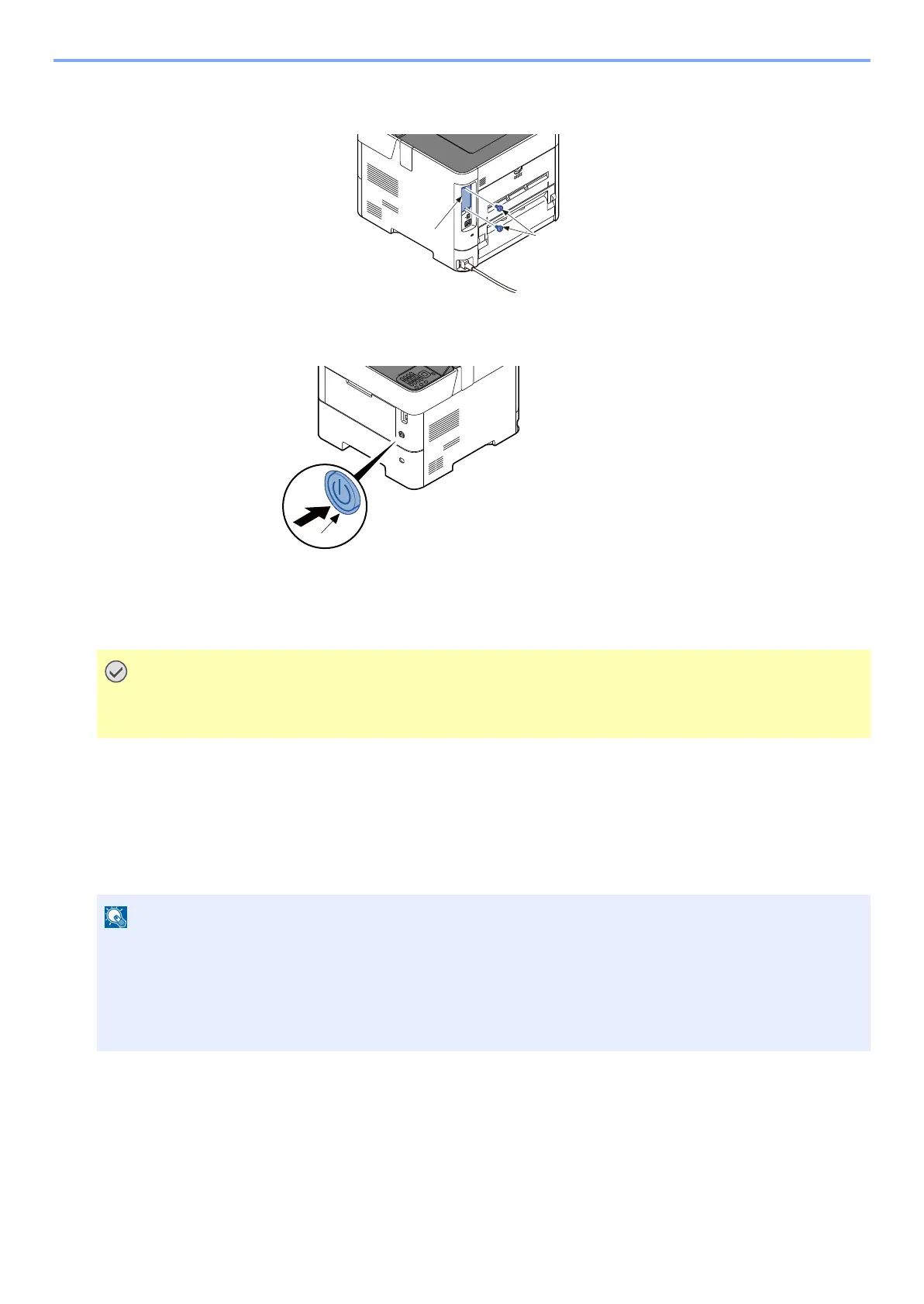
Reattach the slot cover (b) once detached to the main unit with two screws (a)
5
Insert the power cord into the socket and turn on the power switch.
Format SD Card
To use an unused SD/SDHC memory card, you must first use the machine to format the SD/SDHC memory card.
Format procedure
1 [Menu] key > [▲] [▼] key > [Device Common] > [OK] key > [▲] [▼] key > [Format SD Card] > [OK] key
2 Format an optional SD/SDHC memory card.
• Formatting will destroy any existing data on a storage device including a used SD card.
• If you have installed application, do not format the SD card to avoid the removal of the application in the SD card.
The factory default login user name and login password are set as shown below.
• 45 ppm model: Login User Name/ Login Password: 4500 / 4500
• 50 ppm model: Login User Name/ Login Password: 5000 / 5000
• 55 ppm model: Login User Name/ Login Password: 5500 / 5500
• 60 ppm model: Login User Name/ Login Password: 6000 / 6000



 To Next Page