2-23
Installation > Installing the optional parts
[CONFIDENTIAL]
(2) SD/SDHC Memory Card
Reading the SD/SDHC Memory Card
• Once inserted in the machine's slot, the contents of the SD/SDHC memory card can be read from the
operation panel or automatically when you power on or reset the machine.
1
Turn off the main unit and disconnect the power cord and all interface cables.
2
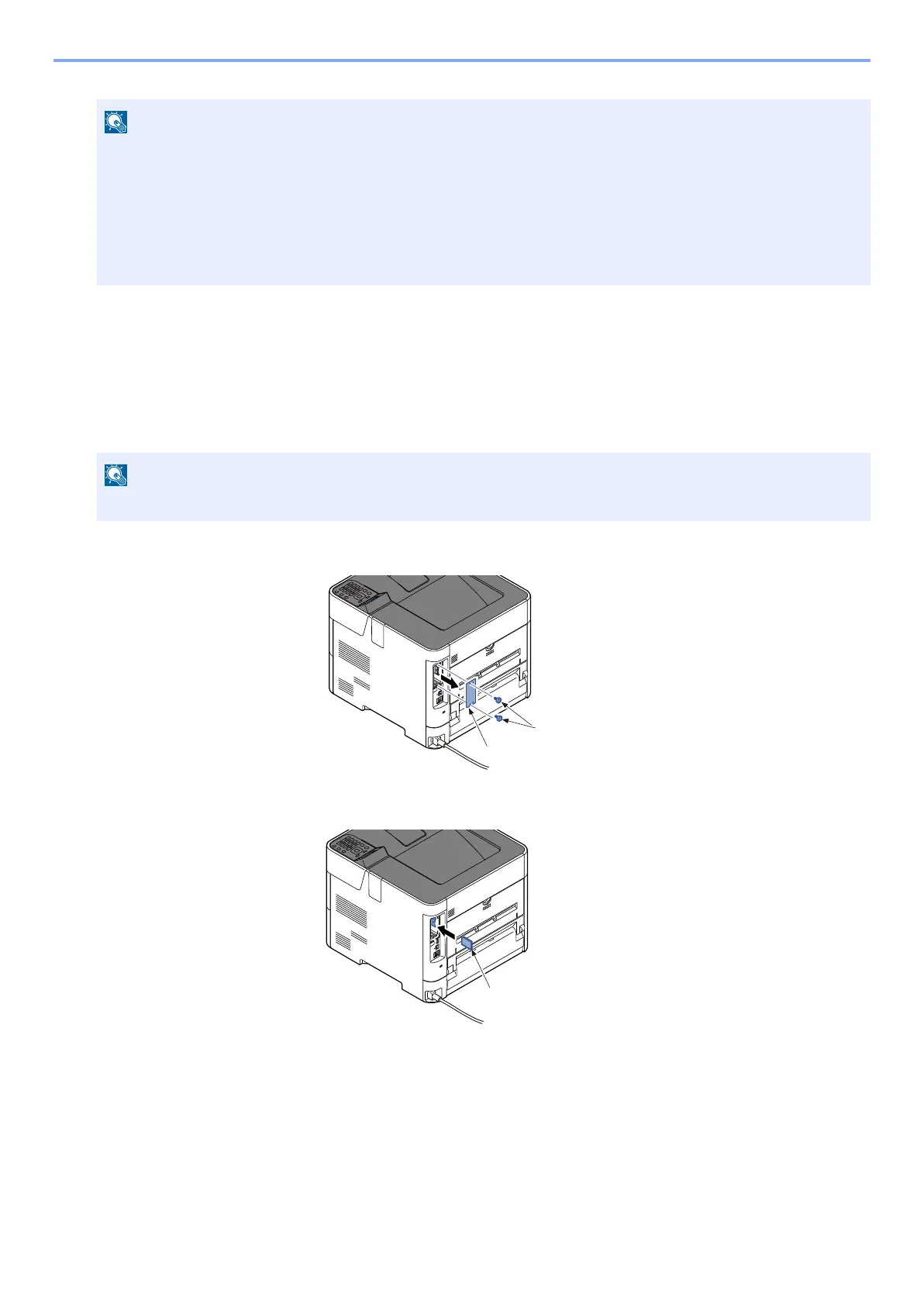
Remove two screws (a) and remove the slot cover (b).
3
Insert the SD/SDHC memory card (a) into the SD/SDHC memory card slot.
Removing the Memory Module
To remove the memory module, remove the right cover and the memory slot cover from the main unit. Then, carefully push
the two stoppers so that the memory module pops up from the socket.
Verifying the Memory Module
To verify that the memory module is working properly, print out a status page and check its content.
If memory is expanded normally, installed memory information is displayed and total memory size is increased (standard
memory sise 512MB)
The shutdown confirmation screen is displayed. It might take about three minutes to shut down.



 To Next Page