2-27
Installation > Installing the optional parts
[CONFIDENTIAL]
(3-1)Wireless Network Interface Kit (IB-36)
1
Turn off the main unit and disconnect the power cord and all interface cables.
2
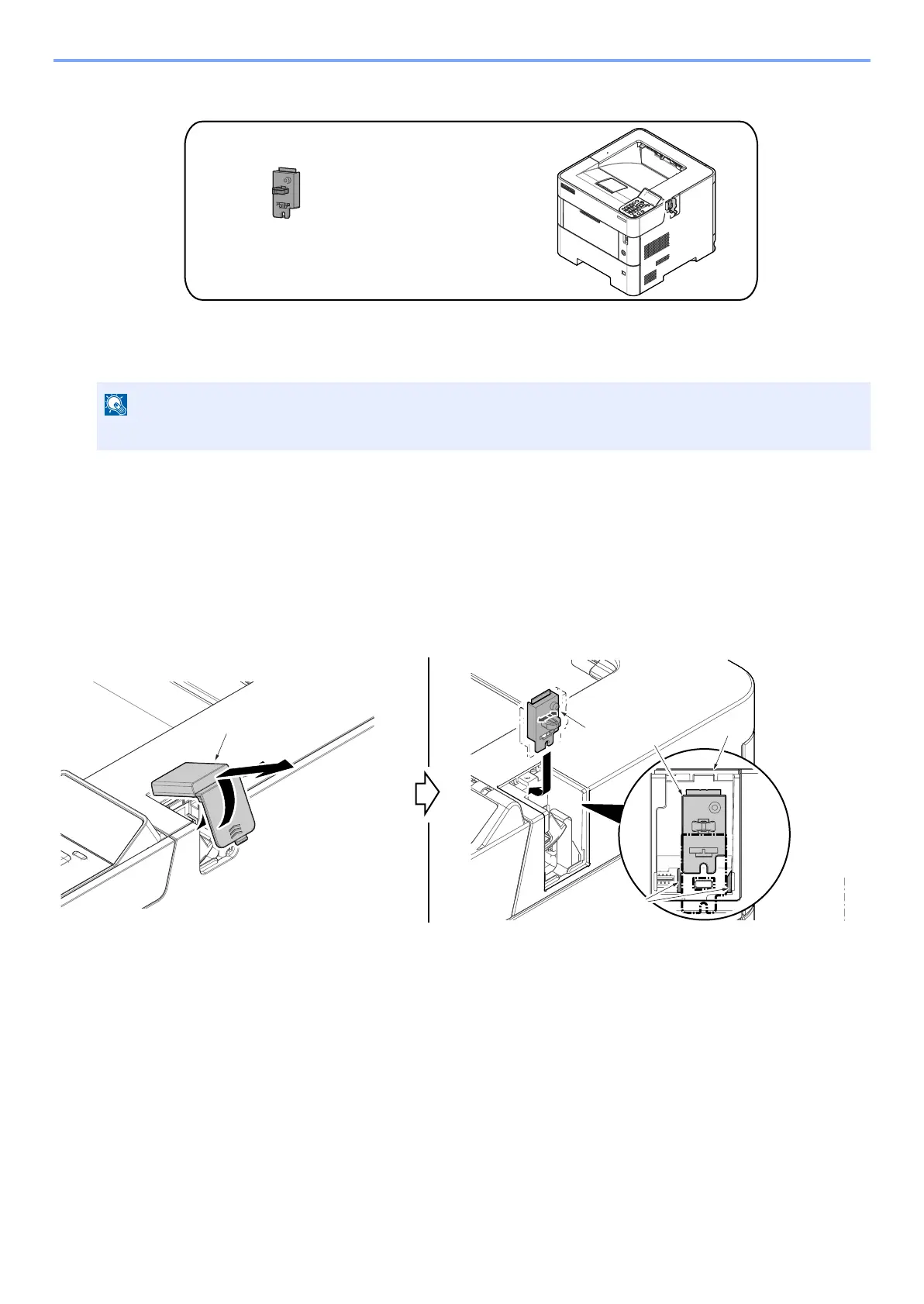
Attaching the Wi-Fi unit
45 ppm model
1 After twisting the Wi-Fi cover (a), remove it.
2 Insert the connector while aligning the backside connector of the Wi-Fi PWB (b) to the connector of the Main
PWB.
• When attaching the WiFi PWB (b) assembly, insert it while aligning it to the guide on the top cover (c).
50/55/60 ppm model
1 Detach the Wi-Fi cover (a) by sliding it.
2 Insert the connector while aligning the backside connector of the Wi-Fi PWB (b) to the connector of the Main
PWB.
• When attaching the WiFi PWB (b) assembly, insert it while aligning it to the guide on the top cover (c).
The shutdown confirmation screen is displayed. It might take about three minutes to shut down.



 To Next Page