Chapter 10 Troubleshooting Alpha Compact 32708612
Version: 14.12.2012 page 130 of 135
PROBLEM POSSIBLE CAUSE SOLUTION
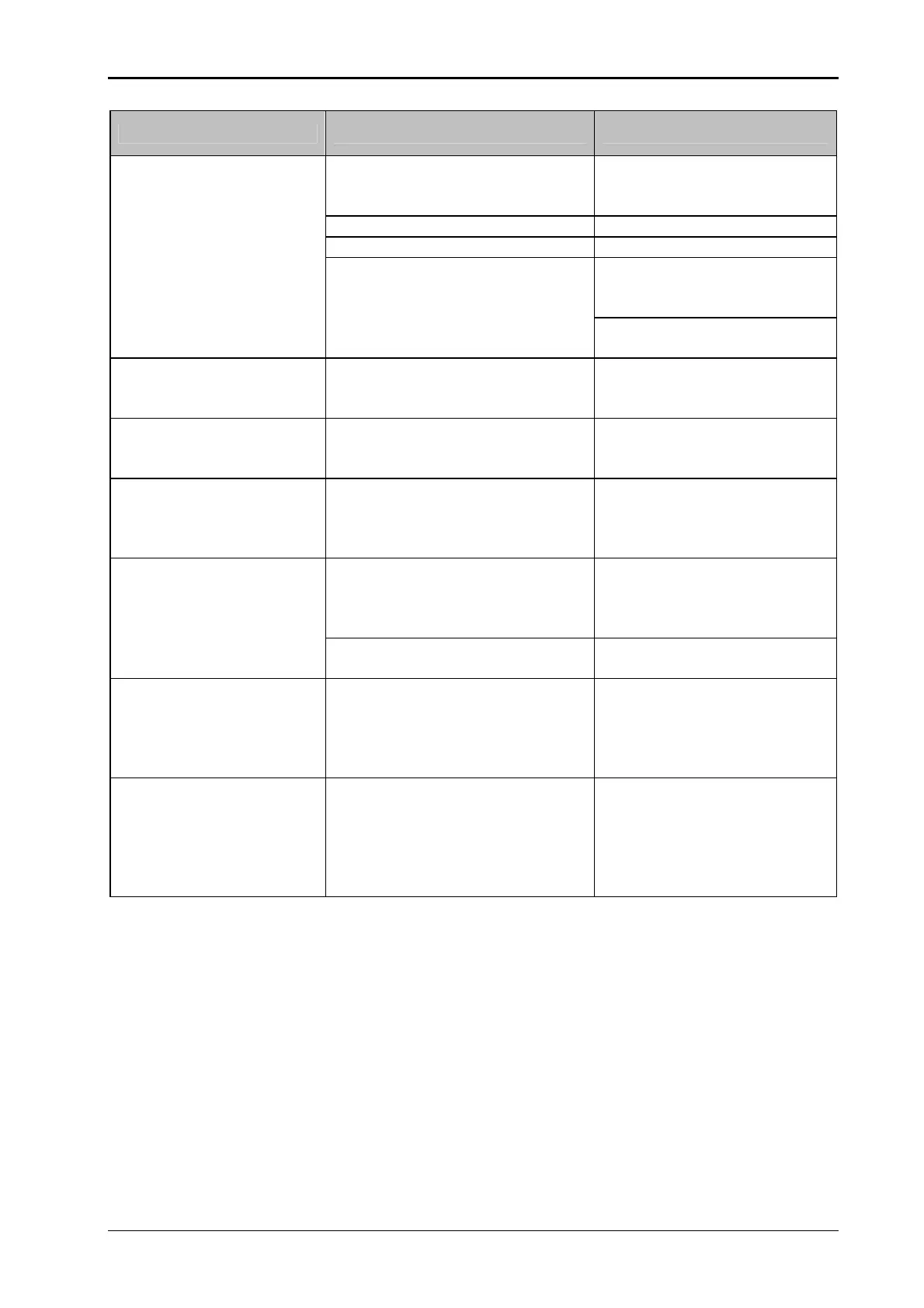
Label does not stop con-
stantly at peeler bar.
In case of label-stop-light barrier:
Label is detected incorrect.
Load label material once
again if necessary or check
position of the label-sensor.
Label-sensor ist polluted. Clean label sensor.
Band brake is adjusted too tight. Check adjustment.
In case of mechanical label-
stop-scanning:
Label is not correct detected.
Load label material once
again if necessary or check
position of the label-sensor.
Remove buildup of adhesive
at the scanning roll.
Label is longer than 300mm. Set the label size in the con-
figuration menu in parameter
[01Label length].
Label sensor has switched to
dark-light-recognation.
Press Teach button longer
than 6 seconds. Sensor
switches NO/NC).
A non default pneumatic peeler
blade is mounted.
Set distance between label-
ling sheet and label sensor
and peeling edge [02Label
position].
Labels run without a stop
or rather the positioning of
the label at the peeler bar
is irregular.
Transmitter and receiver of the
label stop-light barrier are not
placed directly on top of each
other (mechanical damaged).
Adjust transmitter and re-
ceiver and exchange if nec-
essary.
LED at receiver of the label stop-
light barrier flashes permanently
You have to check the sensi-
tivity-adjustment
Double-Labeling:
On one trigger 2 labels
are applied (directly) one
after another.
The feed-length for an applying
cycle is longer than two label
lengths.
The overrun distance has to
be reduced
If this is impossible the driv-
ing ramps have to be short-
ened.
Labeler stops immedia-
tely.
At incorrect stress peaks, the
labeler stops. (A possible hint for
stress peaks is the jittering of the
display controller).
Restart the labeler as usual.
If the labeler stops increas-
ingly often, remedy the caus-
es of the stress peaks or in-
stall a mains filter before the
labeler.


 To Next Page