FUEL INJECTION SYSTEM
8-39
EAS27420
DIAGNOSTIC MODE
Setting the diagnostic mode
1. Turn the main switch to “OFF” and set the engine stop switch to “”.
2. Disconnect the wire harness coupler from the fuel pump.
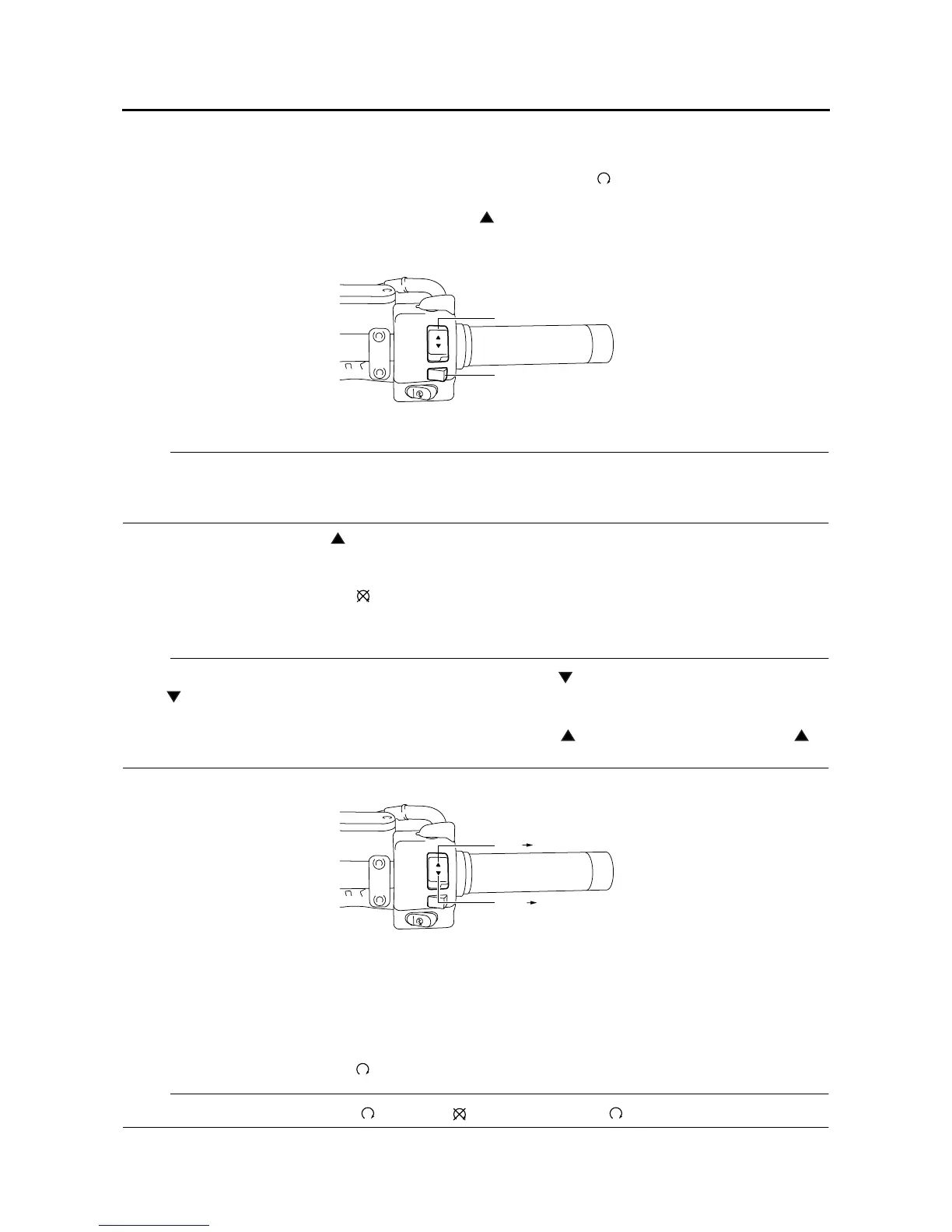
3. Press and hold the “RESET” switch “1” and the “” side of the “SELECT” switch “2”, turn the main
switch to “ON”, and continue to press the switches for 8 seconds or more.
NOTE:
• All displays on the meter disappear except the clock and odometer/trip meter/fuel reserve trip
meter/clock displays.
•“dIAG” appears on the odometer/trip meter/fuel reserve trip meter/clock LCD.
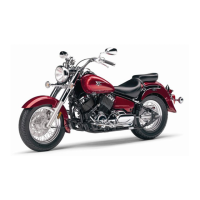
4. Simultaneously press the “” side of the “SELECT” switch and the “RESET” switch for 2 seconds
or more to activate the diagnostic mode. The diagnostic code number “d01” appears on the clock
LCD.
5. Set the engine stop switch to “”.
6. Select the diagnostic code number corresponding to the fault code number by pressing the “SE-
LECT” and “RESET” switches.
NOTE:
• To decrease the selected diagnostic code number, press the “” side of the “SELECT” switch. Press
the “” side of the “SELECT” switch for 1 second or longer to automatically decrease the diagnostic
code numbers.
• To increase the selected diagnostic code number, press the “” side of the switch. Press the “”
side of the switch for 1 second or longer to automatically increase the diagnostic code numbers.
7. Verify the operation of the sensor or actuator.
• Sensor operation
The data representing the operating conditions of the sensor appears on the odometer/trip meter/fu-
el reserve trip meter/clock LCD.
• Actuator operation
Set the engine stop switch to “” to operate the actuator.
NOTE:
If the engine stop switch is set to “”, set it to “”, and then set it to “” again.
SELECT
RESET
2
1
SELECT
RESET
d01”
“d01
d70”
“d70









 To Next Page