115
Address book
Exporting an address book
entry
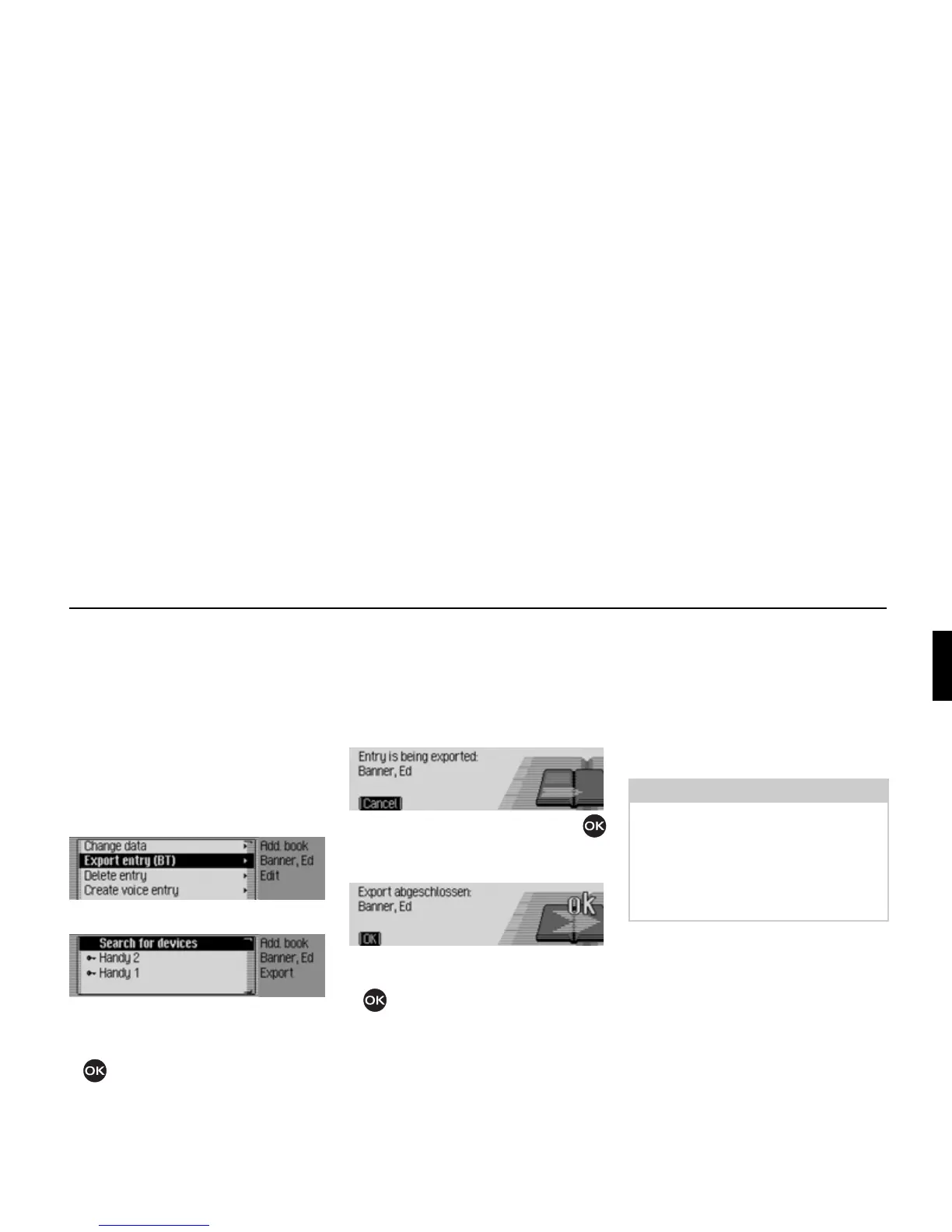
Use this function to transfer a single
address book entry in vCard format to
another device which is equipped with
Bluetooth® wireless technology.
! Find the address book entry which you
wish to export.
! Select the Edit entry.
! Select the Export entry (BT) entry.
! Select the device to which the entry is
to be sent.
! Press the rotary control/push button
.
The Cascade tries to establish a
connection to the required device.
If authentication is required, you will
have to connect/ authenticate the device
as described in “Connecting devices
(Cascade)” on page 123.
Press the rotary control/push button
to abort the transfer. No data will be
transferred.
The address book entry has been sent.
! Press the rotary control/push button
.
Importing an address book
entry
Addresses in vCard format can be
imported from other devices.
This function is initiated by an external
Bluetooth device. Please also refer to the
instructions for your device.
The procedure is as follows:
The external device sends a connection
request.
If authentication is required, you will
have to connect/ authenticate the device
as described in “Connecting devices
(Cascade)” on page 123.
6033
6034
6035
6036
Note:
If a vCard connection to a Bluetooth
device has already been established,
another vCard connection request from
another Bluetooth device will be
rejected without information being sent
by the Cascade.















 To Next Page