©2024 Comba Telecom. All Rights Reserved.
568 Gibraltar Drive, Milpitas, CA 95035 | +1 408 526 0180
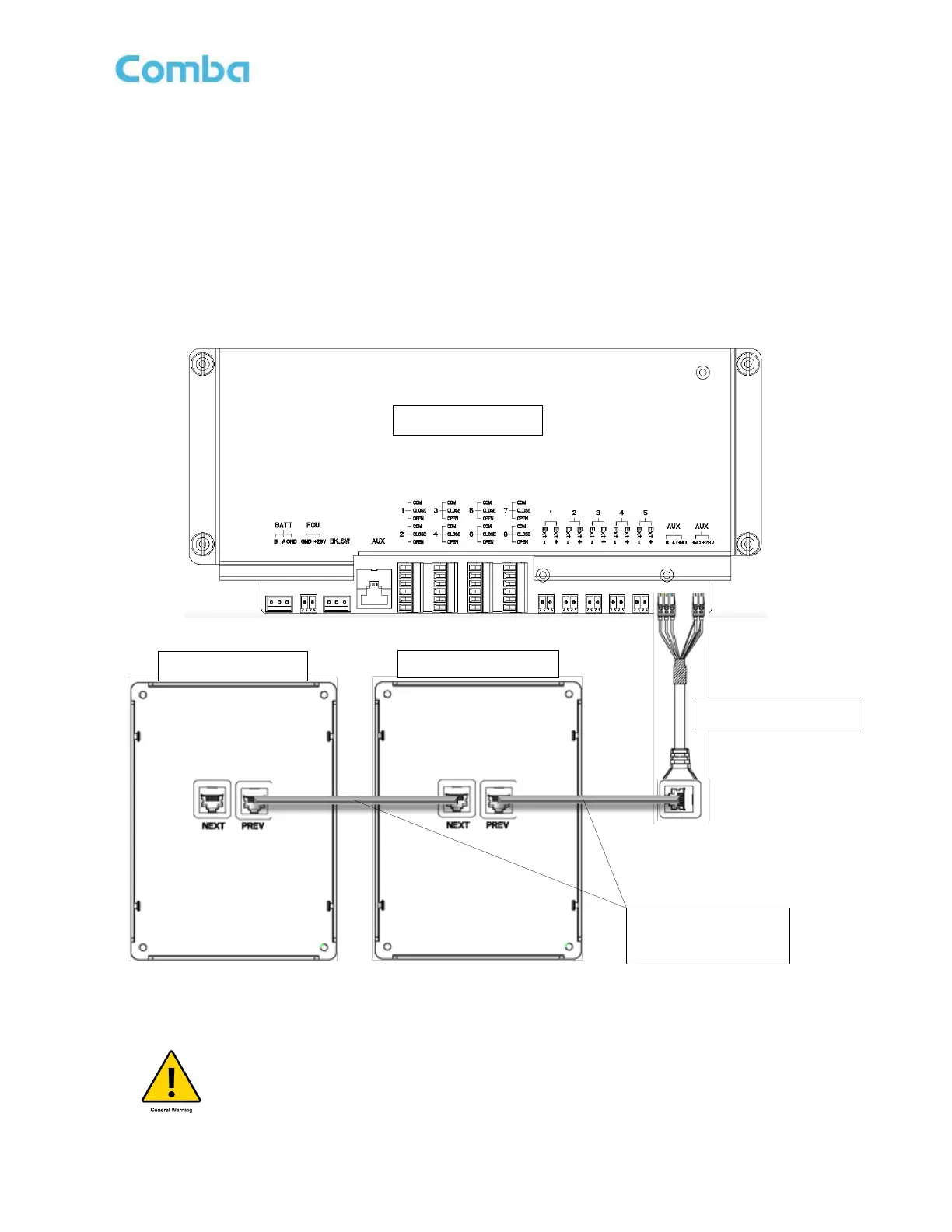
Follow the instructions below and see Figure 78 below, to connect a V3 AP to the V3 BDA/MU or RU:
• Power down the V3 BDA/MU or RU system.
• Connect the RJ45 adapter to the BDA/MU/RU as shown in Figure 78 below.
• Connect RJ45 ethernet cable between the RJ45 adapter and the V3 AP “PREV” port.
• To cascade additional APs, connect RJ45 cat5/6 cable between previous AP1 “NEXT” port and AP2
“PREV” port.
Figure 78: V3 BDA/MU/RU Wiring Connection to V3 AP
Caution: You must follow your local code requirements for guidance on cable
installation. See local codes for additional guidance on installing cabling inside of
conduit as well as free wiring cable. Please ensure the correct liquid tight connector
or cable gland is used.



 To Next Page