©2024 Comba Telecom. All Rights Reserved.
568 Gibraltar Drive, Milpitas, CA 95035 | +1 408 526 0180
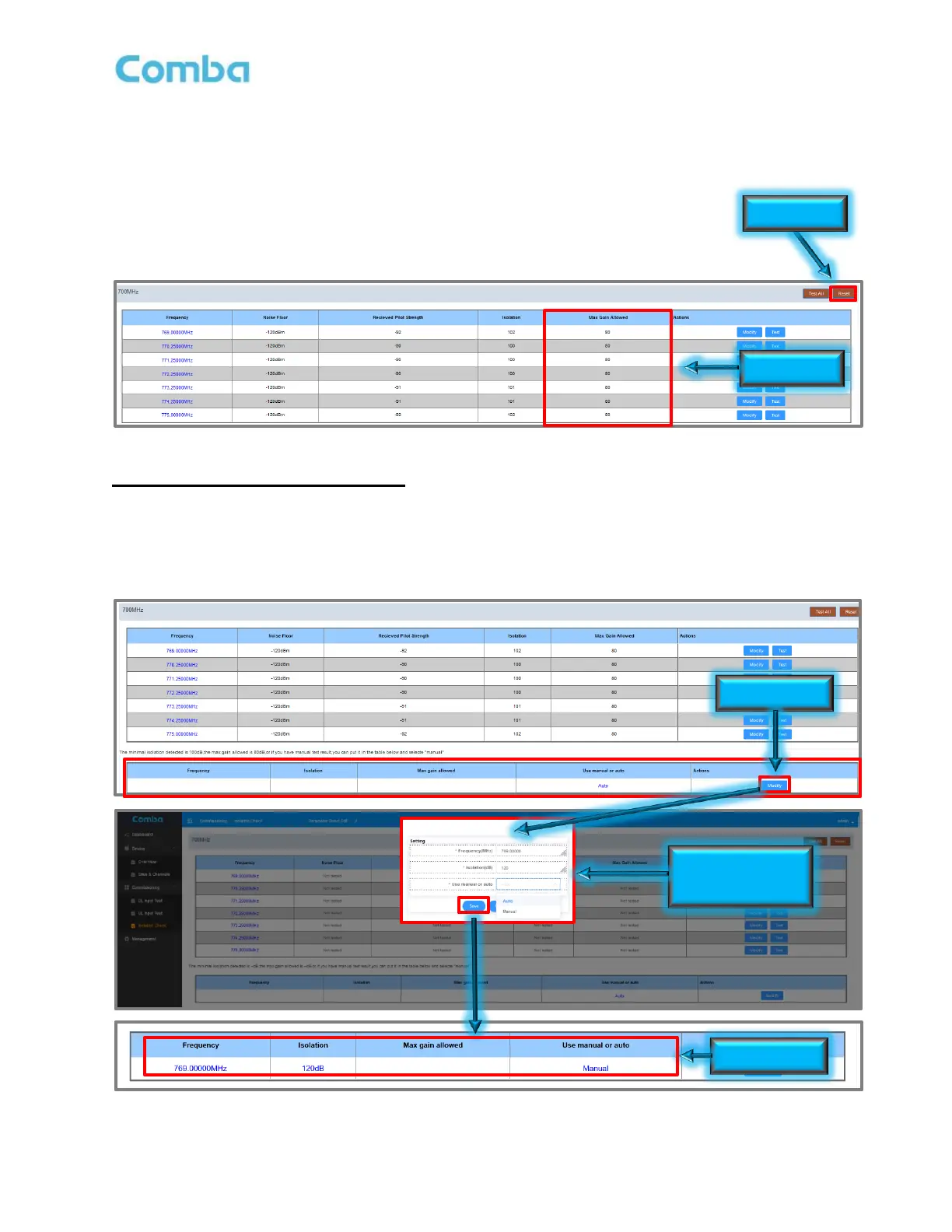
The test results will be displayed for each test frequency for each band. The results will also be displayed in
the <Commissioning Tool> table when you navigate to <Device – Sites & Channels – Site>. The device will
use the Lowest Isolation measured for each band to limit the BDA Gains according to the code requirement to
provide 20dB margin between BDA Gain and Isolation.
• You can reset the measurements at any time by clicking on <Reset>.
Example (See Figure 125 below): Lowest Isolation Measured: 100dB
MAX BDA Gain = Isolation - 20dB = 100dB - 20dB = 80dB
Figure 125: V3 BDA/MU Commissioning Tools – Isolation Check Results
Isolation Check (Manual Measurement):
• Navigate to <Commissioning Tools – Isolation Check>
• Ensure the Isolation Measurement type is set to “Manual” in the <Use manual or auto> section.
• Enter your manual Isolation Measurement in the <Isolation (dB)> section. Click <Save>.
Results will display in the window below each band’s test frequency section. See Figure 126 below.
Figure 126: V3 BDA/MU Commissioning Tools – Isolation Check Manual Override



 To Next Page