xStack® DES-3528/DES-3552 Series Layer 2 Stackable Fast Ethernet Managed Switch Web UI Reference Guide
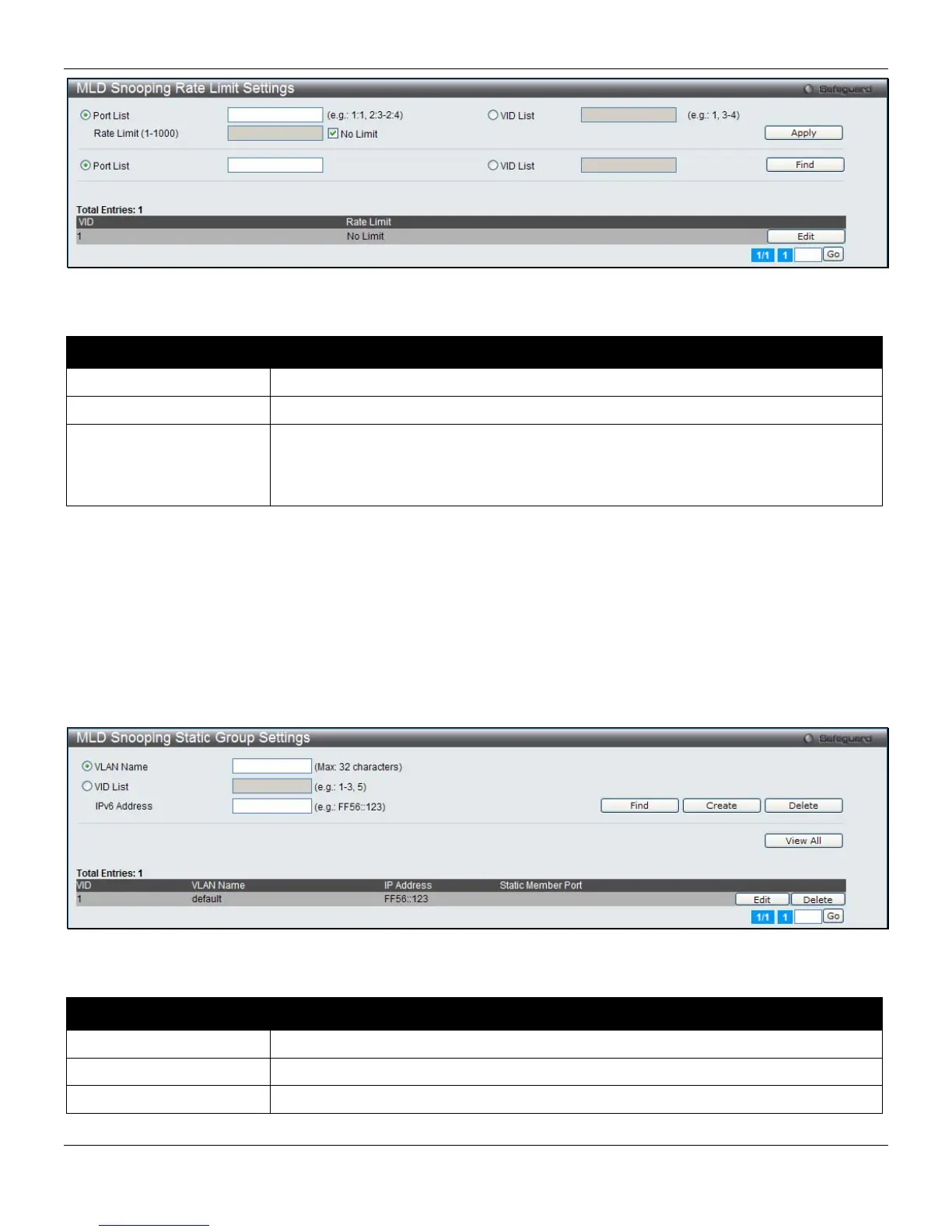
Figure 4-57 MLD Snooping Rate Limit Settings window
The fields that can be configured are described below:
Parameter Description
Port List
Enter the port list here.
VID List
Enter the VID list value here.
Rate Limit
Configure the rate limit of MLD control packet that the Switch can process on a
specific port/VLAN. The rate is specified in packet per second. The packet that
exceeds the limited rate will be dropped. Selecting the No Limit option lifts the rate
limit requirement.
Click the Apply button to accept the changes made for each individual section.
Click the Find button to locate a specific entry based on the information entered.
Click the Edit button to re-configure the specific entry.
MLD Snooping Static Group Settings
This page used to configure the MLD snooping multicast group static members.
To view the following window, click L2 Features > L2 Multicast Control > MLD Snooping > MLD Snooping Static
Group Settings, as shown below:
Figure 4-58 MLD Snooping Static Group Settings window
The fields that can be configured are described below:
Parameter Description
VLAN Name
The name of the VLAN on which the static group resides.
VID List
The ID of the VLAN on which the static group resides.
IPv6 Address
Specify the multicast group IPv6 address.
Click the Find button to locate a specific entry based on the information entered.
112












 To Next Page