xStack® DES-3528/DES-3552 Series Layer 2 Stackable Fast Ethernet Managed Switch Web UI Reference Guide
• one for Ethernet (or MAC address-based) profile configuration,
• one for IPv6 address-based profile configuration,
• one for IPv4 address-based profile configuration, and
• one for packet content profile configuration.
Adding a CPU Ethernet ACL Profile
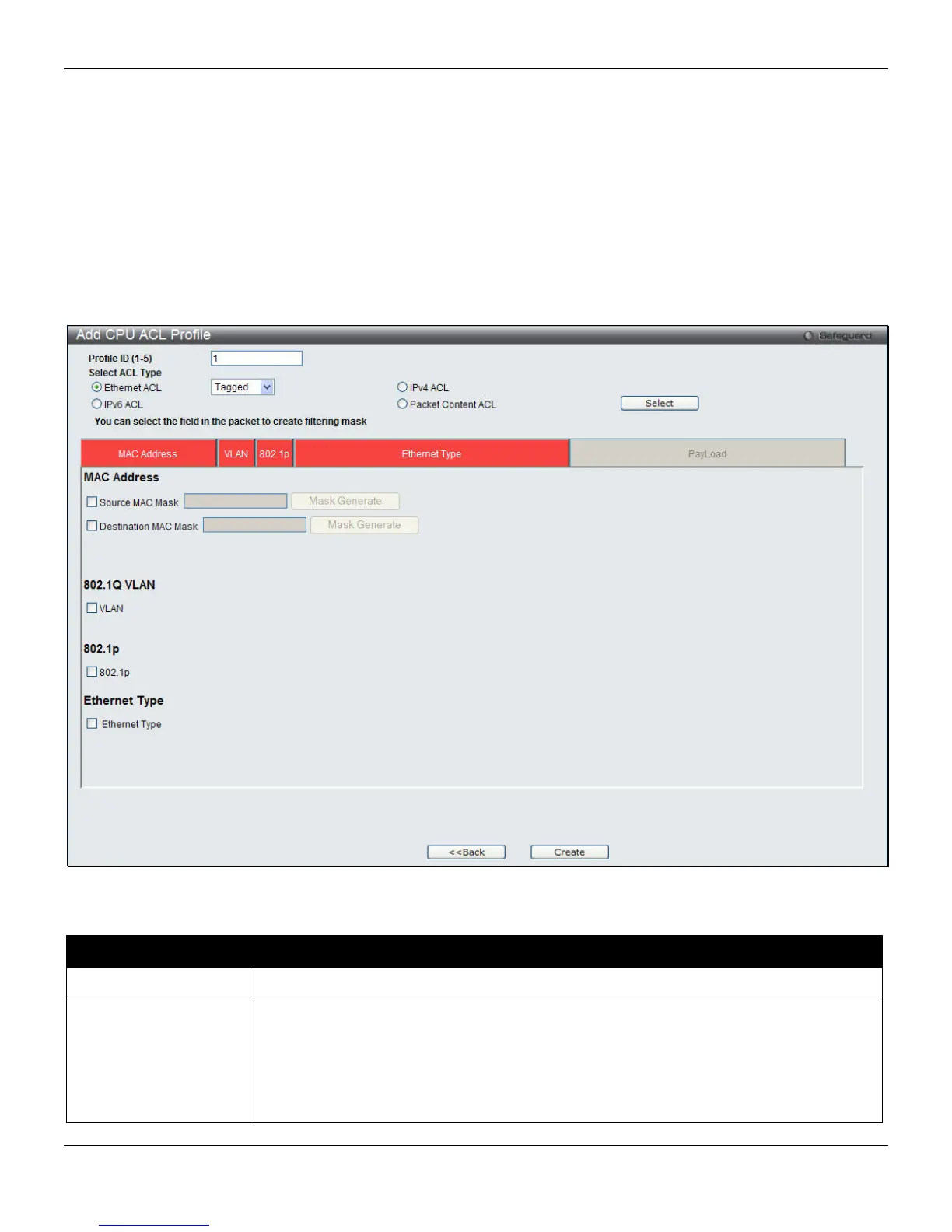
The window shown below is the Add CPU ACL Profile window for Ethernet. To use specific filtering masks in this ACL
profile, click the packet filtering mask field to highlight it red. This will add more filed to the mask.
After clicking the Add CPU ACL Profile button, the following page will appear:
Figure 7-24 Add CPU ACL Profile (Ethernet ACL)
The fields that can be configured are described below:
Parameter Description
Profile ID (1-5)
Enter a unique identifier number for this profile set. This value can be set from 1 to 5.
Select ACL Type
Select profile based on Ethernet (MAC Address), IPv4 address, IPv6 address, or packet
content mask. This will change the window according to the requirements for the type of
profile.
Select Ethernet ACL to instruct the Switch to examine the layer 2 part of each packet
header.
Select IPv4 ACL to instruct the Switch to examine the IP address in each frame's
185












 To Next Page