xStack® DES-3528/DES-3552 Series Layer 2 Stackable Fast Ethernet Managed Switch Web UI Reference Guide
Multicast Address List
Enter the multicast address list value.
Click the Add button to add a new entry based on the information entered.
Click the <<Back button to discard the changes made and return to the previous page.
Click the Delete button to remove the corresponding entry.
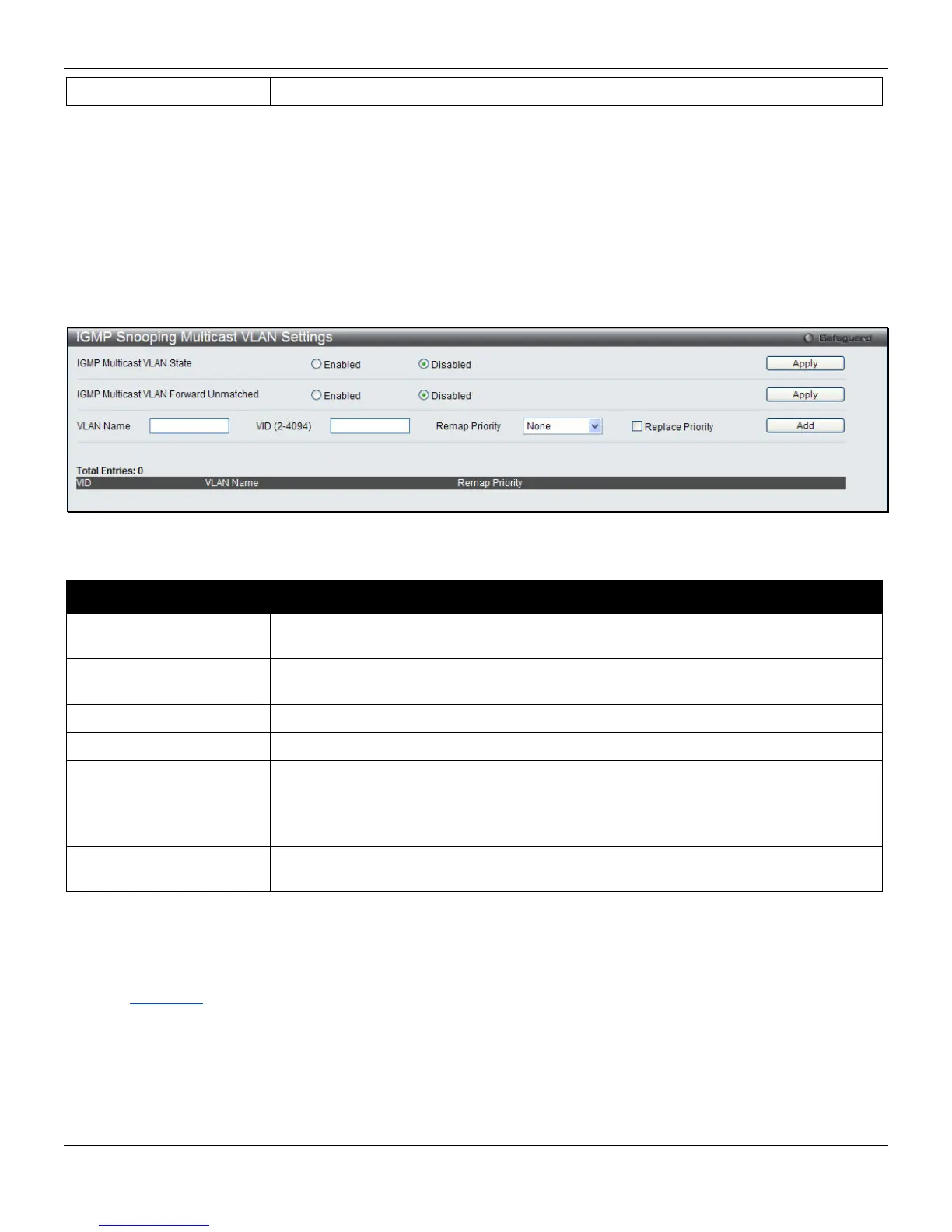
IGMP Snooping Multicast VLAN Settings
On this page the user can configure the IGMP snooping multicast VLAN parameters.
To view the following window, click L2 Features > L2 Multicast Control > Multicast VLAN > IGMP Snooping
Multicast Group VLAN Settings, as shown below:
Figure 4-67 IGMP Snooping Multicast VLAN Settings window
The fields that can be configured are described below:
Parameter Description
IGMP Multicast VLAN
State
Click the radio buttons to enable or disable the IGMP Multicast VLAN state.
IGMP Multicast VLAN
Forward Unmatched
Click the radio buttons to enable or disable the IGMP Multicast VLAN Forwarding
state.
VLAN Name
Enter the VLAN Name used.
VID
Enter the VID used.
Remap Priority
0-7 – The remap priority value (0 to 7) to be associated with the data traffic to be
forwarded on the multicast VLAN.
None – If None is specified, the packet’s original priority is used. The default setting is
None.
Replace Priority
Specify that the packet’s priority will be changed by the Switch, based on the remap
priority. This flag will only take effect when the remap priority is set.
Click the Apply button to accept the changes made for each individual section.
Click the Add button to add a new entry based on the information entered.
Click the Edit button to configure the IGMP Snooping Multicast VLAN Settings for the specific entry.
Click the Delete button to remove the specific entry.
Click the Profile List
link to configure the IGMP Snooping Multicast VLAN Settings for the specific entry.
After clicking the Edit button, the following page will appear:
118












 To Next Page