xStack® DES-3528/DES-3552 Series Layer 2 Stackable Fast Ethernet Managed Switch Web UI Reference Guide
MAC-based VLAN Settings
Users can create new MAC-based VLAN entries, search and delete existing entries. When a static MAC-based VLAN
entry is created for a user, the traffic from this user will be able to be serviced under the specified VLAN.
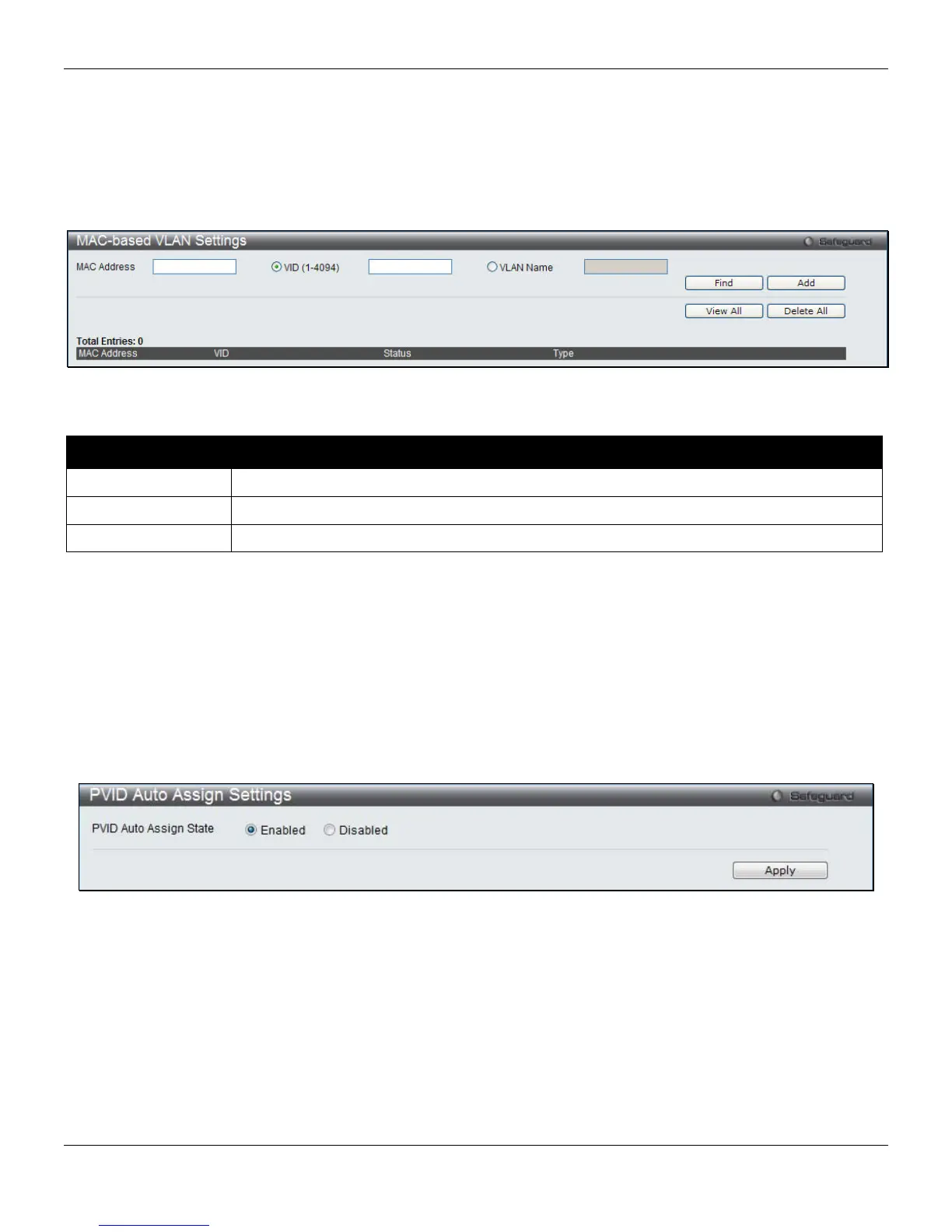
To view the following window, click L2 Features > VLAN > MAC-based VLAN Settings, as shown below:
Figure 4-13 MAC-based VLAN Settings
The fields that can be configured are described below:
Parameter Description
MAC Address
Specify the MAC address to be used to create a MAC-based VLAN entry.
VID (1-4094)
Select this option and enter the VLAN ID.
VLAN Name
Select this option and enter the VLAN name of a previously configured VLAN.
Click the Find button to locate a specific entry based on the information entered.
Click the Add button to add a new entry based on the information entered.
Click the View All button to display all the existing entries.
Click the Delete All button to remove all the entries listed.
Click the Delete button to remove the specific entry.
PVID Auto Assign Settings
Users can enable or disable PVID Auto Assign Status. The default setting is enabled.
To view the following window, click L2 Features > VLAN > PVID Auto Assign Settings, as shown below:
Figure 4-14 PVID Auto Assign Settings window
Click the Apply button to accept the changes made.
69












 To Next Page