xStack® DES-3528/DES-3552 Series Layer 2 Stackable Fast Ethernet Managed Switch Web UI Reference Guide
The fields that can be configured are described below:
Parameter Description
DHCPv6 Relay State
Click the radio buttons to enable or disable the DHCPv6 Relay service on the Switch.
The default is Disabled.
DHCPv6 Relay Hops
Count Limit (1-32)
This field allows an entry between 1 and 32 to define the maximum number of router
hops DHCPv6 messages can be forwarded. The default hop count is 4.
Click the Apply button to accept the changes made for each individual section.
DHCPv6 Relay Settings
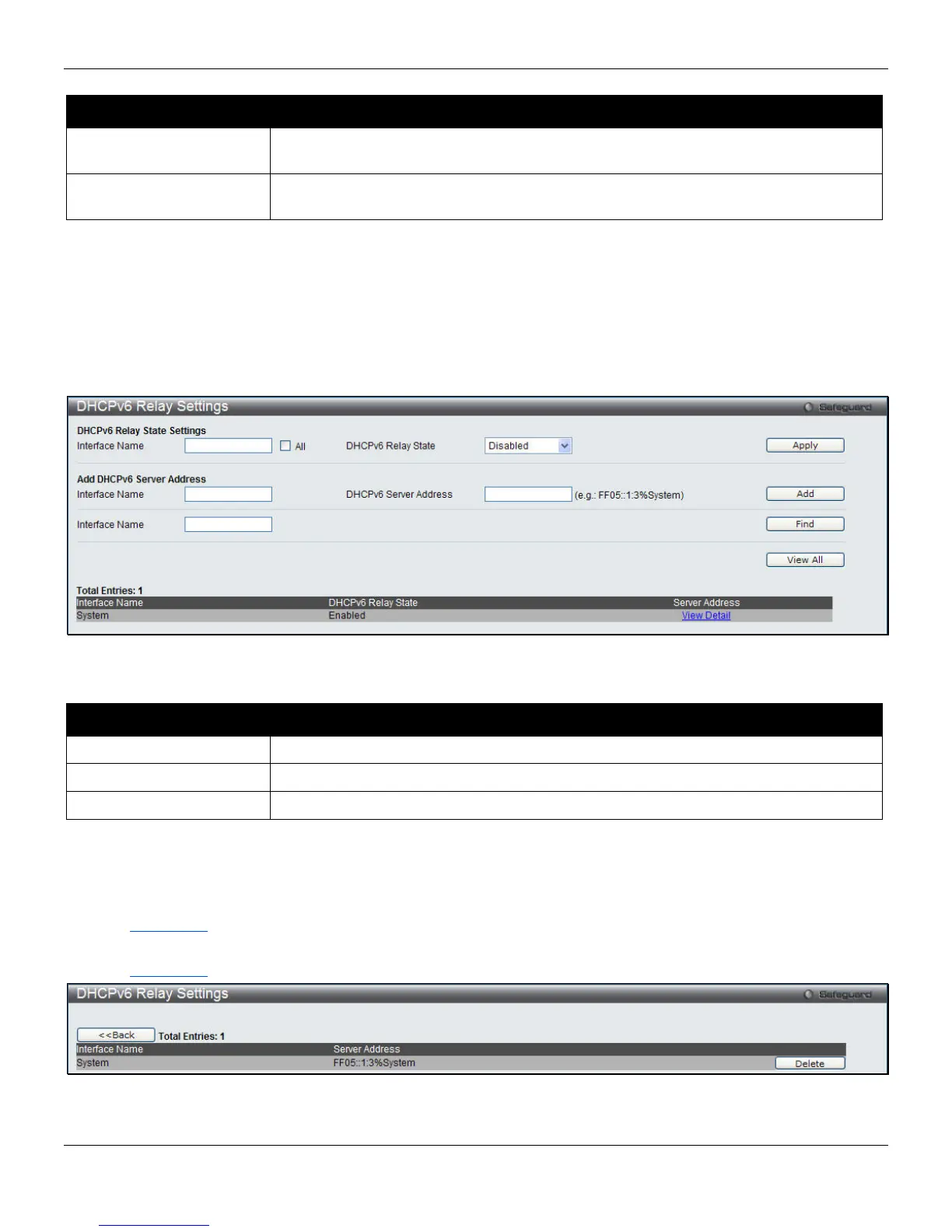
This window is used to configure DHCPv6 relay settings.
To view this window, click Network Application > DHCP > DHCPv6 Relay > DHCPv6 Relay Settings, as shown
below:
Figure 9-17 DHCPv6 Relay Settings
The fields that can be configured are described below:
Parameter Description
Interface Name
Enter a name of the interface. Tick the All check box to apply to all the interfaces.
DHCPv6 Relay State
Use the drop-down menu to enable or disable the DHCPv6 relay.
DHCPv6 Server Address
Enter the DHCPv6 Server address.
Click the Apply button to implement the changes made.
Click the Add button to add a new entry based on the information entered.
Click the Find button to locate a specific entry based on the information entered.
Click the View All button to display all the existing entries.
Click the View Detail
link to view the detailed information about the specific interface.
Click the View Detail
link to see the following window:
Figure 9-18 DHCPv6 Relay Settings - View Detail window
286












 To Next Page