xStack® DES-3528/DES-3552 Series Layer 2 Stackable Fast Ethernet Managed Switch Web UI Reference Guide
CFM Linktrace Settings
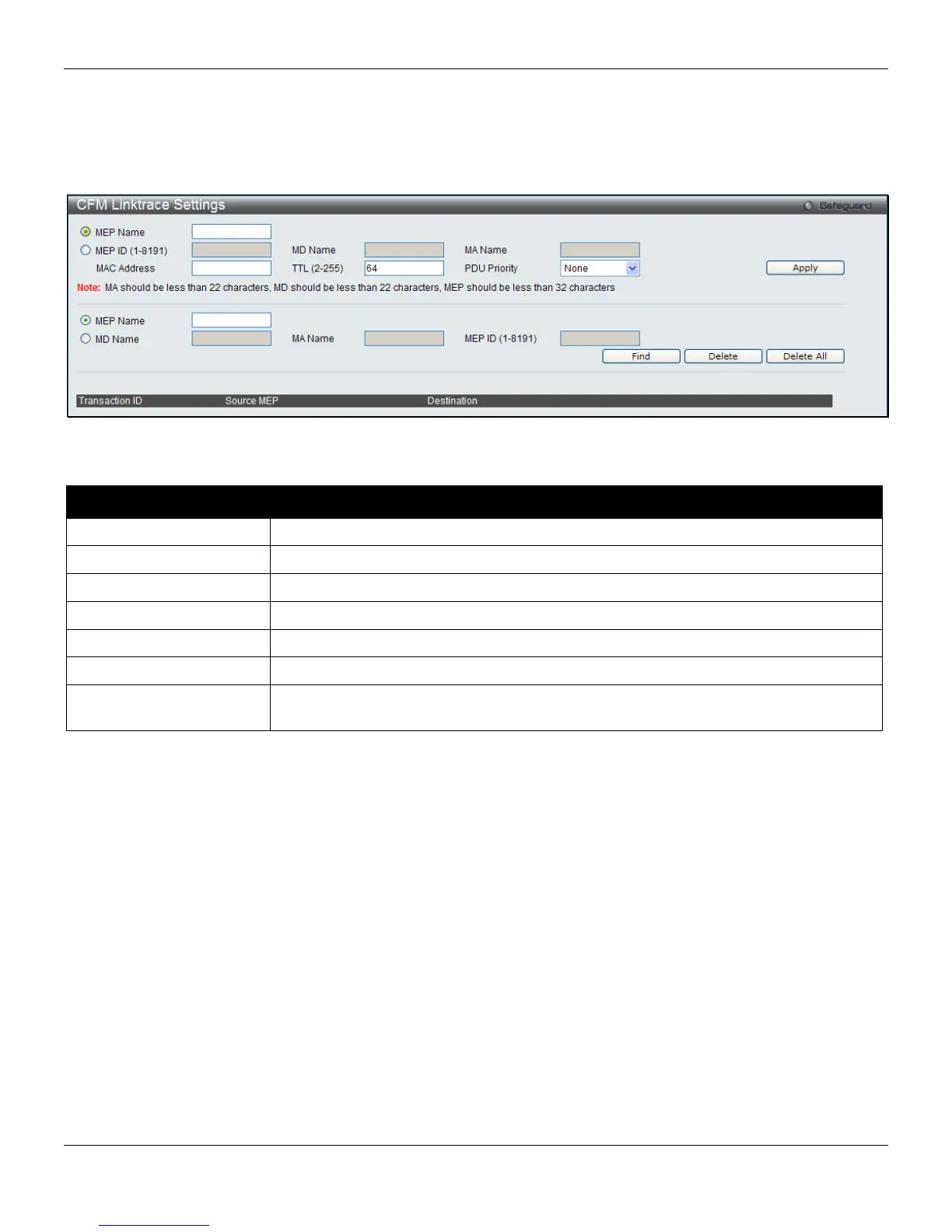
This window is used to configure the CFM linktrace settings on the Switch.
To view this window, click OAM > CFM > CFM Linktrace Settings, as shown below:
Figure 10-10 CFM Linktrace Settings window
The fields that can be configured are described below:
Parameter Description
MEP Name
The name of the Maintenance End Point.
MEP ID (1-8191)
The ID for the Maintenance End Point between 1 and 8191.
MD Name
The Maintenance Domain Name.
MA Name
The Maintenance Association Name.
MAC Address
The destination MAC address.
TTL (2-255)
The linktrace message TTL value. The default value is 64.
PDU Priority
The 802.1p priority to be set in the transmitted LTM. If the PDU Priority is not
specified, it uses the same priority as CCMs sent by the MA.
Click Apply to implement changes made.
Click the Find button to locate a specific entry based on the information entered.
Click the Delete button to remove the specific entry.
Click the Delete All button to remove all the entries.
CFM Packet Counter
This window is used to show the CFM Packet Counter List on the Switch.
To view this window, click OAM > CFM > CFM Packet Counter, as shown below:
300












 To Next Page