xStack® DES-3528/DES-3552 Series Layer 2 Stackable Fast Ethernet Managed Switch Web UI Reference Guide
Click the Apply button to accept the changes made.
NOTE: The Engine ID length is 10-64 and accepted characters can range from 0 to F.
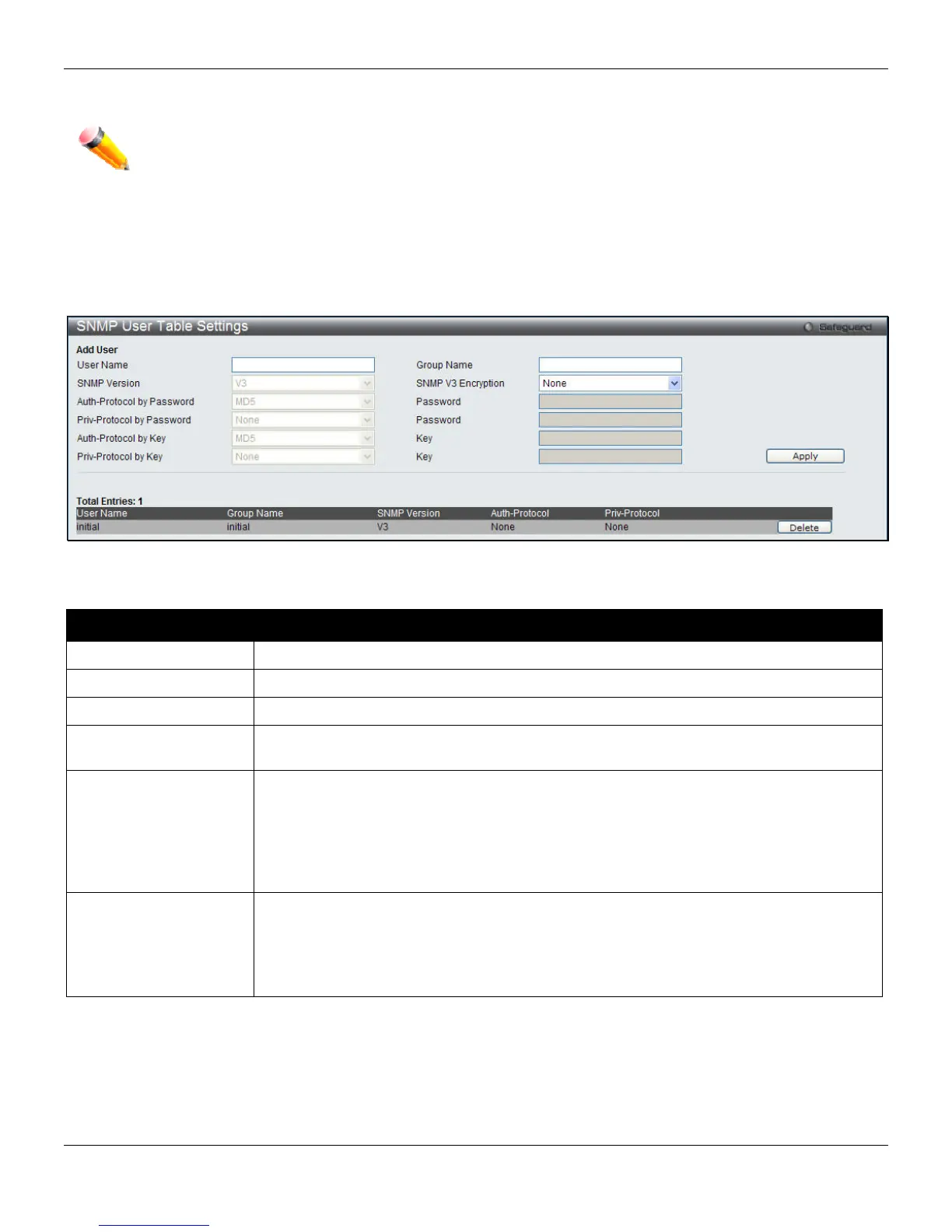
SNMP User Table Settings
This window displays all of the SNMP User’s currently configured on the Switch.
To view the following window, click Management > SNMP Settings > SNMP User Table Settings, as shown below:
Figure 3-40 SNMP User Table Settings window
The fields that can be configured are described below:
Parameter Description
User Name
An alphanumeric string of up to 32 characters. This is used to identify the SNMP users.
Group Name
This name is used to specify the SNMP group created can request SNMP messages.
SNMP Version
V3 – Indicates that SNMP version 3 is in use.
SNMP V3 Encryption
Use the drop-down menu to enable encryption for SNMP V3. This is only operable in
SNMP V3 mode. The choices are None, Password, or Key.
Auth-Protocol
MD5 – Specify that the HMAC-MD5-96 authentication level will be used. This field is only
operable when V3 is selected in the SNMP Version field and the Encryption field has
been checked. This field will require the user to enter a password.
SHA – Specify that the HMAC-SHA authentication protocol will be used. This field is only
operable when V3 is selected in the SNMP Version field and the Encryption field has
been checked. This field will require the user to enter a password.
Priv-Protocol
None – Specify that no authorization protocol is in use.
DES – Specify that DES 56-bit encryption is in use, based on the CBC-DES (DES-56)
standard. This field is only operable when V3 is selected in the SNMP Version field and
the Encryption field has been checked. This field will require the user to enter a
password.
Click the Apply button to accept the changes made.
Click the Delete button to remove the specific entry.
52












 To Next Page