xStack® DES-3528/DES-3552 Series Layer 2 Stackable Fast Ethernet Managed Switch Web UI Reference Guide
VLAN ID
Click the radio button and enter a Guest VLAN ID.
Member Ports
Enter the list of ports that have been configured for the Guest VLAN.
Unit
Select the unit to configure.
From Port
The beginning port of a range of ports to be configured for MAC-based access control.
To Port
The ending port of a range of ports to be configured for MAC-based access control.
State
Use this drop-down menu to enable or disable MAC-based access control on the port or
range of ports selected in the Port Settings section of this window.
Aging Time (1-1440)
Enter a value between 1 and 1440 minutes. The default is 1440.
Block Time (0-300)
Enter a value between 1 and 300 seconds. The default is 300.
Max User (1-1000)
Enter the maximum user used for this configuration. When No Limit is selected, there will
be no user limit applied to this rule.
Click the Apply button to accept the changes made for each individual section.
Click the Delete button to remove the specific entry.
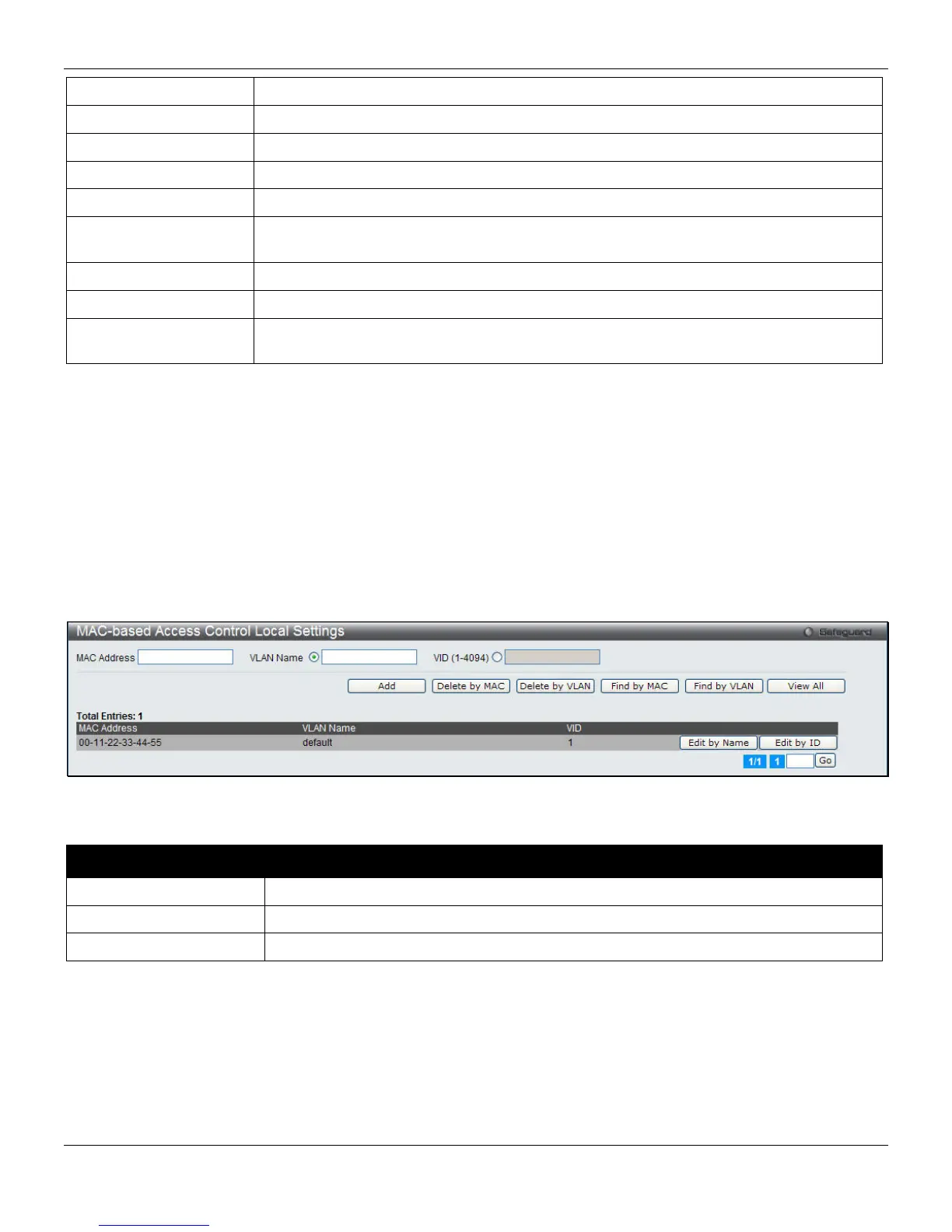
MAC-based Access Control Local Settings
Users can set a list of MAC addresses, along with their corresponding target VLAN, which will be authenticated for the
Switch. Once a queried MAC address is matched in this window, it will be placed in the VLAN associated with it here.
The Switch administrator may enter up to 128 MAC addresses to be authenticated using the local method configured
here.
To view this window, click Security > MAC-based Access Control (MAC) > MAC-based Access Control Local
Settings, as shown below:
Figure 8-33 MAC-based Access Control Local Settings window
The fields that can be configured are described below:
Parameter Description
MAC address
Enter the MAC address that will be added to the local authentication list here.
VLAN Name
Enter the VLAN name of the corresponding MAC address here.
VID (1-4094)
Enter the VLAN ID of the corresponding MAC address here.
Click the Add button to add a new entry based on the information entered.
Click the Delete by MAC button to remove the specific entry based on the MAC address entered.
Click the Delete by VLAN button to remove the specific entry based on the VLAN name or ID entered.
Click the Find by MAC button to locate a specific entry based on the MAC address entered.
Click the Find by VLAN button to locate a specific entry based on the VLAN name or ID entered.
Click the View All button to display all the existing entries.
229












 To Next Page