xStack® DES-3528/DES-3552 Series Layer 2 Stackable Fast Ethernet Managed Switch Web UI Reference Guide
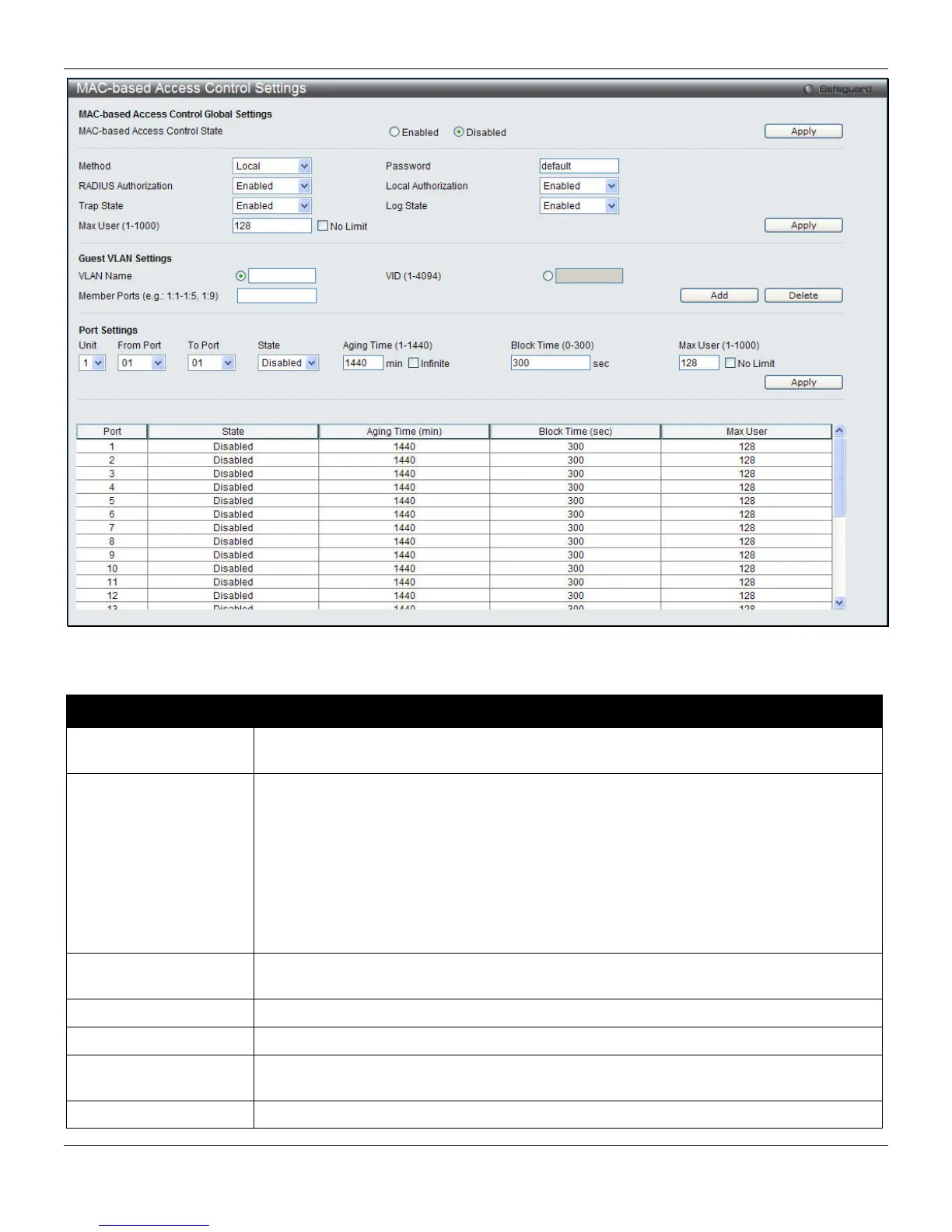
Figure 8-32 MAC-based Access Control Settings window
The fields that can be configured are described below:
Parameter Description
MAC-based Access
Control State
Toggle to globally enable or disable the MAC-based access control function on the
Switch.
Method
Use this drop-down menu to choose the type of authentication to be used when
authentication MAC addresses on a given port. The user may choose between the
following methods:
Local – Use this method to utilize the locally set MAC address database as the
authenticator for MAC-based access control. This MAC address list can be configured in
the MAC-based access control Local Database Settings window.
RADIUS – Use this method to utilize a remote RADIUS server as the authenticator for
MAC-based access control. Remember, the MAC list must be previously set on the
RADIUS server.
Password
Enter the password for the RADIUS server, which is to be used for packets being sent
requesting authentication. The default password is “default”.
RADIUS Authorization
Use the drop-down menu to enable or disable the use of RADIUS Authorization.
Local Authorization
Use the drop-down menu to enable or disable the use of Local Authorization.
Max User (1-1000)
Enter the maximum amount of users of the Switch. Tick No Limit to have unlimited
users.
VLAN Name
Enter the name of the previously configured Guest VLAN being used for this function.
228












 To Next Page