xStack® DES-3528/DES-3552 Series Layer 2 Stackable Fast Ethernet Managed Switch Web UI Reference Guide
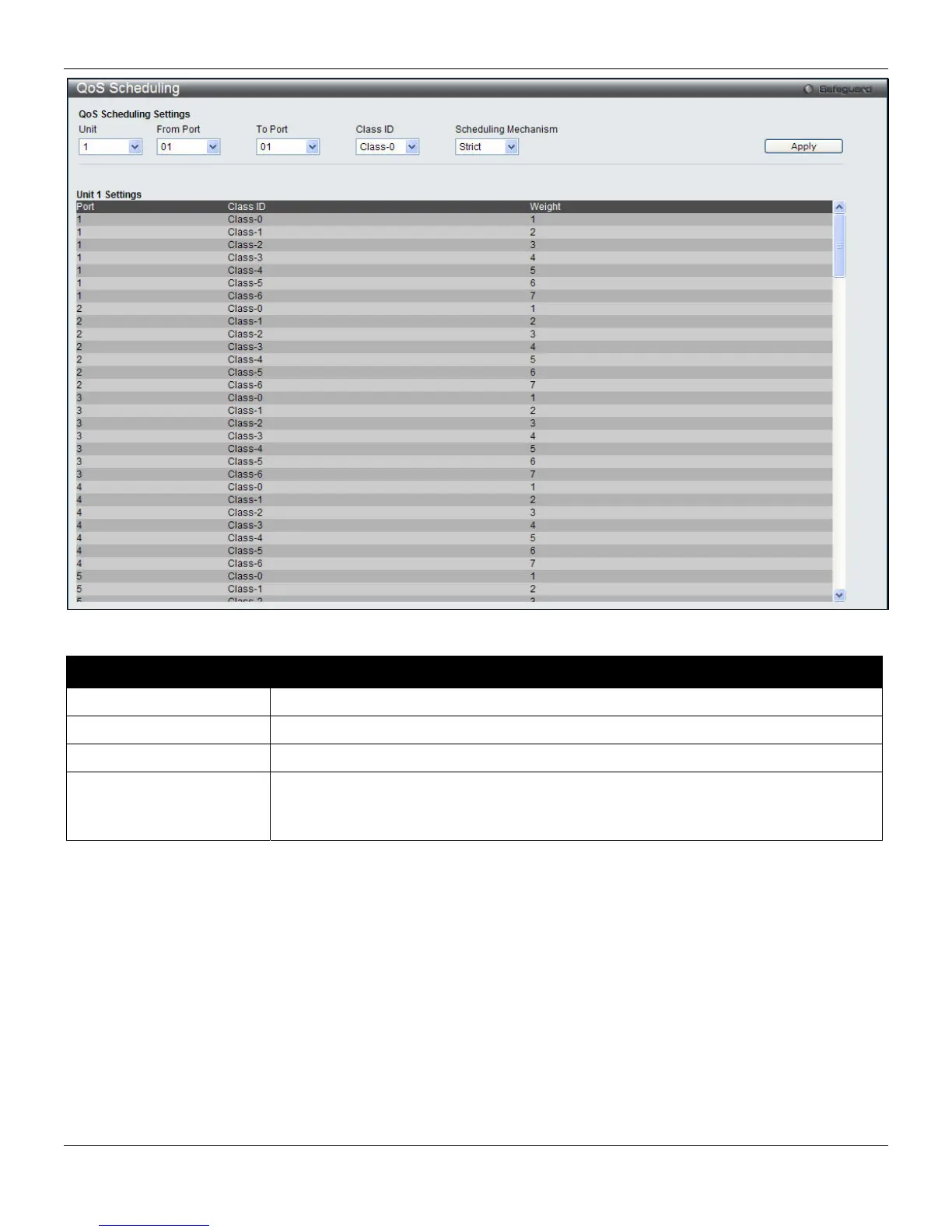
Figure 6-12 QoS Scheduling window
The following parameters can be configured:
Parameter Description
Unit
Select the unit to configure.
From Port / To Port
Enter the port or port list to configure.
Class ID
Select the Class ID, from 0 to 6 to configure for the QoS parameters.
Scheduling Mechanism
Strict – Select to have the queue always in the strict mode.
Weight – Use the weighted round-robin (WRR) algorithm to handle packets in an even
distribution in priority classes of service.
Click the Apply button to accept the changes made.
QoS Scheduling Mechanism
Changing the output scheduling used for the hardware queues in the Switch can customize QoS. As with any changes
to QoS implementation, careful consideration should be given to how network traffic in lower priority queues are
affected. Changes in scheduling may result in unacceptable levels of packet loss or significant transmission delays. If
you choose to customize this setting, it is important to monitor network performance, especially during peak demand,
as bottlenecks can quickly develop if the QoS settings are not suitable.
To view this window, click QoS > Scheduling Settings > QoS Scheduling Mechanism, as shown below:
160












 To Next Page