xStack® DES-3528/DES-3552 Series Layer 2 Stackable Fast Ethernet Managed Switch Web UI Reference Guide
CPU Access Profile List
Due to a chipset limitation and needed extra switch security, the Switch incorporates CPU Interface filtering. This
added feature increases the running security of the Switch by enabling the user to create a list of access rules for
packets destined for the Switch’s CPU interface. Employed similarly to the Access Profile feature previously mentioned,
CPU interface filtering examines Ethernet, IP and Packet Content Mask packet headers destined for the CPU and will
either forward them or filter them, based on the user’s implementation. As an added feature for the CPU Filtering, the
Switch allows the CPU filtering mechanism to be enabled or disabled globally, permitting the user to create various lists
of rules without immediately enabling them.
NOTE: CPU Interface Filtering is used to control traffic access to the Switch directly such as protocols
transition or management access. A CPU interface filtering rule won’t impact normal L2/3 traffic
forwarding. However, a improper CPU interface filtering rule may cause the network to become
unstable.
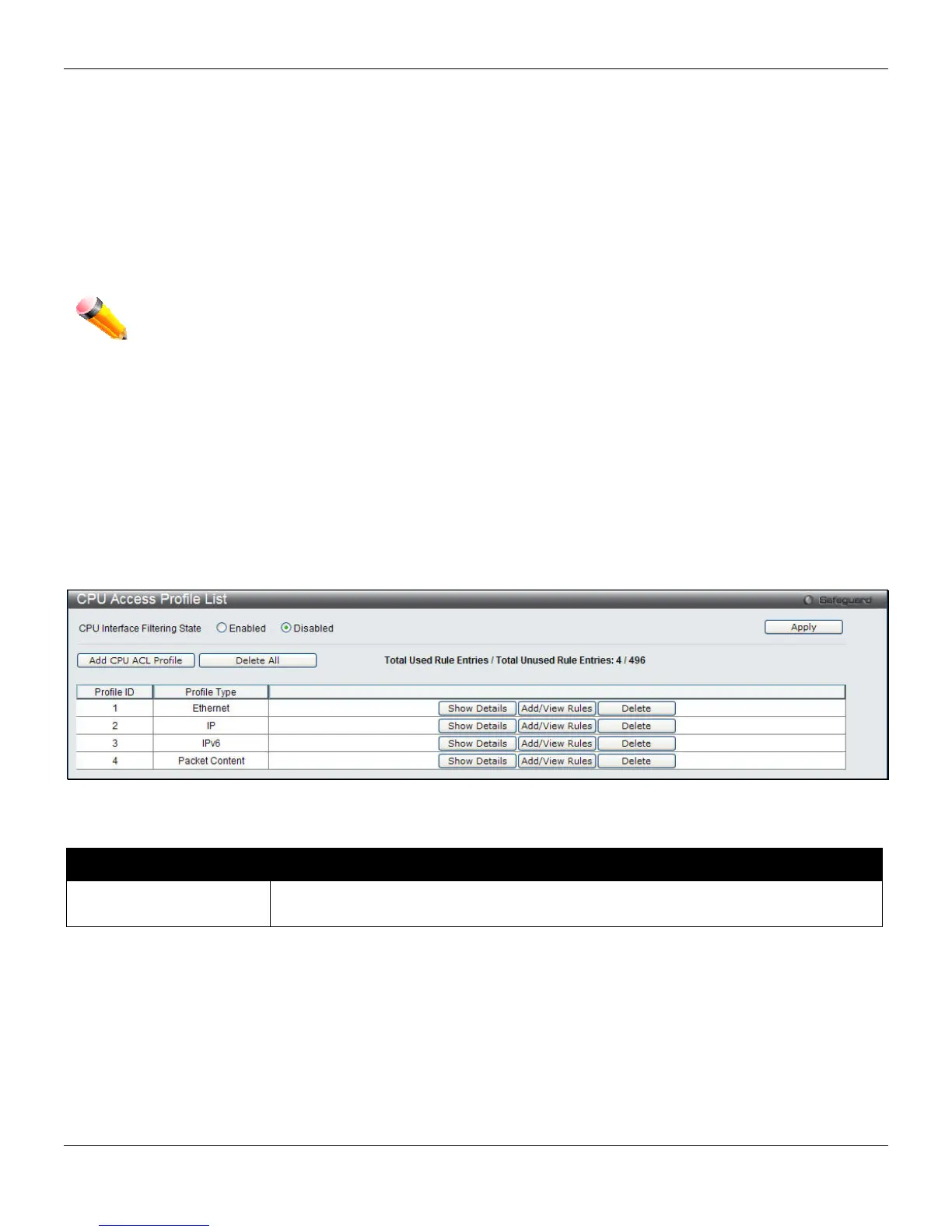
To view CPU Access Profile List window, click ACL > CPU Access Profile List, as shown below:
Creating an access profile for the CPU is divided into two basic parts. The first is to specify which part or parts of a
frame the Switch will examine, such as the MAC source address or the IP destination address. The second part is
entering the criteria the Switch will use to determine what to do with the frame. The entire process is described below.
Users may globally enable or disable the CPU Interface Filtering State mechanism by using the radio buttons to
change the running state. Choose Enabled to enable CPU packets to be scrutinized by the Switch and Disabled to
disallow this scrutiny.
Figure 7-23 CPU Access Profile List window
The fields that can be configured are described below:
Parameter Description
CPU Interface Filtering
State
Enable or disable the CPU interface filtering state.
Click the Apply button to accept the changes made.
Click the Add CPU ACL Profile button to add an entry to the CPU ACL Profile List.
Click the Delete All button to remove all access profiles from this table.
Click the Show Details button to display the information of the specific profile ID entry.
Click the Add/View Rules button to view or add CPU ACL rules within the specified profile ID.
Click the Delete button to remove the specific entry.
There are four Add CPU ACL Profile windows;
184












 To Next Page