xStack® DES-3528/DES-3552 Series Layer 2 Stackable Fast Ethernet Managed Switch Web UI Reference Guide
Based on 802.3af/at PDs receive power according to the following classification: PSE provides power according to the following classification:
13
Class Maximum power available to PD
0 12.95W
1 3.84W
2 6.49W
3 12.95W
4 29.5W
To configure the PoE features on the DES-3528P/DES-3552P, click Configuration > PoE. The PoE System Settings
window is used to assign a power limit and power disconnect method for the whole PoE system. To configure the
Power Limit for the PoE system, enter a value between 37W and 370W for the DES-3528P/DES-3552P in the Power
Limit field. The default setting is 370W. When the total consumed power exceeds the power limit, the PoE controller
(located in the PSE) disconnects the power to prevent overloading the power supply.
PoE System Settings
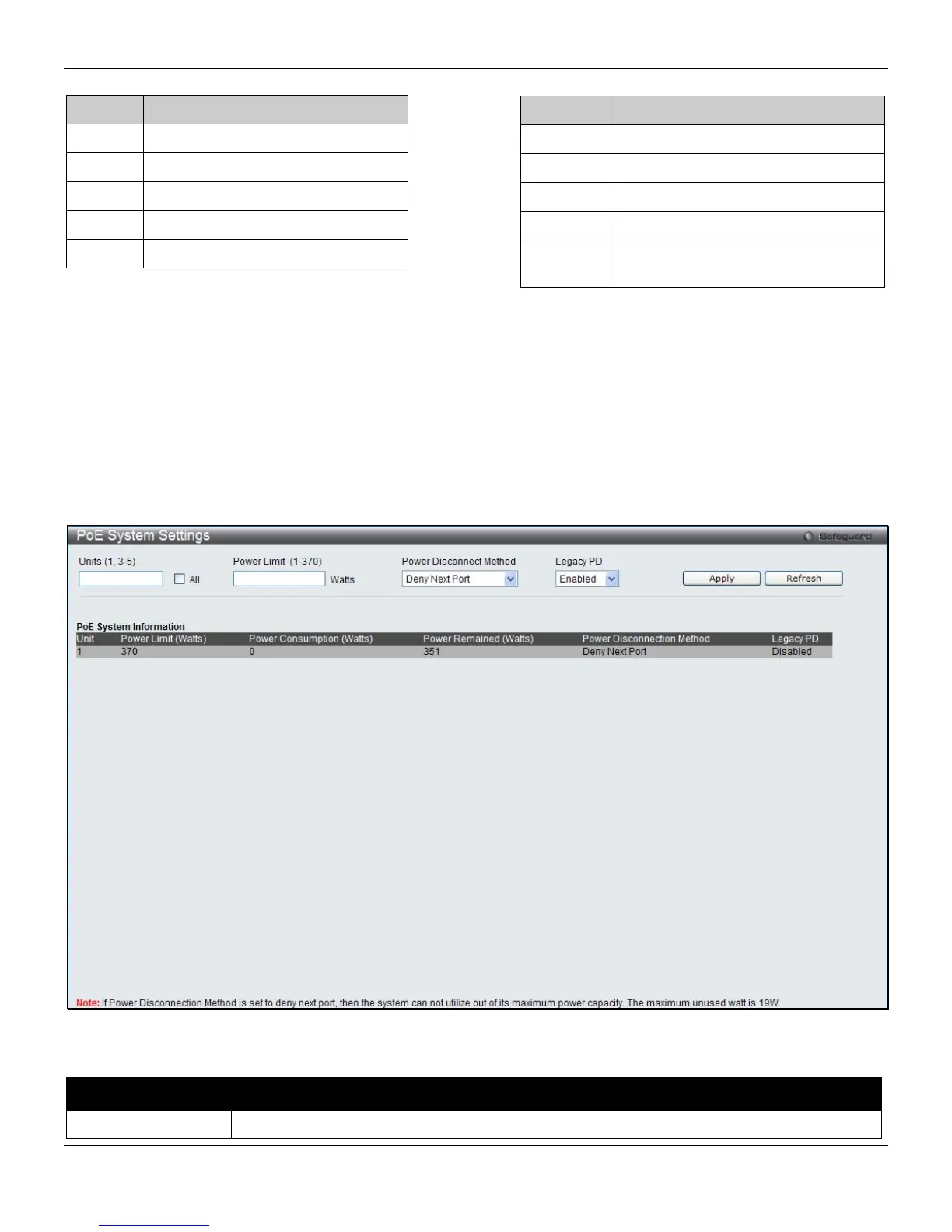
To view the following window, click System Configuration > PoE > PoE System Settings, as shown below:
Figure 2-7 PoE System Settings window
The following parameters can be configured:
Parameter Description
Unit (1, 3-5)
Select the unit to configure. Tick the All check box to select all units.
Class Max power used by PSE
0 15.4W
1 4.0W
2 7.0W
3 15.4W
User define Maximum 30W, PSE configuration is
up to 35W (only for ports 1-8)












 To Next Page