xStack® DES-3528/DES-3552 Series Layer 2 Stackable Fast Ethernet Managed Switch Web UI Reference Guide
Host-based Network Access Control
In order to successfully make use of 802.1X in a
shared media LAN segment, it would be necessary to
create “logical” Ports, one for each attached device
that required access to the LAN. The Switch would
regard the single physical Port connecting it to the
shared media segment as consisting of a number of
distinct logical Ports, each logical Port being
independently controlled from the point of view of
EAPOL exchanges and authorization state. The Switch
learns each attached devices’ individual MAC
addresses, and effectively creates a logical Port that
the attached device can then use to communicate with
the LAN via the Switch.
802.1X
Client
Network access controlled port
Network access uncontrolled port
RADIUS
Server
Ethernet Switch
802.1X
Client
802.1X
Client
802.1X
Client
802.1X
Client
802.1X
Client
802.1X
Client
802.1X
Client
802.1X
Client
802.1X
Client
802.1X
Client
802.1X
Client
…
Figure 8-8 Example of Typical Host-based Configuration
802.1X Global Settings
Users can configure the 802.1X global parameter.
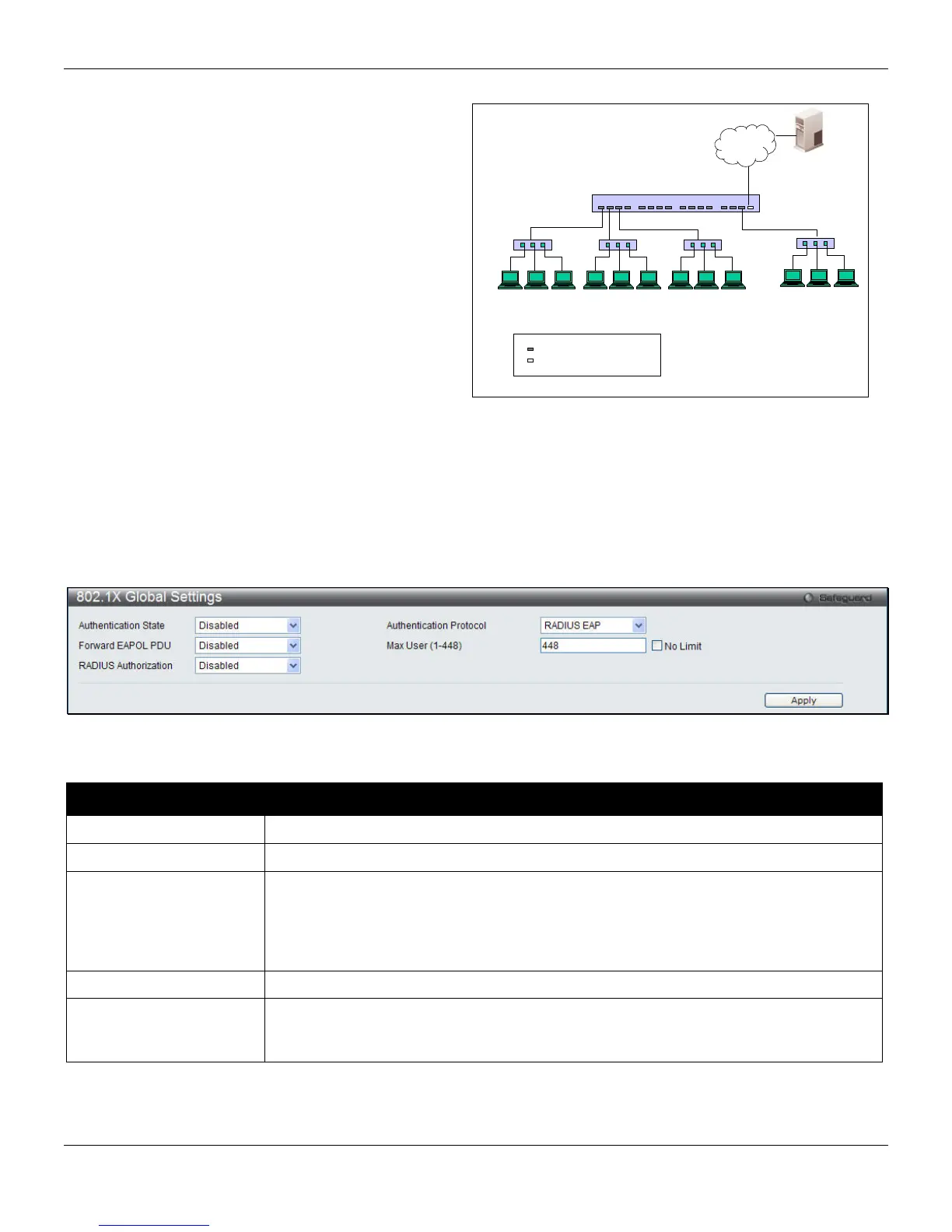
To view this window, click Security > 802.1X > 802.1X Global Settings, as shown below:
Figure 8-9 802.1X Global Settings window
The fields that can be configured are described below:
Parameter Description
Authentication State
Choose the 802.1X authenticator state.
Authentication Protocol
Choose the authenticator protocol, Local or RADIUS EAP.
Forward EAPOL PDU
This is a global setting to control the forwarding of EAPOL PDU. When 802.1X
functionality is disabled globally or for a port, and if 802.1X forward PDU is enabled
both globally and for the port, a received EAPOL packet on the port will be flooded in
the same VLAN to those ports for which 802.1X forward PDU is enabled and 802.1X is
disabled (globally or just for the port). The default state is disabled.
Max Users (1-448)
Specifies the maximum number of users. The limit on the maximum users is 448 users.
RADIUS Authorization
This option is used to enable or disable acceptation of authorized configuration. When
the authorization is enabled for 802.1X’s RADIUS, the authorized data assigned by the
RADIUS server will be accepted if the global authorization network is enabled.
Click the Apply button to accept the changes made.
205












 To Next Page