xStack® DES-3528/DES-3552 Series Layer 2 Stackable Fast Ethernet Managed Switch Web UI Reference Guide
WAC Port Settings
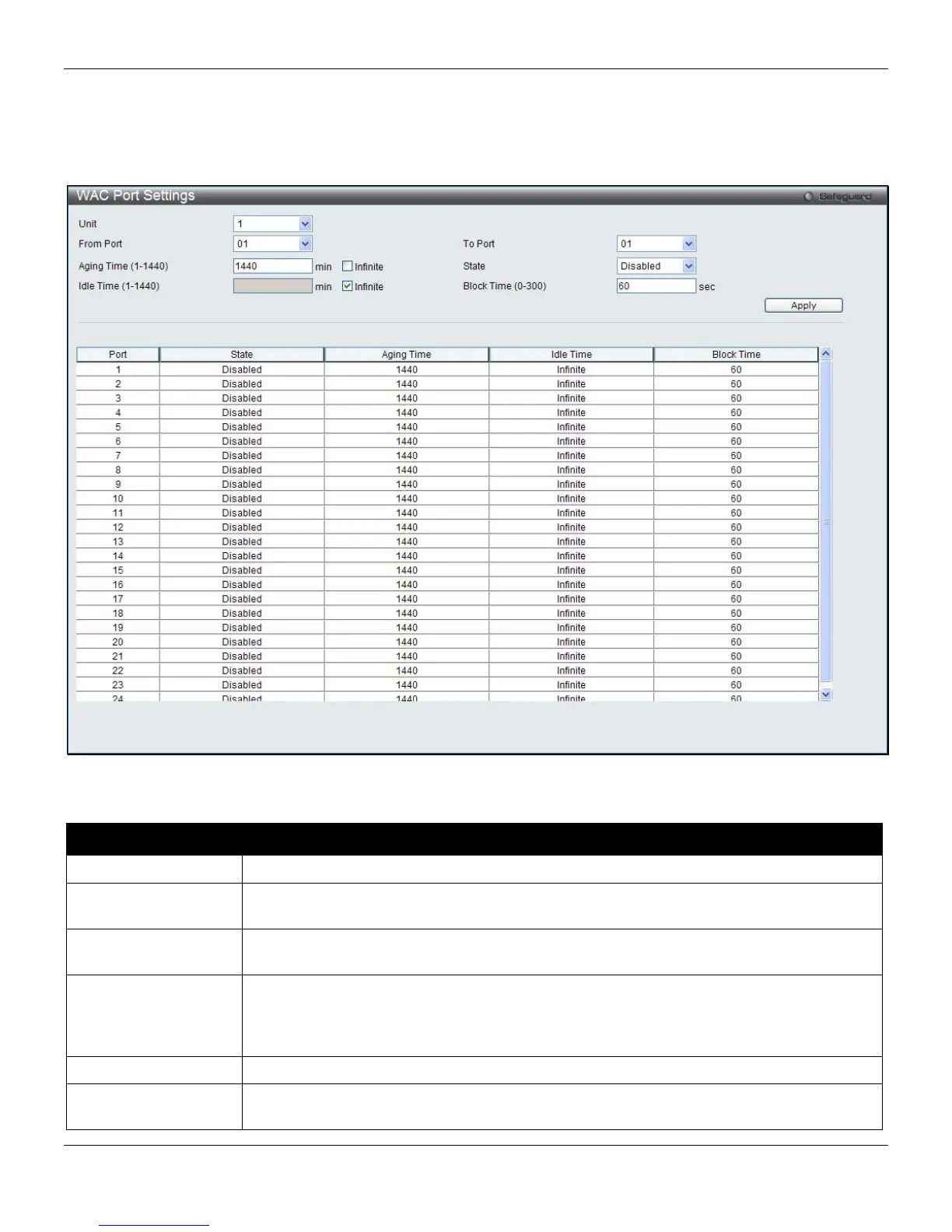
Users can view and set port configurations for Web authentication.
To view this window, click Security > Web-based Access Control (WAC) > WAC Port Settings, as shown below:
Figure 8-39 WAC Port Settings window
The fields that can be configured are described below:
Parameter Description
Unit
Select the unit to configure.
From Port
Use this drop-down menu to select the beginning port of a range of ports to be enabled as
WAC ports.
To Port
Use this drop-down menu to select the ending port of a range of ports to be enabled as
WAC ports.
Aging Time (1-1440)
This parameter specifies the time period during which an authenticated host will remain in
the authenticated state. Enter a value between 1and 1440 minutes. Tick the Infinite check
box to indicate the authenticated host will never age out on the port. The default value is
1440 minutes (24 hours).
State
Use this drop-down menu to enable the configured ports as WAC ports.
Idle Time (1-1440)
If there is no traffic during the Idle Time parameter, the host will be moved back to the
unauthenticated state. Enter a value between 1 and 1440 minutes. Tick the Infinite check
235












 To Next Page