xStack® DES-3528/DES-3552 Series Layer 2 Stackable Fast Ethernet Managed Switch Web UI Reference Guide
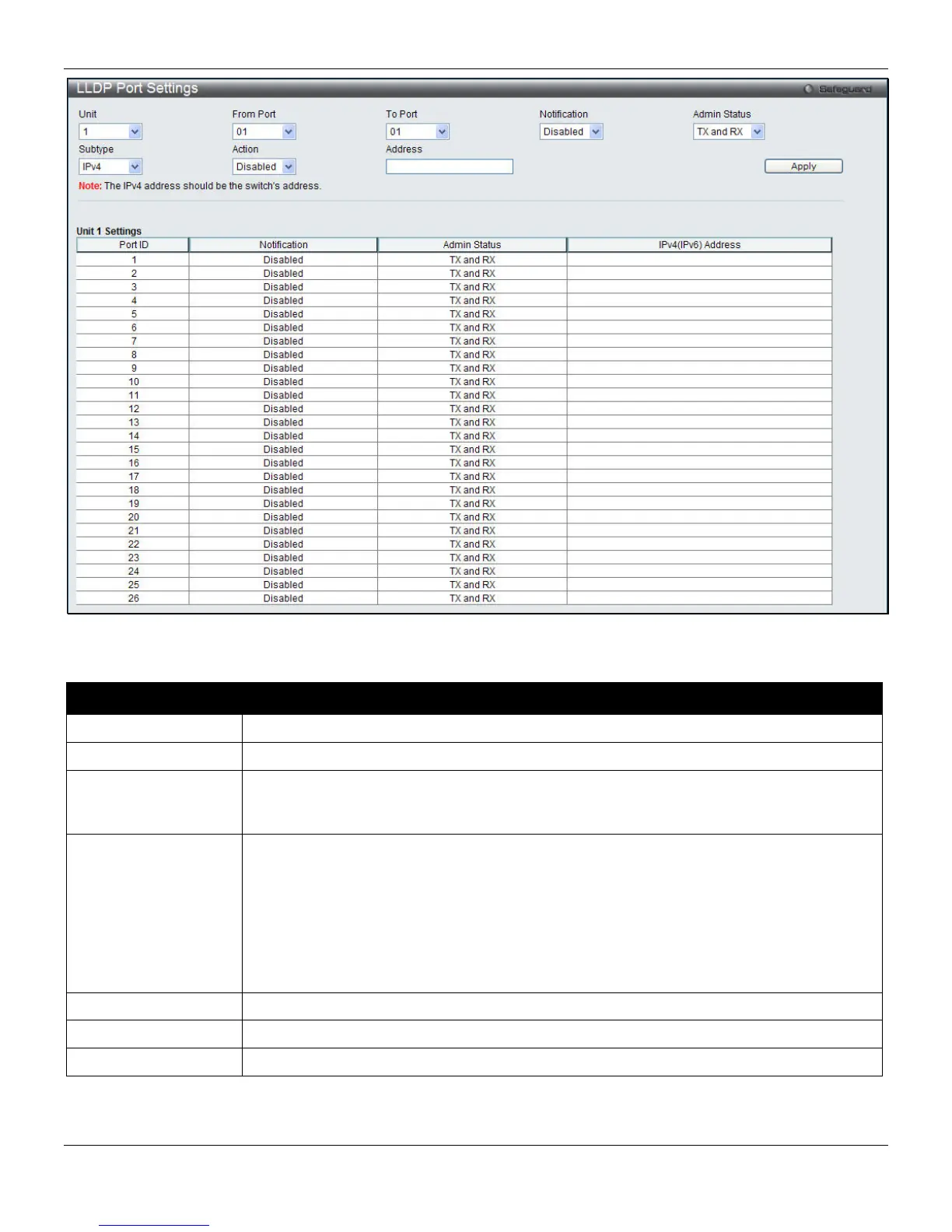
Figure 4-85 LLDP Port Settings window
The fields that can be configured are described below:
Parameter Description
Unit
Select a unit to configure.
From Port / To Port
Use the drop-down menu to select the ports used for this configuration.
Notification
Use the pull-down menu to enable or disable the status of the LLDP notification. This
function controls the SNMP trap. However, it cannot implement traps on SNMP when the
notification is disabled.
Admin Status
This function controls the local LLDP agent and allows it to send and receive LLDP frames
on the ports. This option contains TX, RX, TX and RX or Disabled.
TX - the local LLDP agent can only transmit LLDP frames.
RX - the local LLDP agent can only receive LLDP frames.
TX And RX - the local LLDP agent can both transmit and receive LLDP frames.
Disabled - the local LLDP agent can neither transmit nor receive LLDP frames.
The default value is TX And RX.
Subtype
Use the drop-down menu to select the type of the IP address information will be sent.
Action
Use the drop-down menu to enable or disable the action field.
Address
Enter the IP address that will be sent.
Click the Apply button to accept the changes made.
132












 To Next Page