xStack® DES-3528/DES-3552 Series Layer 2 Stackable Fast Ethernet Managed Switch Web UI Reference Guide
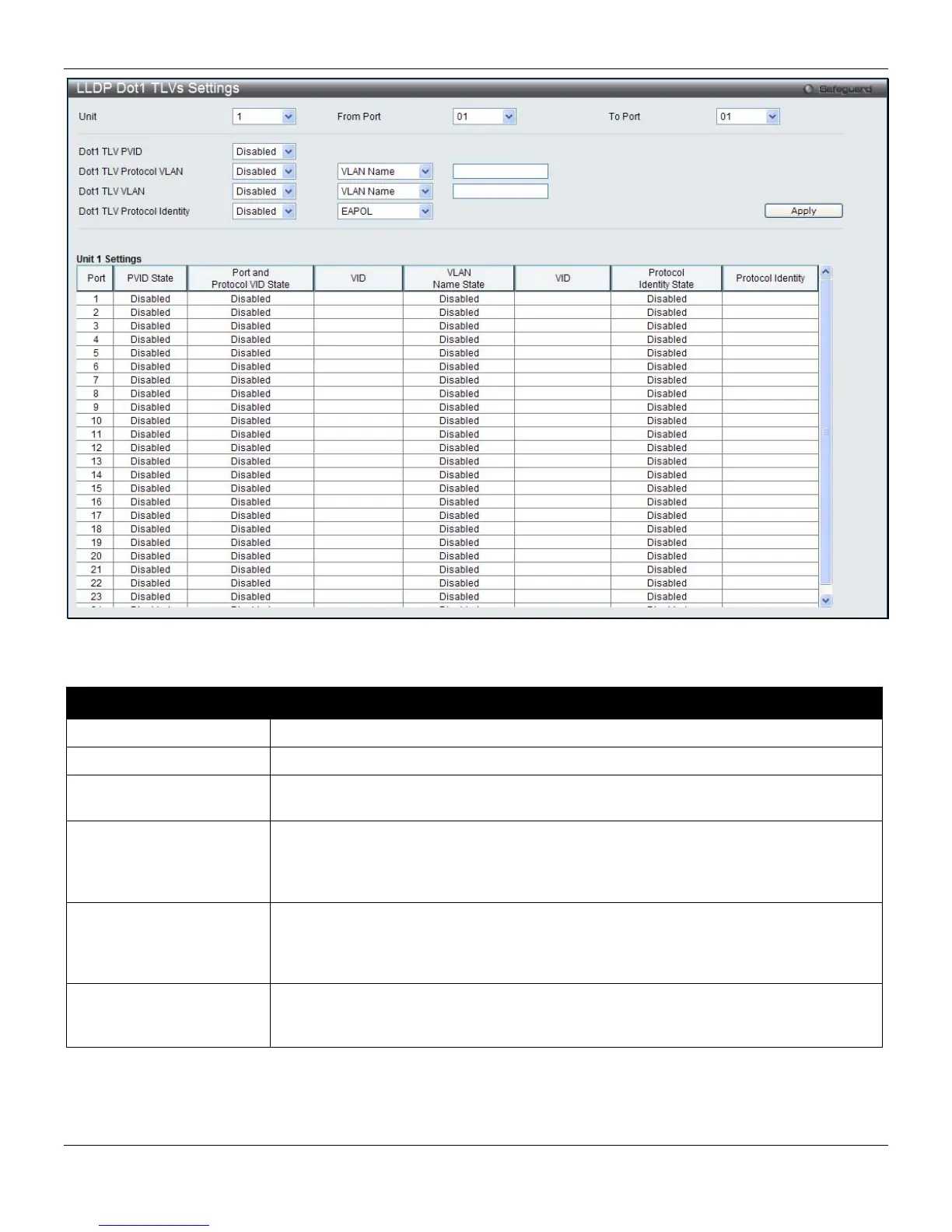
Figure 4-88 LLDP Dot1 TLVs Settings window
The fields that can be configured are described below:
Parameter Description
Unit
Select a unit to configure.
From Port / To Port
Use the drop-down menu to select the port range to use for this configuration.
Dot1 TLV PVID
Use the drop-down menu to enable or disable and configure the Dot1 TLV PVID
option.
Dot1 TLV Protocol VLAN
Use the drop-down menu to enable or disable, and configure the Dot1 TLV Protocol
VLAN option. After enabling this option, the user can select to use VLAN Name, VID
List or All in the next drop-down menu. After selecting this, the user can enter either
the VLAN Name or VID List value in the space provided.
Dot1 TLV VLAN
Use the drop-down menu to enable or disable, and configure the Dot1 TLV VLAN
option. After enabling this option, the user can select to use VLAN Name, VID List or
All in the next drop-down menu. After selecting this, the user can enter either the
VLAN Name or VID List value in the space provided.
Dot1 TLV Protocol
Identity
Use the drop-down menu to enable or disable, and configure the Dot1 TLV Protocol
Identity option. After enabling this option, the user can select to use EAPOL, LACP,
GVRP, STP, or All.
Click the Apply button to accept the changes made.
135












 To Next Page