xStack® DES-3528/DES-3552 Series Layer 2 Stackable Fast Ethernet Managed Switch Web UI Reference Guide
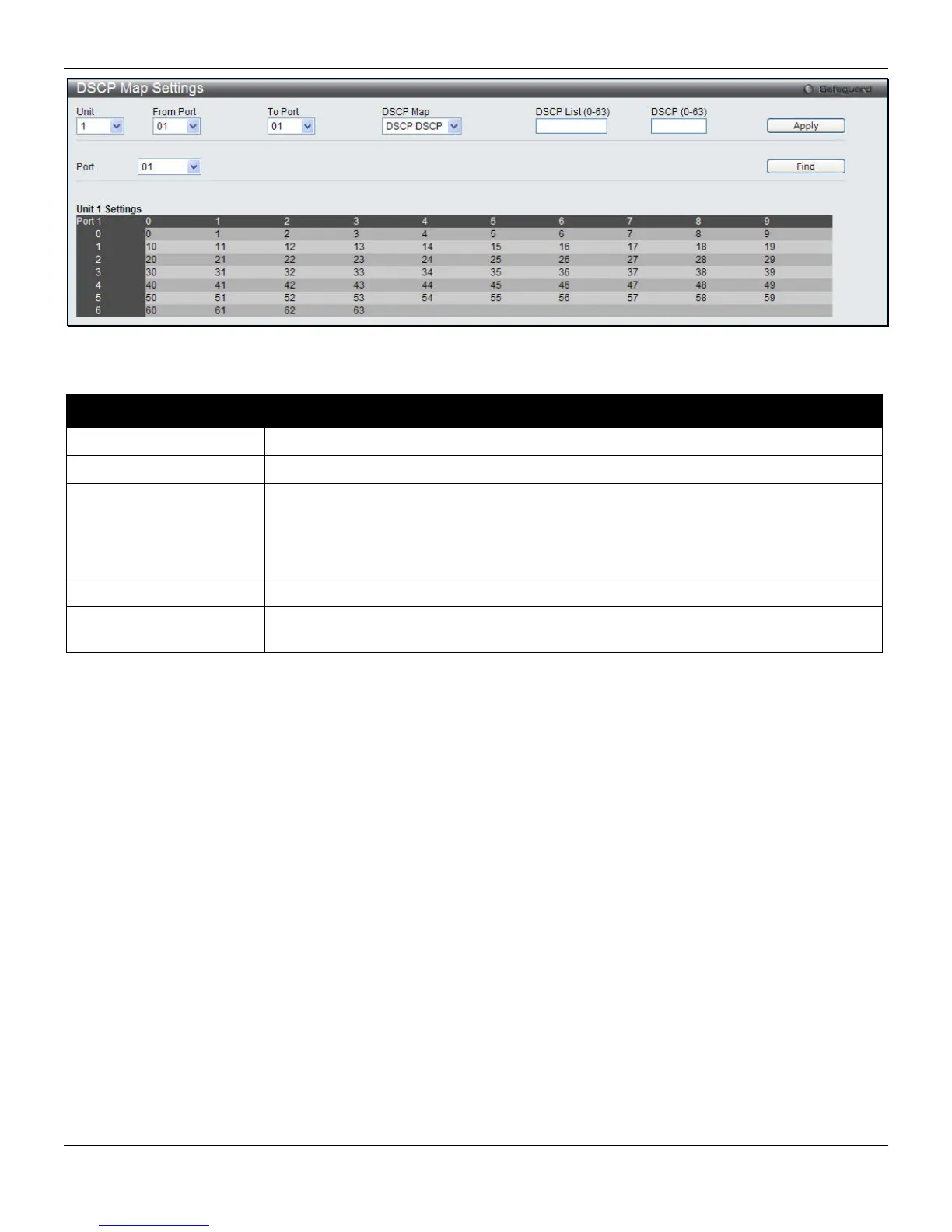
Figure 6-9 DSCP Map Settings - DSCP DSCP window
The fields that can be configured are described below:
Parameter Description
Unit
Select the unit to configure.
From Port / To Port
Use the drop-down menu to select a range of port to configure.
DSCP Map
Use the drop-down menu to select one of two options:
DSCP Priority – Specify a list of DSCP values to be mapped to a specific priority.
DSCP DSCP – Specify a list of DSCP value to be mapped to a specific DSCP.
DSCP Color - Specify a list of DSCP values to be mapped to a specific color.
DSCP List (0-63)
Enter a DSCP List value.
DSCP (0-63)
Enter a DSCP value. This appears when selecting DSCP DSCP in the DSCP Map
drop-down menu.
Click the Apply button to accept the changes made.
To view the following window, click QoS > DSCP > DSCP Map Settings and select DSCP Color from the DSCP Map
drop-down menu, as shown below:
157












 To Next Page