xStack® DES-3528/DES-3552 Series Layer 2 Stackable Fast Ethernet Managed Switch Web UI Reference Guide
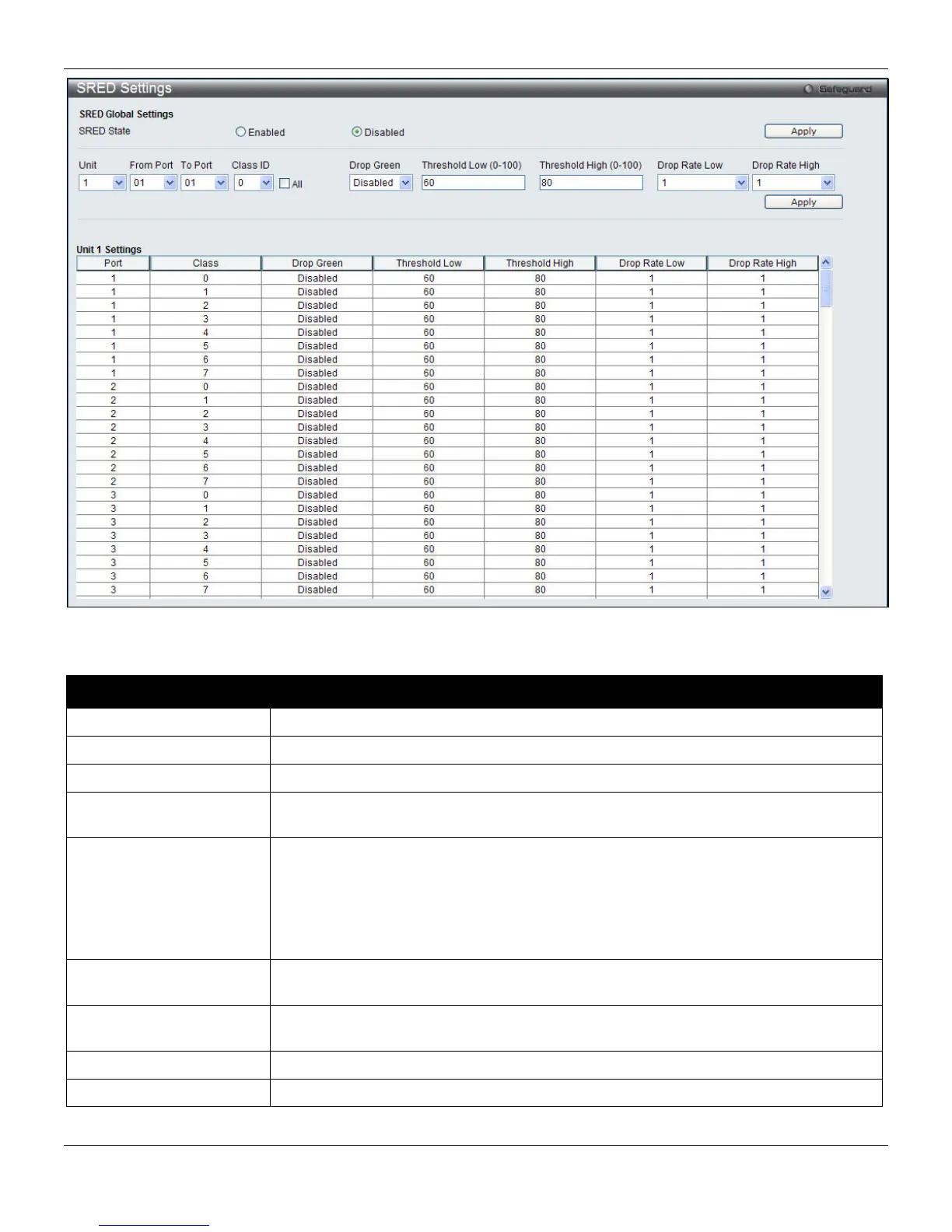
Figure 6-14 SRED Settings window
The following parameters can be configured:
Parameter Description
SRED State
Click the radio buttons to enable or disable sRED.
Unit
Select the unit to configure.
From Port / To Port
Enter the port or port list to configure.
Class ID
Use the drop-down menu to select the class ID. Tick the All check box to apply to all
class ID.
Drop Green
Select Disable to drop red colored packets if the queue depth is above the low
threshold, and drop yellow colored packets if the queue depth is above the high
threshold.
Select Enable to drop yellow and red colored packets if the queue depth is above the
low threshold, and drop green colored packets if the queue depth is above the high
threshold.
Threshold Low (0-100)
Specify the low percent of space utilized. By default, the value is 60. The range is 0 to
100.
Threshold High (0-100)
Specify the high percent of queue space utilized. By default, the value is 80. The
range is 0 to 100.
Drop Rate Low
Specify the drop rate of the low threshold.
Drop Rate High
Specify the drop rate of the high threshold.
Click the Apply button to accept the changes made for each individual section.
163












 To Next Page