xStack® DES-3528/DES-3552 Series Layer 2 Stackable Fast Ethernet Managed Switch Web UI Reference Guide
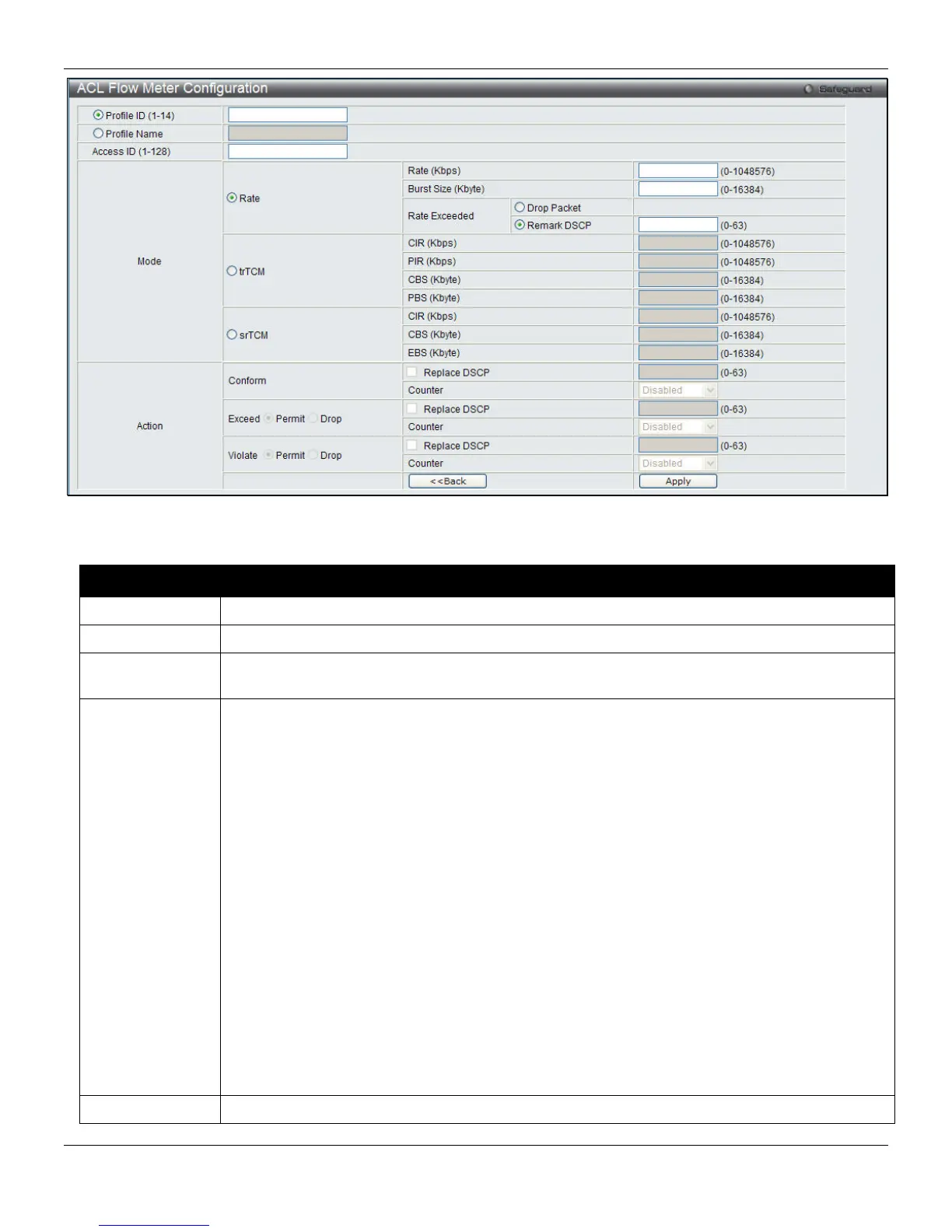
Figure 7-46 ACL Flow meter Configuration window
The fields that can be configured are described below:
Parameter Description
Profile ID (1-14)
Enter the Profile ID for the flow meter.
Profile Name
Enter the Profile Name for the flow meter.
Access ID (1-
128)
Enter the Access ID for the flow meter.
Mode
Rate – Specify the rate for single rate two color mode.
Rate – Specify the committed bandwidth in Kbps for the flow.
Burst Size – Specify the burst size for the single rate two color mode. The unit is in kilobyte.
Rate Exceeded – Specify the action for packets that exceed the committed rate in single rate
two color mode. The action can be specified as one of the following:
Drop Packet – Drop the overload packets immediately.
Remark DSCP – Mark the packet with a specified DSCP.
trTCM – Specify the “two-rate three-color mode.”
CIR – Specify the Committed information Rate. The unit is Kbps. CIR should always be equal
or less than PIR.
PIR – Specify the Peak information Rate. The unit is Kbps. PIR should always be equal to or
greater than CIR.
CBS – Specify the Committed Burst Size. The unit is in kilobyte.
PBS – Specify the Peak Burst Size. The unit is in kilobyte.
srTCM – Specify the “single-rate three-color mode”.
CIR – Specify the Committed Information Rate. The unit is in kilobyte.
CBS – Specify the Committed Burst Size. The unit is in kilobyte.
EBS – Specify the Excess Burst Size. The unit is in kilobyte.
Action
Conform – This field denotes the green packet flow. Green packet flows may have their DSCP
200












 To Next Page