xStack® DES-3528/DES-3552 Series Layer 2 Stackable Fast Ethernet Managed Switch Web UI Reference Guide
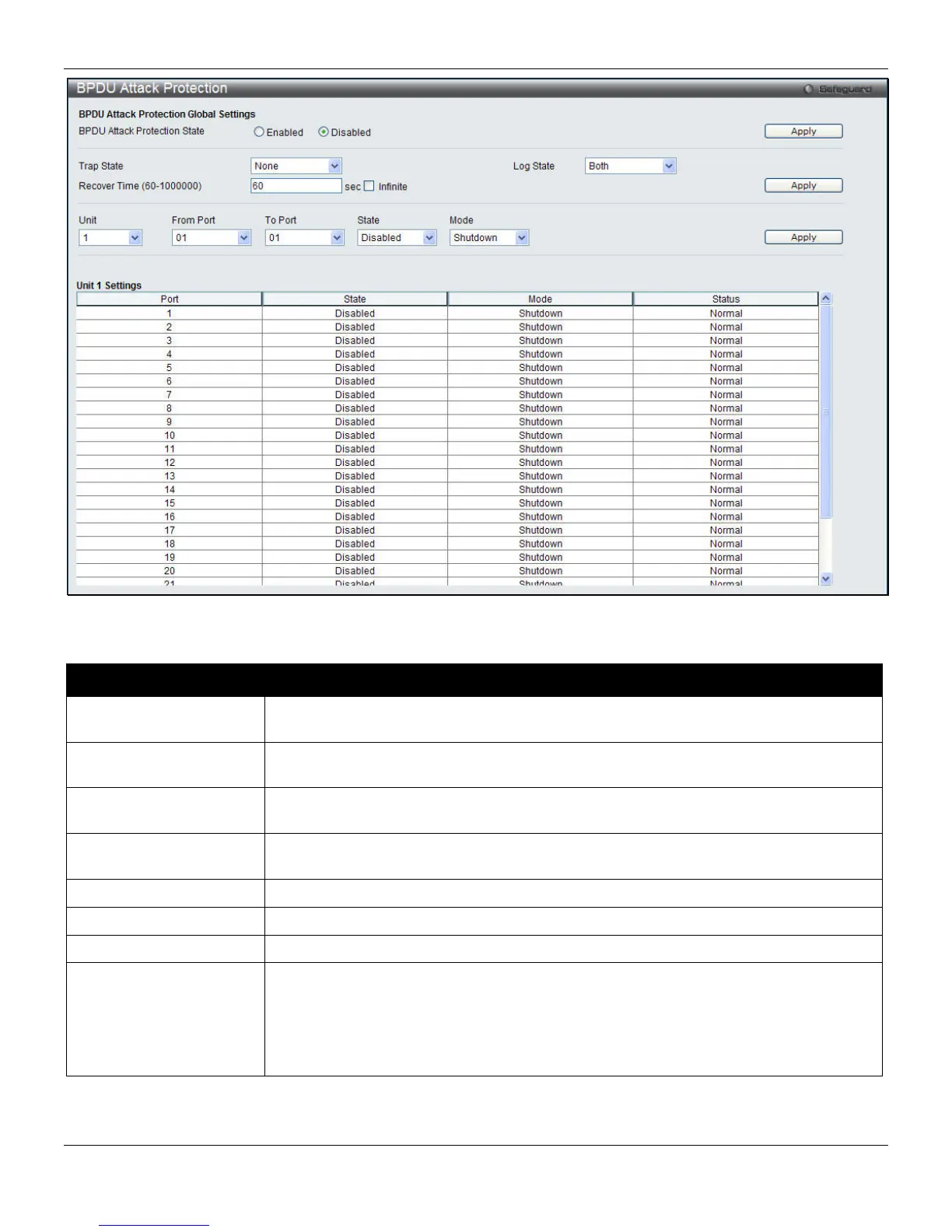
Figure 8-54 BPDU Attack Protection window
The fields that can be configured are described below:
Parameter Description
BPDU Attack Protection
State
Click the radio buttons to enable or disable the BPDU attack protection state.
Trap State
Specify when a trap will be sent. Options to choose from are None, Attack Detected,
Attack Cleared or Both.
Log State
Specify when a log entry will be sent. Options to choose from are None, Attack
Detected, Attack Cleared or Both.
Recover Time
Specify the BPDU protection Auto-Recovery timer. The default value of the recovery
timer is 60.
Unit
Select the unit to configure.
From Port / To Port
Select a range of ports to use for this configuration.
State
Use the drop-down menu to enable or disable the protection mode for a specific port.
Mode
Specify the BPDU protection mode. The default mode is shutdown.
Drop – Drop all received BPDU packets when the port enters under attack state.
Block – Drop all packets (include BPDU and normal packets) when the port enters
under attack state.
Shutdown – Shut down the port when the port enters under attack state.
Click the Apply button to accept the changes made for each individual section.
251












 To Next Page