xStack® DES-3528/DES-3552 Series Layer 2 Stackable Fast Ethernet Managed Switch Web UI Reference Guide
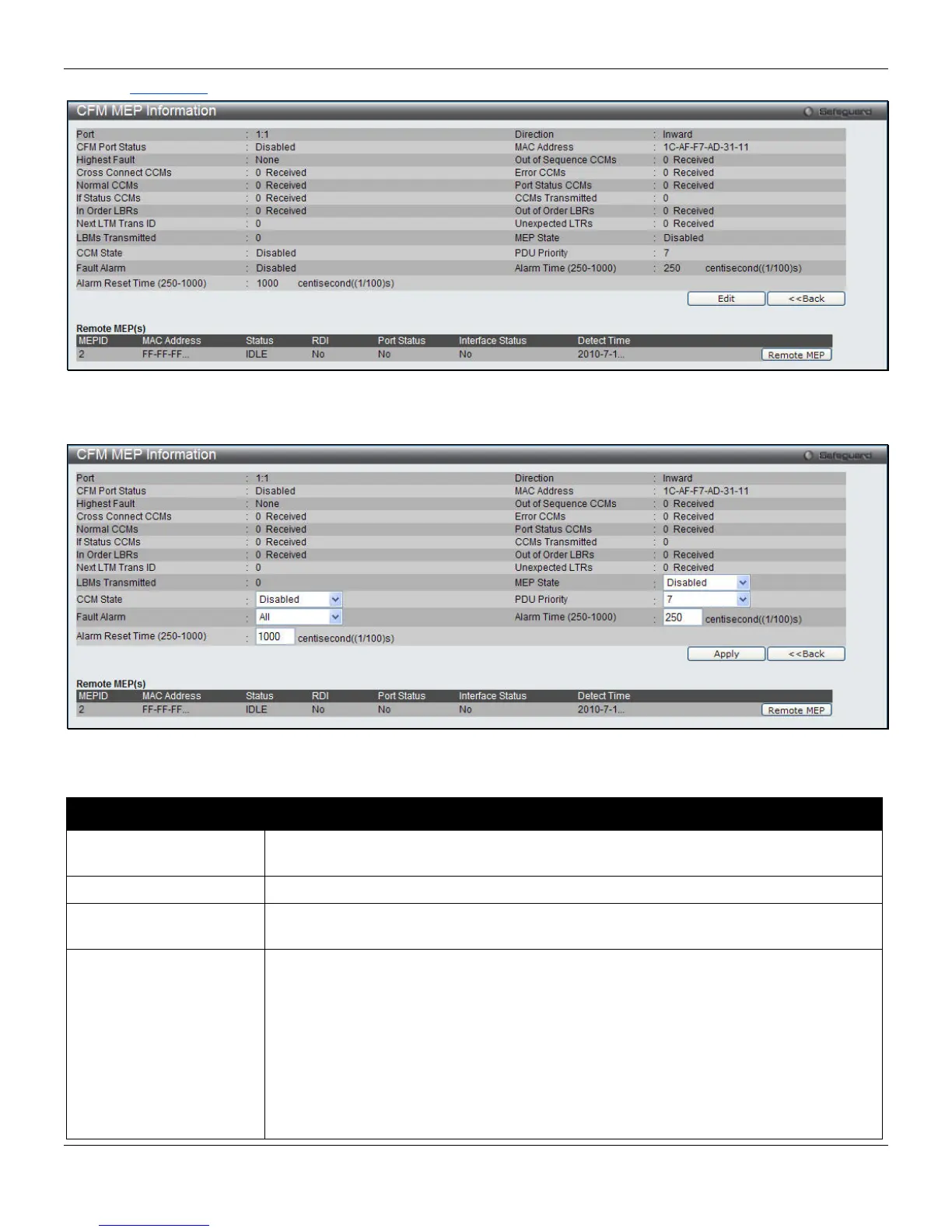
Click the View Detail
link to see the following window:
Figure 10-5 CFM MEP Information window
Click the Edit button to see the following window.
Figure 10-6 CFM MEP Information - Edit window
The fields that can be configured are described below:
Parameter Description
MEP State
Use the drop-down menu to select the MEP administrative state to Disabled or
Enabled.
CCM State
Use the drop-down menu to select the CCM transmission state to Disabled or Enabled.
PDU Priority
Use the drop-down menu to set the 802.1p priority in the CCMs and the LTMs
messages transmitted by the MEP. The default value is 7.
Fault Alarm
Use the drop-down menu to select the control types of the fault alarms sent by the
MEP.
All - All types of fault alarms will be sent.
MAC Status - Only the fault alarms whose priority is equal to or higher than “Some
Remote MEP MAC Status Errors” will be sent.
Remote CCM - Only the fault alarms whose priority is equal to or higher than “Some
Remote MEPs Down” will be sent.
Error CCM - Only the fault alarms whose priority is equal to or higher than “Error CCM
Received” will be sent.
296












 To Next Page