xStack® DES-3528/DES-3552 Series Layer 2 Stackable Fast Ethernet Managed Switch Web UI Reference Guide
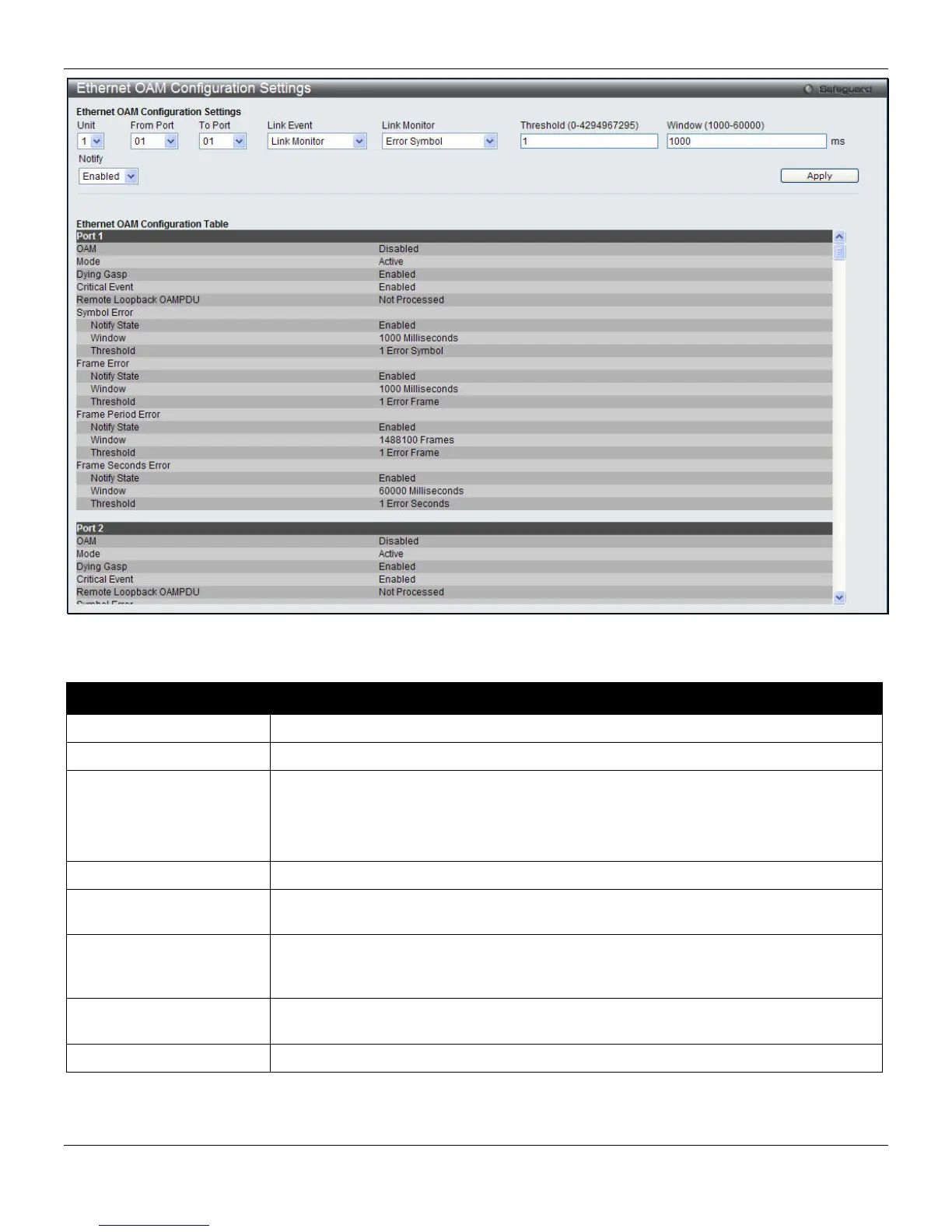
Figure 10-15 Ethernet OAM Configuration Settings window
The fields that can be configured are described below:
Parameter Description
Unit
Select the unit to configure.
From Port / To Port
Select a range of ports to be configured.
Link Event
Configure the Ethernet OAM link event. Specify Link Monitor or Critical Link Event.
Link Monitor - Indicate that the OAM entity can send and receive Event Notification
OAMPDUs.
Critical Link Event - Configure the Ethernet OAM critical link event.
Link Monitor
Use the drop-down menu to select various types of link monitoring.
Critical Link Event
Use the drop-down menu to select the critical link event between Dying Gasp and
Critical Event.
Threshold
(0-4294967295)
Specify the number of error frame per second in the period that is required to be equal
to or greater than the value of the special threshold in order for the event to be
generated. The default value of threshold is 1 error frame per second.
Window
(1000-60000)
Specify the period of error frame summary events. The range is from 1000ms to
60000ms and the default value is 1000 ms.
Notify
Specify to Enable or Disable the event notification. The default state is Enabled.
Click the Apply button to implement changes made.
304












 To Next Page