xStack® DES-3528/DES-3552 Series Layer 2 Stackable Fast Ethernet Managed Switch Web UI Reference Guide
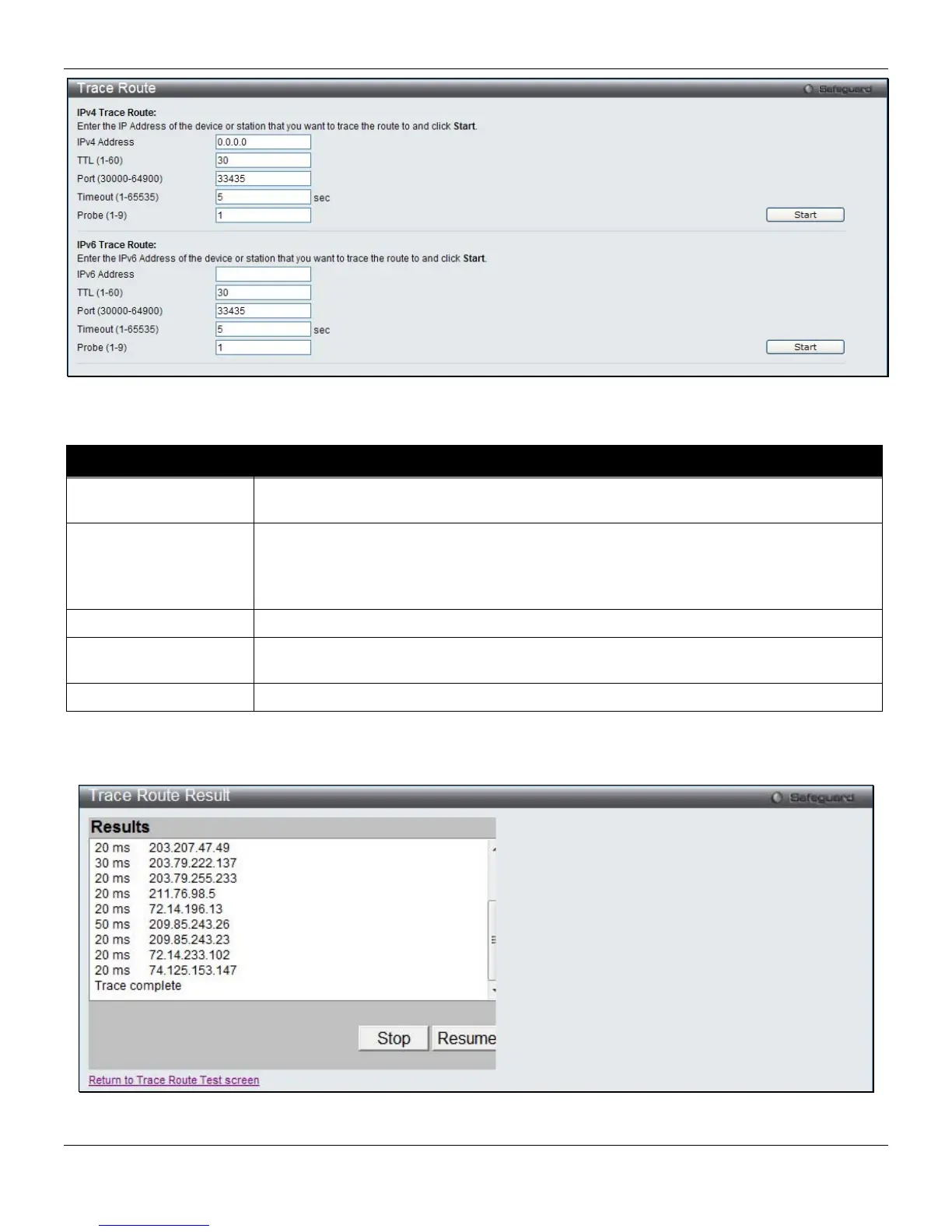
Figure 11-25 Trace Route window
The fields that can be configured are described below:
Parameter Description
IPv4 Address / IPv6
Address
The IP address of the destination station.
TTL (1-60)
The time to live value of the trace route request. This is the maximum number of routers
that a trace route packet can pass. The trace route option will cross while seeking the
network path between two devices.
The range for the TTL is 1 to 60 hops.
Port (30000-64900)
The port number. The value range is from 30000 to 64900.
Timeout (1-65535)
Defines the timeout period while waiting for a response from the remote device. A value
of 1 to 65535 seconds can be specified. The default is 5 seconds.
Probe (1-9)
The number of probing. The range is from 1 to 9. If unspecified, the default value is 1.
Click the Start button to initiate the Trace Route.
After clicking the Start button, the following page will appear:
Figure 11-26 Trace Route Result window
330












 To Next Page