xStack® DES-3528/DES-3552 Series Layer 2 Stackable Fast Ethernet Managed Switch Web UI Reference Guide
The fields that can be configured are described below:
Parameter Description
Get IP From
Use the drop-down menu to specify the method that this Interface uses to acquire an IP
address.
Interface Name
Enter the name of the IP interface being configured.
IPv4 Address
Enter the IPv4 address used.
Subnet Mask
Enter the IPv4 subnet mask used.
VLAN Name
Enter the VLAN Name used.
IPv4 State
Use the drop-down menu to enable or disable IPv4 State.
Interface Admin State
Use the drop-down menu to enable or disable the Interface Admin State.
Click the Apply button to accept the changes made.
Click the <<Back button to discard the changes made and return to the previous page.
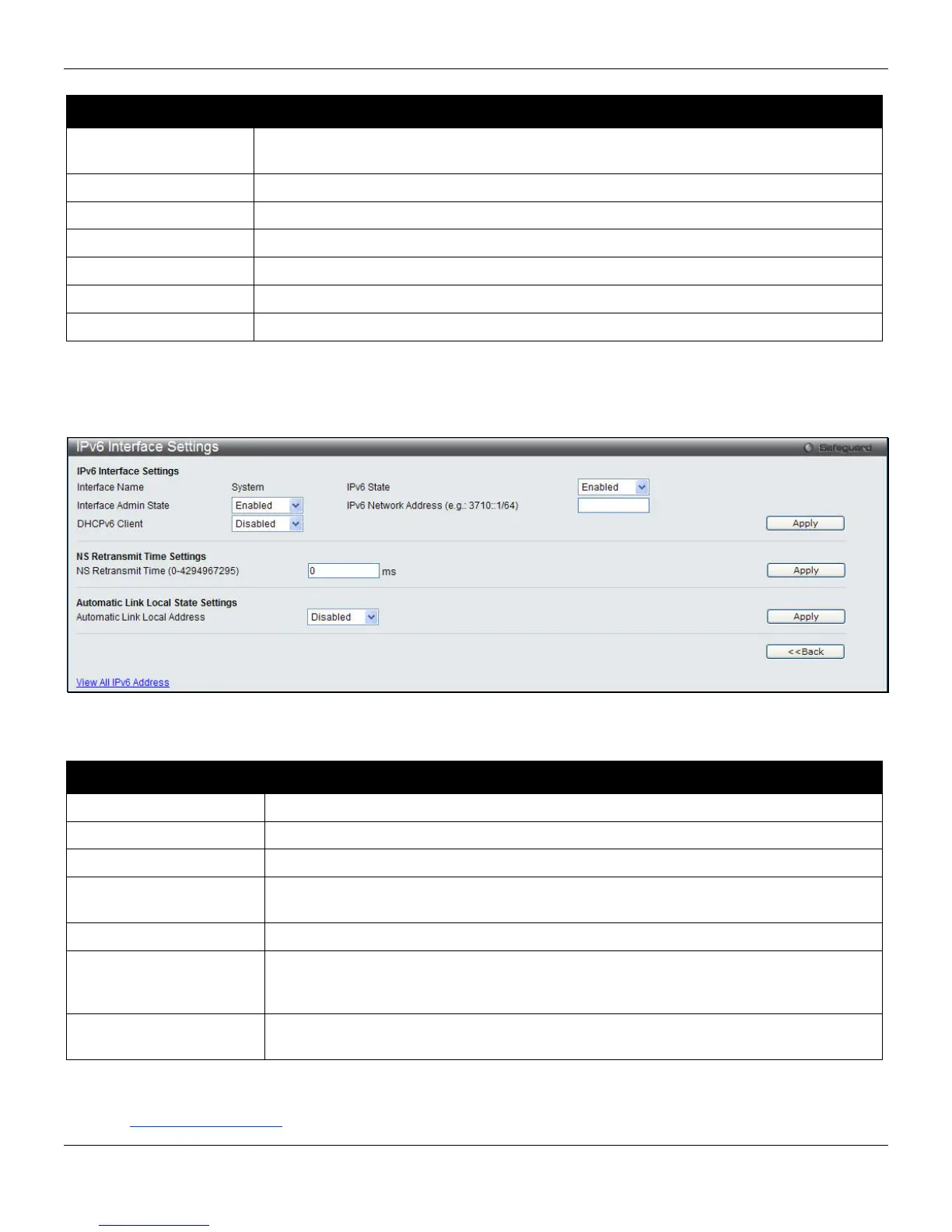
Click the IPv6 Edit button to see the following window.
Figure 3-11 IPv6 Interface Settings – IPv6 Edit window
The fields that can be configured are described below:
Parameter Description
Interface Name
Display the IPv6 interface name.
IPv6 State
Use the drop-down menu to enable or disable IPv6 State.
Interface Admin State
Use the drop-down menu to enable or disable the Interface Admin State.
IPv6 Network Address
(e.g.: 3710::1/64)
Enter the neighbor’s global or local link address.
DHCPv6 Client
Use the drop-down menu to enable or disable the DHCPv6 client.
NS Retransmit Time (0-
4394967295)
Enter the Neighbor solicitation’s retransmit timer in millisecond here. It has the same
value as the RA retransmit time in the configuration of the IPv6 ND RA command. If
this field is configure, it will duplicate the enter into the RA field.
Automatic Link Local
Address
Use the drop-down menu to enable or disable the Automatic Link Local Address.
Click the Apply button to accept the changes made for each individual section.
Click the <<Back button to discard the changes made and return to the previous page.
Click the View All IPv6 Address
link to view all the current IPv6 address.
33












 To Next Page