Chapter 4 Parameters
4-76
Settings Functions Descriptions
RU N/ STOP
command
sp eed
command
speed limit speed limit sp eed
command
torque
command
torque
command
torque
limit
torque
limit
sp eed
co ntrol
sp eed
co ntrol
torque
control
torque
control
sp eed
co ntrol
(decel. t o stop )
contro l
mode
03 -0 0~ 03= 2
(AVI/AUI/ACI is
t or que co mman d)
03 -0 0~ 03= 1
(AVI/AUI/ACI is
fr eq uen cy co mman d)
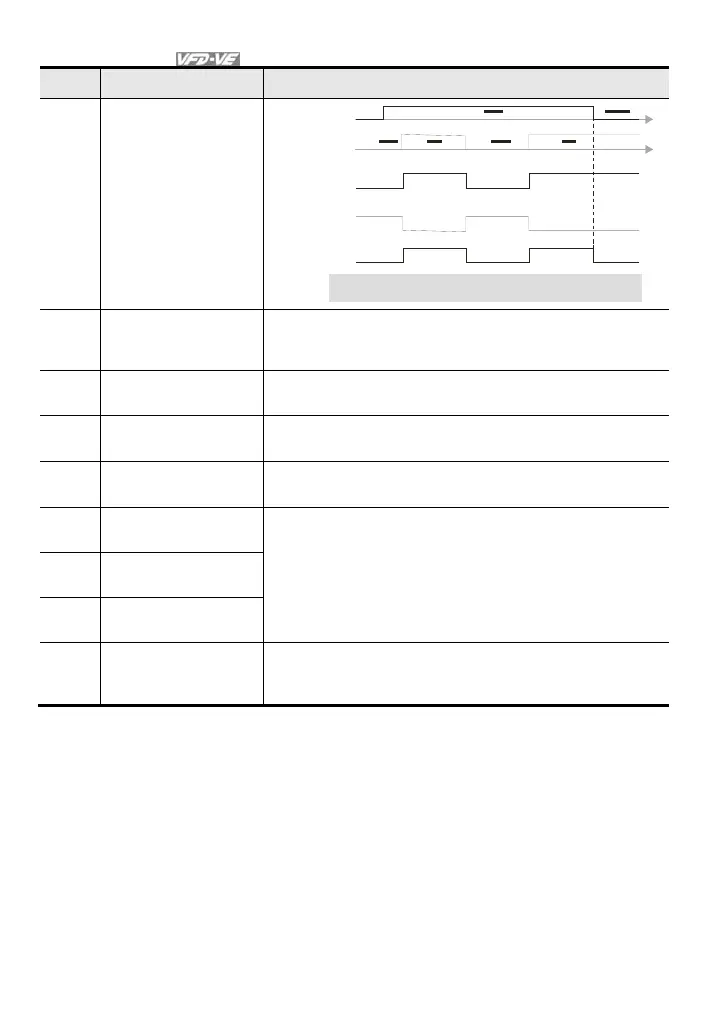
Mul ti- f unc ti on i np ut
ter minal is set to 26
(torque/speed
mode switch )
Switch timing for t orque/speed control
(00-10=3/4, mu lt i-fu nct ion inpu t terminal is set to 26)
27 ASR1/ASR2 selection
When the contact is ON: speed will be adjusted by ASR 2
setting. OFF: speed will be adjusted by ASR 1 setting. Refer to
Pr.10-08 for details.
28 Emergency stop (EF1)
When the contact is ON, the drive will execute emergency stop.
(it will have fault code record)
29
Signal confirmation for Y-
connection
When is the contact is ON, the drive will operate by 1st V/f.
30
Signal confirmation for
connection
When the contact is ON, the drive will operate by 2nd V/f.
31
High torque bias (by
Pr.07-29)
Refer to Pr.07-27~07-31 for details.
32
Middle torque bias (by
Pr.07-30)
33
Low torque bias (by
Pr.07-31)
34
Enable multi-step
position control
When the contact is ON, the corresponding 15-step speed for
the multi-function inputs 1-4 will be 15 positions. (Refer to Pr.04-
15 to Pr.04-29)



 To Next Page