Chapter 4 Parameters
4-80
Settings Functions Descriptions
40 Force stop
When this contact is ON during operation, the drive will free run
to stop.
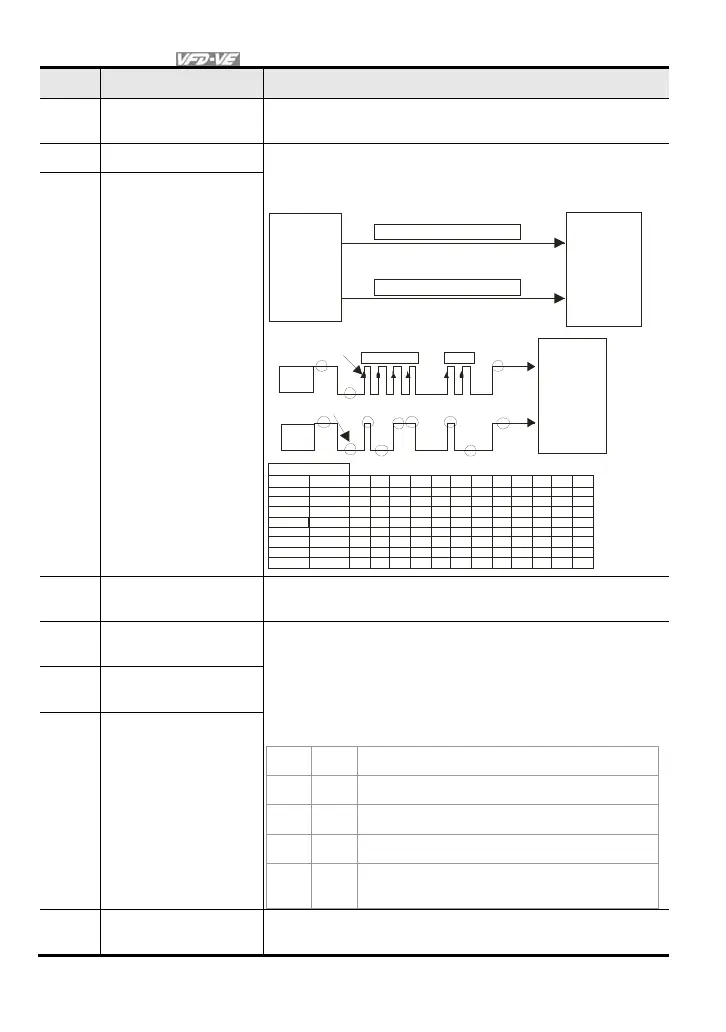
41 Serial position clock The position method of the main shaft:
When using setting 41 and setting 42, it needs to use with 2
input terminals for multi-position control.
CNC
DO
SPI Position Command Clock
DI
DO
SPI Position Command Data
DI
Con tro ller
(PLC)
main
shaft
VFD -VE
PG position
co ntrol point
Pr.10-19
OSS
Clock
OSS
Dat a
1 2 3 4 11 12
b0
b11
En coder b1b2b3b4b5b6b7b8b9
b1 0
36 0
18 0
90
45
13 7
30 8
40 96
40 95
20 48
10 24
51 2
15 58
35 04
36 87
0
1
00
0
00000000
11
1
1
1
1
1
1
1
1
1
00
0
000000001
0
0
00000000
1
0
00000000
1
0
00010110
1
1
0
0
0
0
0
1
1011000011
1
0
0110011111
PG position
co ntr ol poi nt
Pr.10 -19
main shaft
VFD-VE
transmission start
Rea dy for t ra nsmission
test example
angle
42 Serial position input
43
Analog input resolution
selection
Refer to Pr.10-25 for details.
44
Enable Reset initial reel
diameter
When the drive is at stop and it is in tension control mode, it
needs to set 3-step initial reel by the digital status of terminals
45 and 46 (Pr.08-46~48). Using terminal 44 function after setting
contact status of 45 and 46 as shown in the following table.
MI=46 MI=45 MI=44
OFF OFF ON: writing Pr.08-46 setting into Pr.08-54
OFF ON ON: writing Pr.08-47 setting into Pr.08-54
ON OFF ON: writing Pr.08-48 setting into Pr.08-54
ON ON ON: reset Pr.08-54 setting to the factory
setting
45
Reset initial reel
diameter 1
46
Reset initial reel
diameter 2
47
Reset PID control
integration of tension
When this contact is ON, the PID control integration of tension is
reset.



 To Next Page