SETTING THE MASTER SPEAKER VOLUME
VF6 Infinity Vista 2-13
Setting the Master Speaker Volume
The setting for the master speaker volume defines the volume for alarm tones, pulse
tones, attention and error tones. The available settings are
10, 20...100% and OFF.
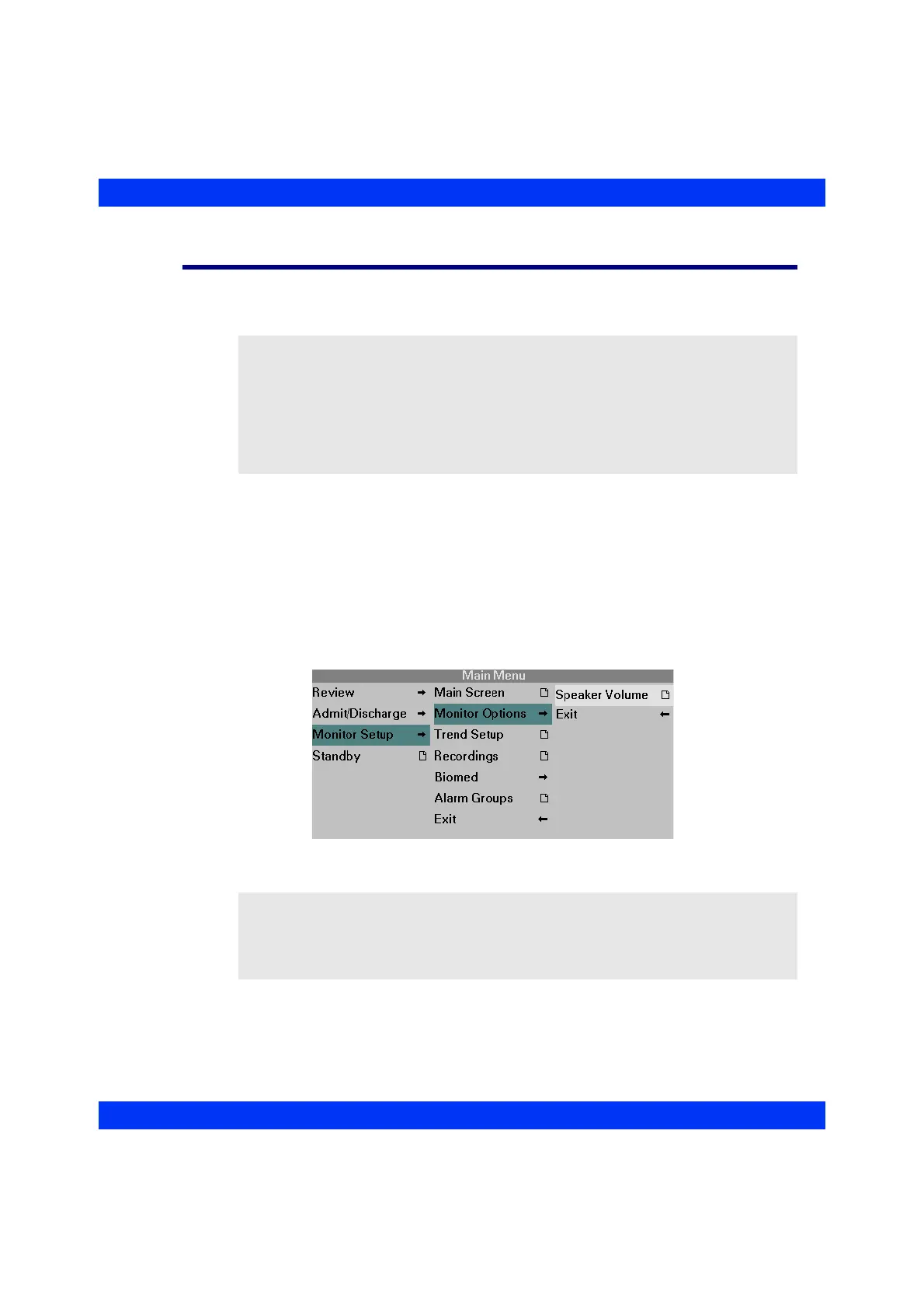
STEPS: Setting the Speaker Volume
1. Press the Menu fixed key.
2. Click on
Monitor Setup.
3. Click on
Monitor Options.
4. Click on
Speaker Volume.
5. Click the knob, select a setting, and click the knob again.
NOTE:
z For safety reasons, you cannot turn the speaker volume off when the monitor
operates as a stand-alone device or if the French-NFC mode has been selected
(a Service setting).
z If your monitor is operating in the Infinity network and you turn the speaker
volume off, a crossed speaker symbol appears above the first waveform
channel.
NOTE: The setting for the master speaker volume defines the maximum volume for
all tones, including the user-adjustable QRS and SpO
2
pulse tones. Therefore, if you set
the master speaker volume to Low, but set the QRS and SpO
2
pulse tones to High in the
ECG or SpO
2
menu (see ECG and SpO
2
chapters), the master volume setting prevails
and pulse tones sound at a low volume.











 To Next Page