Multicast Filtering
3-205
• IGMP Query Timeout — The time the switch waits after the previous querier stops
before it considers the router port (i.e., the interface which had been receiving
query packets) to have expired. (Range: 300-500 seconds, Default: 300)
• IGMP Version — Sets the protocol version for compatibility with other devices on
the network. (Range: 1-3; Default: 2)
Notes: 1.
All systems on the subnet must support the same version.
2. Some attributes are only enabled for IGMPv2, including IGMP Report Delay
and IGMP Query Timeout.
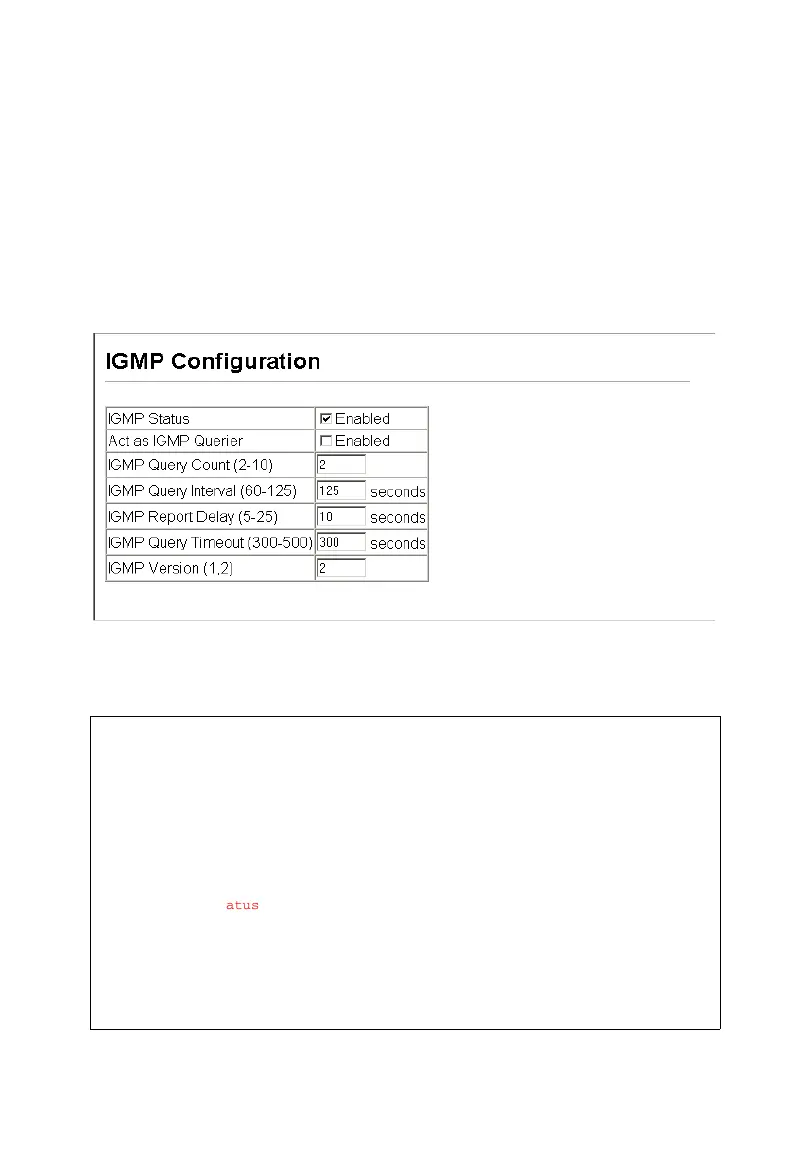
Web – Click IGMP Snooping, IGMP Configuration. Adjust the IGMP settings as
required, and then click Apply. (The default settings are shown below.)
Figure 3-101 Configuring IGMP
CLI – This example modifies the settings for multicast filtering, and then displays the
current status.
Console(config)#ip igmp snooping 4-253
Console(config)#ip igmp snooping querier 4-257
Console(config)#ip igmp snooping query-count 10 4-257
Console(config)#ip igmp snooping query-interval 100 4-258
Console(config)#ip igmp snooping query-max-response-time 20 4-258
Console(config)#ip igmp snooping router-port-expire-time 300 4-259
Console(config)#ip igmp snooping version 2 4-254
Console(config)#exit
Console#show ip igmp snooping 4-255
Service Status: Enabled
Querier Status: Enabled
Leave proxy status: Disabled
Query Count: 10
Query Interval: 100 sec
Query Max Response Time: 20 sec
Router Port Expire Time: 300 sec
Immediate Leave Processing: Disabled on all VLANs
IGMP Snooping Version: Version 2
Console#












 To Next Page