031914 7-5
KEYBOARD BUTTONS
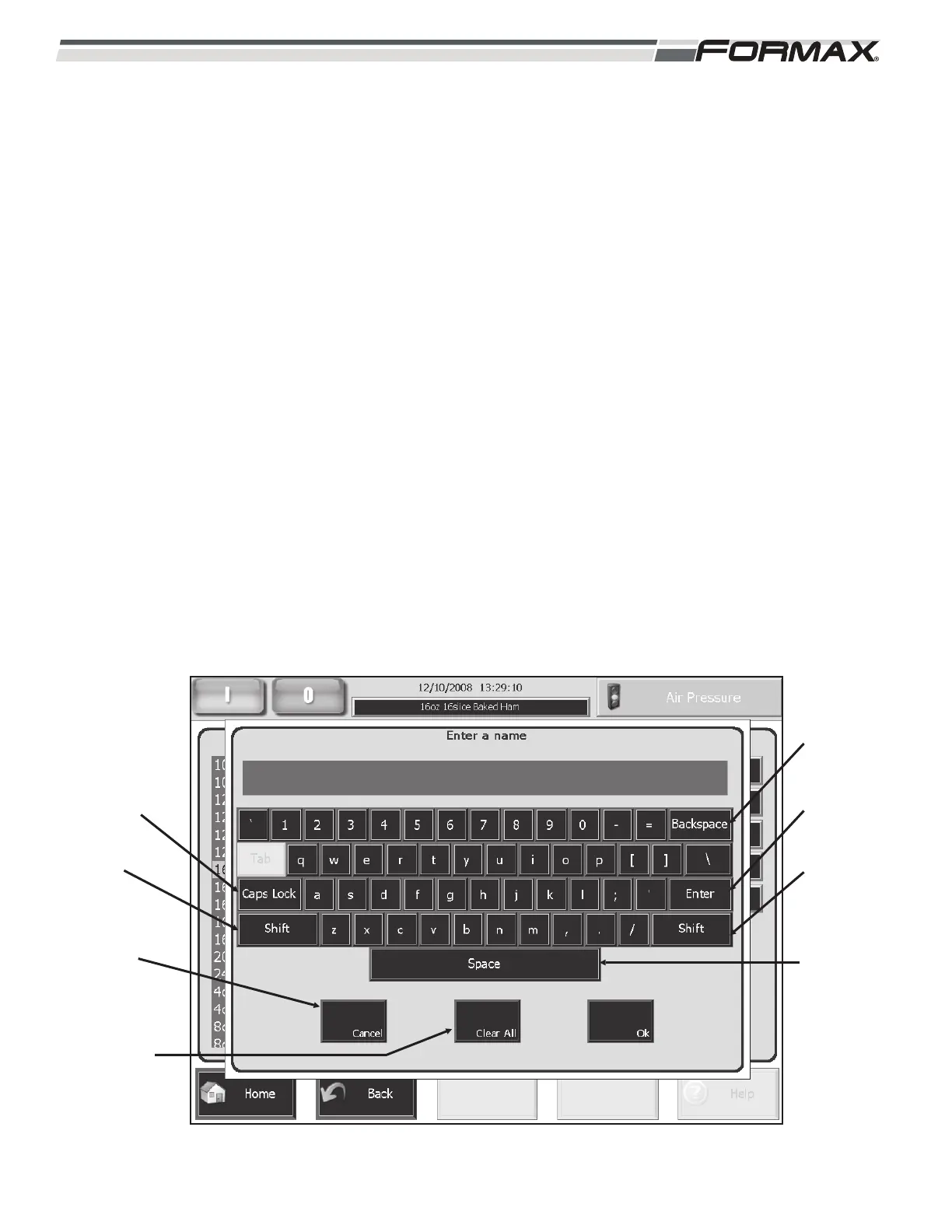
CAPS LOCK: Touching the “Caps Lock” button will change the
letters to “Upper Case” and allow you to use all capital letters in the
Product Code “Name.”
SHIFT: Touching the “Shift” button will shift the next letter typed in
the Product Code to a capital letter.
CLEAR ALL: Touching the “Clear All” button will erase all the
letters typed in the text window and allow you to start over.
SPACE: The “Space” Button allows you to use spaces between the
different words in the Product Code “Name.”
BACKSPACE: Touching the “Backspace” button will remove the
last letter that you typed. Touching it repeatedly will continue to
remove the letters that you have typed.
CANCEL: Touching the “Cancel” button will stop the “Create a
Product Code” function and return you to the “Home” screen.
ENTER: Touching the “Enter” button after typing in the new Product
Code “Name” will finalize the creation of the Product Code.
ILLUSTRATION 10
BACKSPACE
ENTER
SHIFT
SPACE
CAPS LOCK
SHIFT
CANCEL
CLEAR ALL



 To Next Page