M2-30 031914
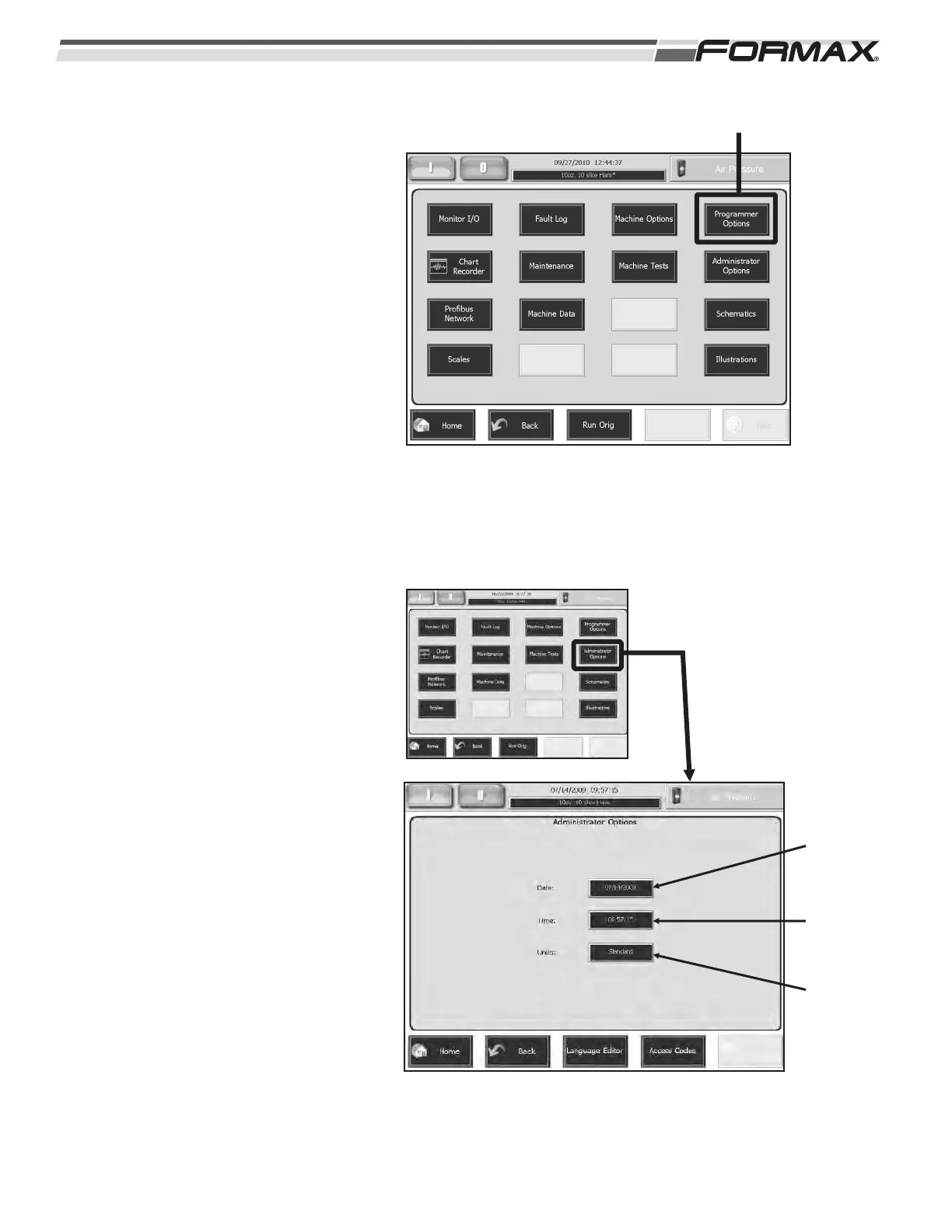
PROGRAMMERS OPTIONS: The
“Programmers Options” screen is set up and
programmed by the Software Engineers prior
to the machine shipment and should not be
changed for any reason! (Illustration 47)
ACAUTION!
Do Not change the settings on this
screen without specific instructions
from the Software Engineers!
ADMINISTRATOR OPTIONS: The
“Administrator Options” screen allows you to
change the “Date,” “Time” and the type of
units that will be used on the screens.
(Illustration 48) The “Language Editor” and
“Access Codes” screens can also be
accessed from this screen.
Date: To change the Date:
1. Touch the “Date” window.
(Illustration 48)
2. Touch the “Clear All” button to
erase the old date.
3. Type the new date on the
keyboard and touch the “OK”
button.
Time: To change the Time:
1. Touch the “Time” window.
(Illustration 48)
2. Touch the “Clear All” button to
erase the old time.
3. Type the new time on the
keyboard and touch the “OK”
button.
Units: To change the Units:
1. Touch the “Units” window.
(Illustration 48)
2. Touch and highlight “Standard” or
“Metric” and touch the “OK” button
to select the new Units.
ILLUSTRATION 47
PROGRAMMER OPTIONS
“DATE”
WINDOW
“TIME”
WINDOW
“UNITS”
WINDOW
ILLUSTRATION 48



 To Next Page