031914 M6-5
SCALE CALIBRATION
The following procedure must be done with the scale
seals in the released position. The Slicer must be in the
“RUN” position. All the guards must be closed, all “Master
Off” buttons pulled out and the main air turned “ON.”
IMPORTANT!
The “Scale Calibration Procedure” must be performed
using a 1000-gram Weight Standard! “Metric” must be
selected on the Administrator Options screen. The
calibration will FAIL if it is not performed with a
1000-gram Weight Standard!
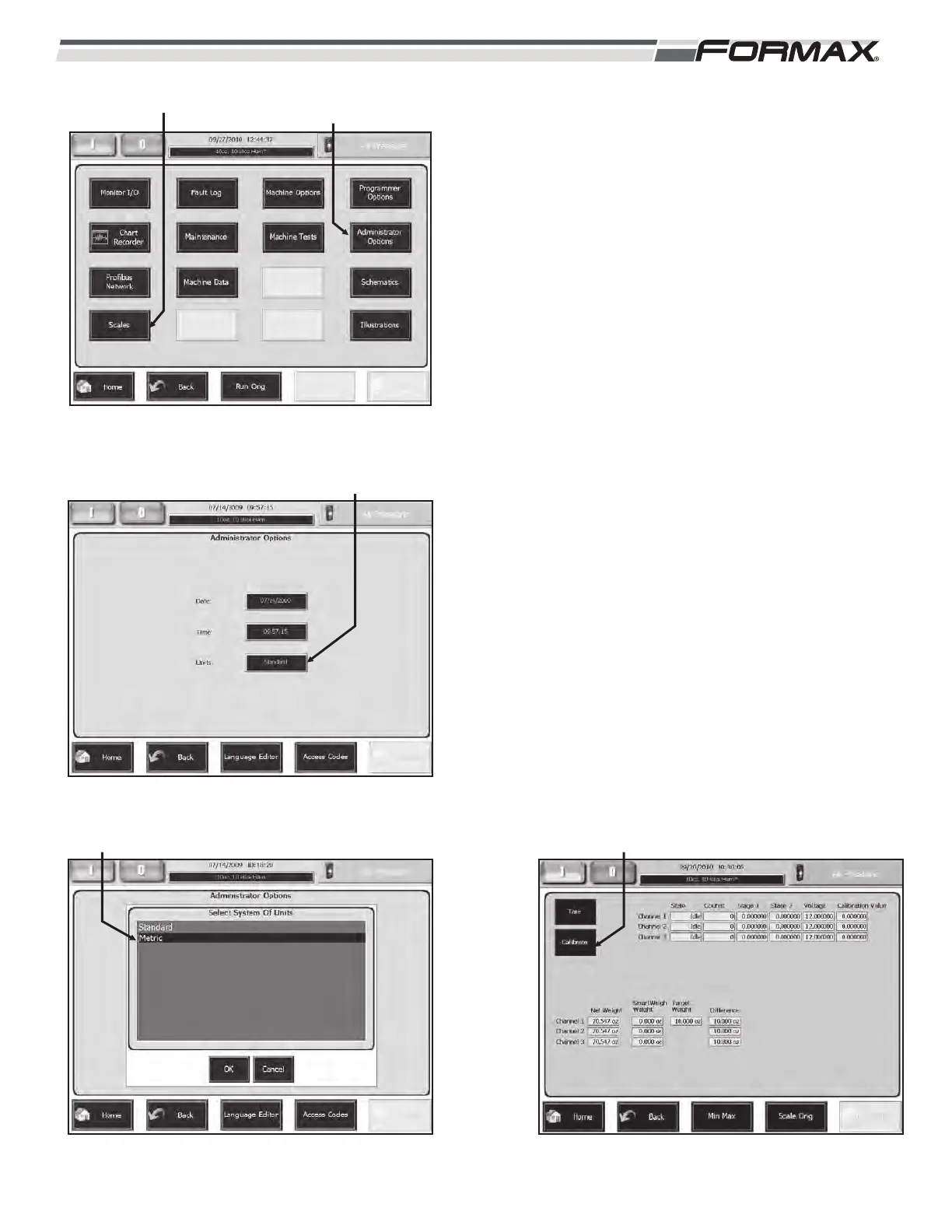
STEP 5 SET THE UNITS TO METRIC
1. If the Slicer is already in grams go to step 2.
2. If the Slicer is in ounces press “Administrator
Options” button on the Service screen.
(Illustration 15)
3. Touch the “Units” box, (Illustration 16) select
“Metric,” press the “OK” button. (Illustration 17)
STEP 6 GO TO THE “SCALE” SCREEN
1. Touch the “Service” button on the “Home” screen.
2. Touch the “Scales” button on the “Service” screen.
(Illustration 15)
3. Touch the “Calibrate” button. (Illustration 18)
ILLUSTRATION 15
ADMINISTRATOR
OPTIONS
SCALES
ILLUSTRATION 17
SELECT “METRIC”
ILLUSTRATION 18
CALIBRATE
ILLUSTRATION 16
UNITS



 To Next Page