031914 M3-55
STEP 1 TURN “OFF” THE MAIN POWER
AND AIR
ADANGER!
Follow your company’s Lockout/Tagout
procedures when performing any
maintenance on your Formax machine.
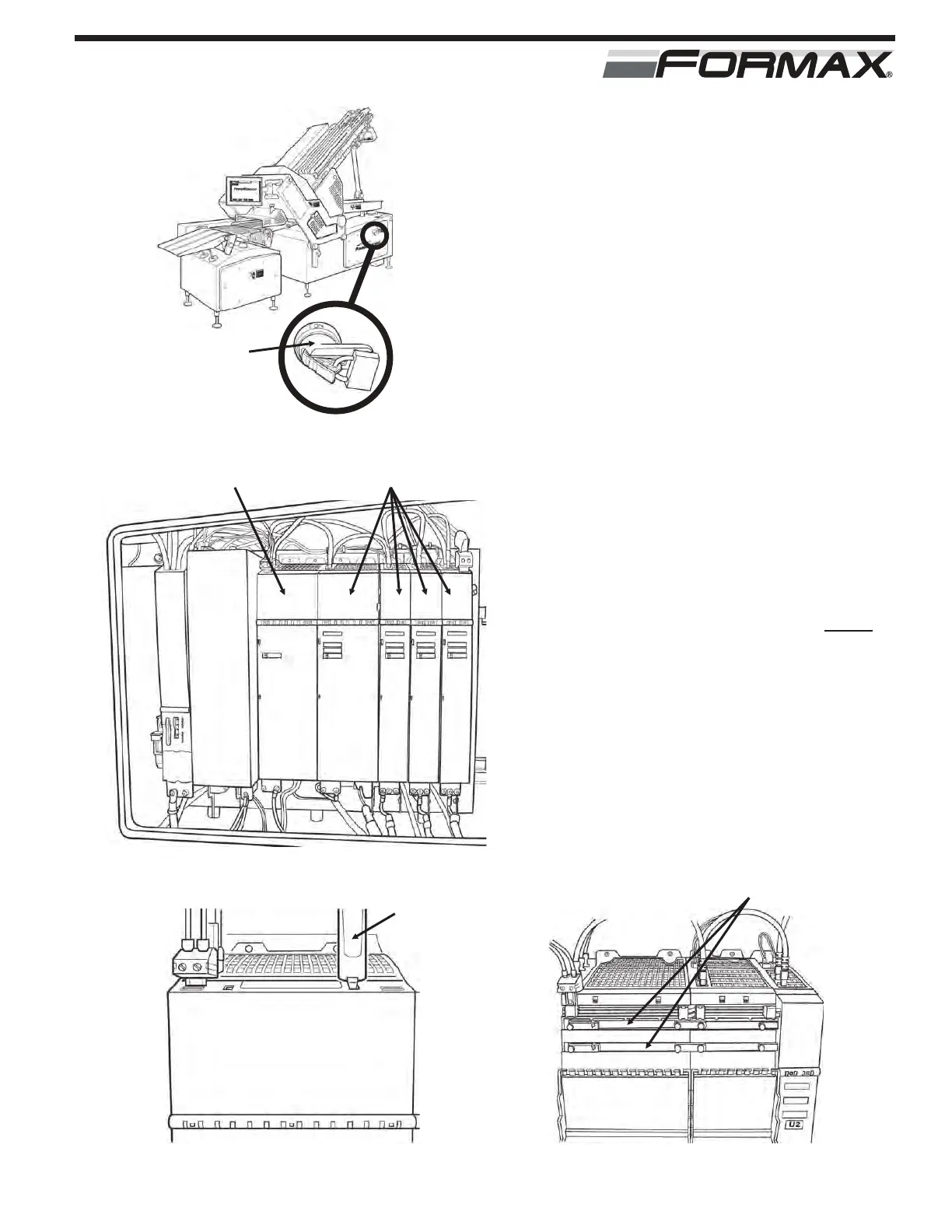
(Illustration 1)
The Active Line Module, the Servo
Drives, and the Servo Motors contain
dangerous voltages! (Illustration 2) Only
Qualified personnel should perform
service on any of these components!
Always observe the following
precautions: The DC Bus voltage stored
in the Active Line Module and the Servo
Drives is in excess of 600 VDC. There
are storage capacitors connected to the
DC Bus that take 5 minutes to discharge
after the power is disconnected. WAIT
the full 5 minutes for the voltage to drop
before removing the DC Bus covers or
servicing any of the modules. (Use the
tool provided with module to open the
cover, exposing the DC bus links.)
(Illustrations 3)
Use a voltage meter to check the DC
Bus voltage. The voltage should be at
“zero” before proceeding. (Illustration 4)
ACTIVE LINE MODULE REPLACEMENT
ILLUSTRATION 2
ACTIVE LINE MODULE SERVO DRIVE MODULE
ILLUSTRATION 4
METER LEADS
ILLUSTRATION 3
TOOL
MAIN POWER
HANDLE WITH
LOCKOUT
DEVICE
ILLUSTRATION 1



 To Next Page