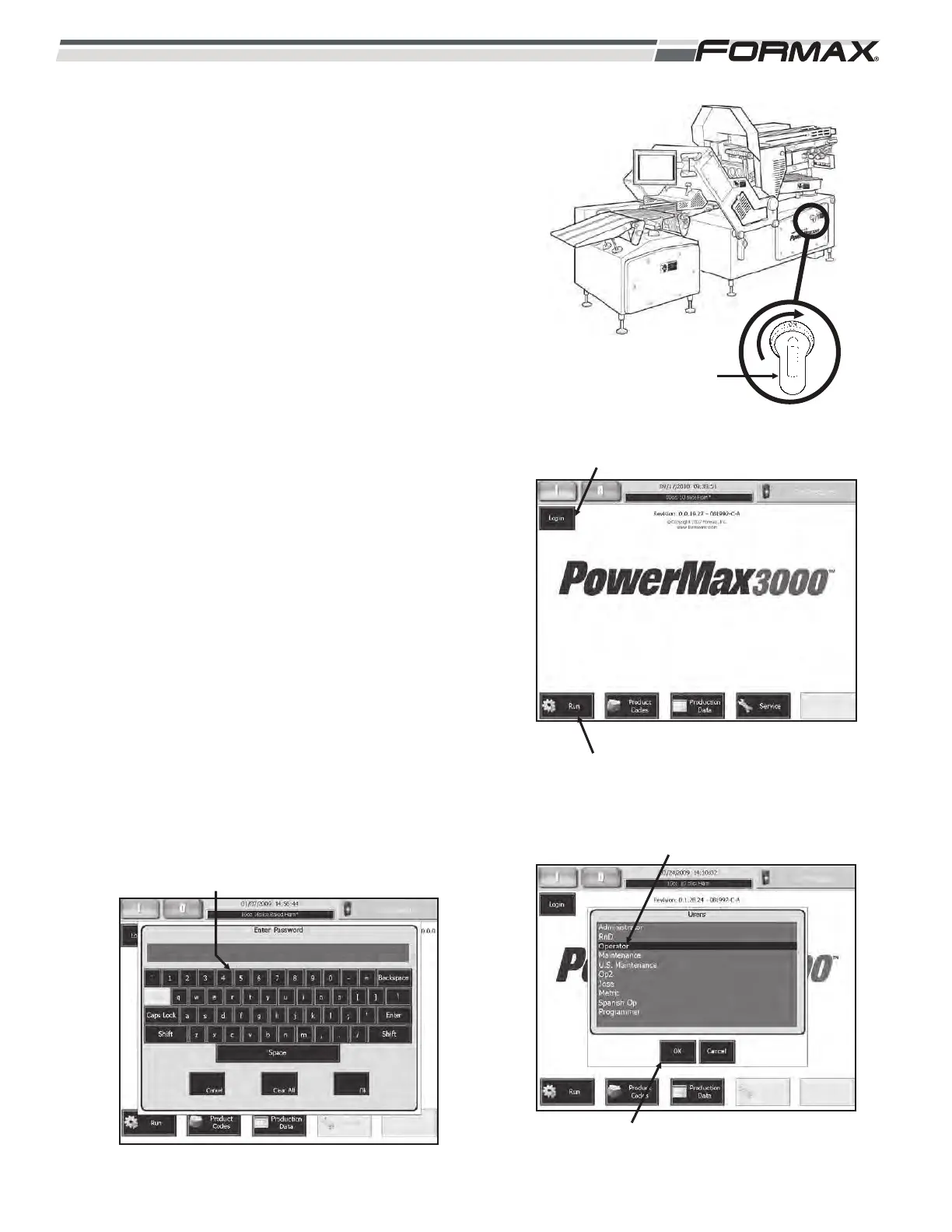
STEP 2 TURN “ON” THE MAIN POWER
AND AIR (Illustration 4)
ADANGER!
Follow your company’s lockout/tagout
procedure before turning “On” the power
to the machine.
1. Follow the Touchscreen prompts
and calibrate the Touchscreen.
STEP 3 “LOGIN” TO THE MACHINE
1. Touch the “Login” button in the upper left
corner of the Touchscreen. (Illustration 5)
2. Touch your “user name” on the “User”
screen. It will highlight. (Illustration 6)
3. Touch the “OK” button.
4. Enter your “password” on the keypad and
touch the “OK” button. (Illustration 7)
5. Touch the “Run” button on the “Home” or
“Main” screen. (Illustration 5)
6-2 031914
ILLUSTRATION 5
“RUN” BUTTON
“LOGIN” BUTTON
ILLUSTRATION 6
USER NAMES
“OK” BUTTON
ILLUSTRATION 7
ENTER “PASSWORD”
POWER ON
ILLUSTRATION 4



 To Next Page