M2-16 031914
MACHINE TESTS
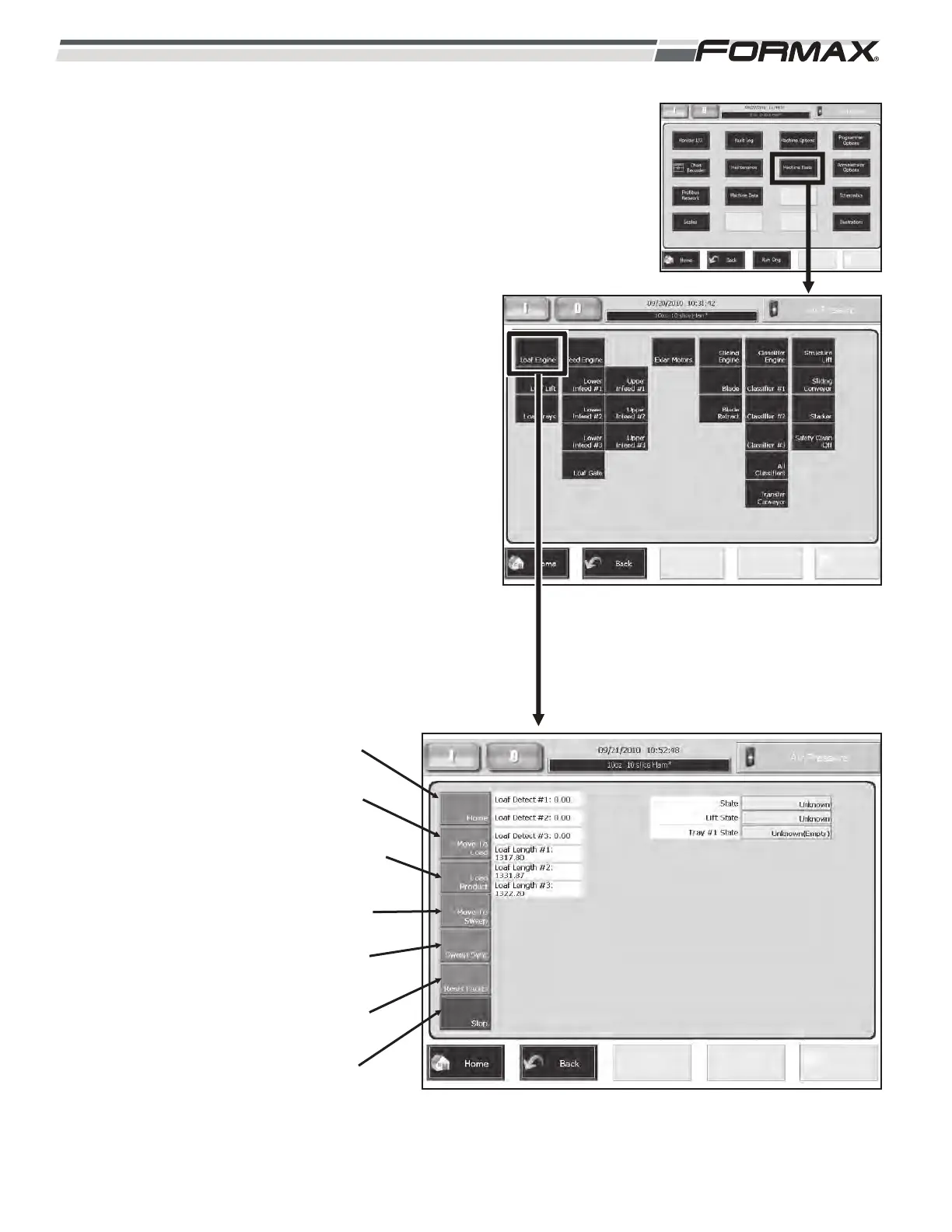
The “Machine Tests” screens allow you run each Servo
Motor independently to troubleshoot or test the Servo
Drive and Servo Motor. (Illustration 25) The “Machine
Tests” screen displays all of the Servo Motors used on
the Slicer. The “Exlar” Servo Motor screen will display by
pushing the “Exlar Motors” button on the “Machine
Tests” screen. The resolver/encoder feedback accuracy
can be checked using the “Move” function of the “Motor
Test.”
Loaf Engine: The Loaf Engine screen allows you to test
all the functions of the Loaf Tray. (Illustration 26)
Home: Homes the Loaf Lift to the “down” position.
Move To Load: Moves the Loaf Lift from the
“Sweep” position (up) to the “Load” position (down).
Load Product: Moves the #1, #2 and #3 to the “up”
position and #4 to the “down position.
Move To Sweep: Moves the Loaf Lift from the
“Load” position (down) to the “Grip” position (up).
Sweep Sync: Not
Applicable.
Reset Faults: Resets
faults.
Stop: Stops the Loaf
Lift movement when
using one of the tests.
ILLUSTRATION 25
ILLUSTRATION 26
HOME
MOVE TO
LOAD
LOAD
PRODUCT
MOVE TO
SWEEP
SWEEP
SYNC
RESET
FAULTS
STOP



 To Next Page