031914 7-7
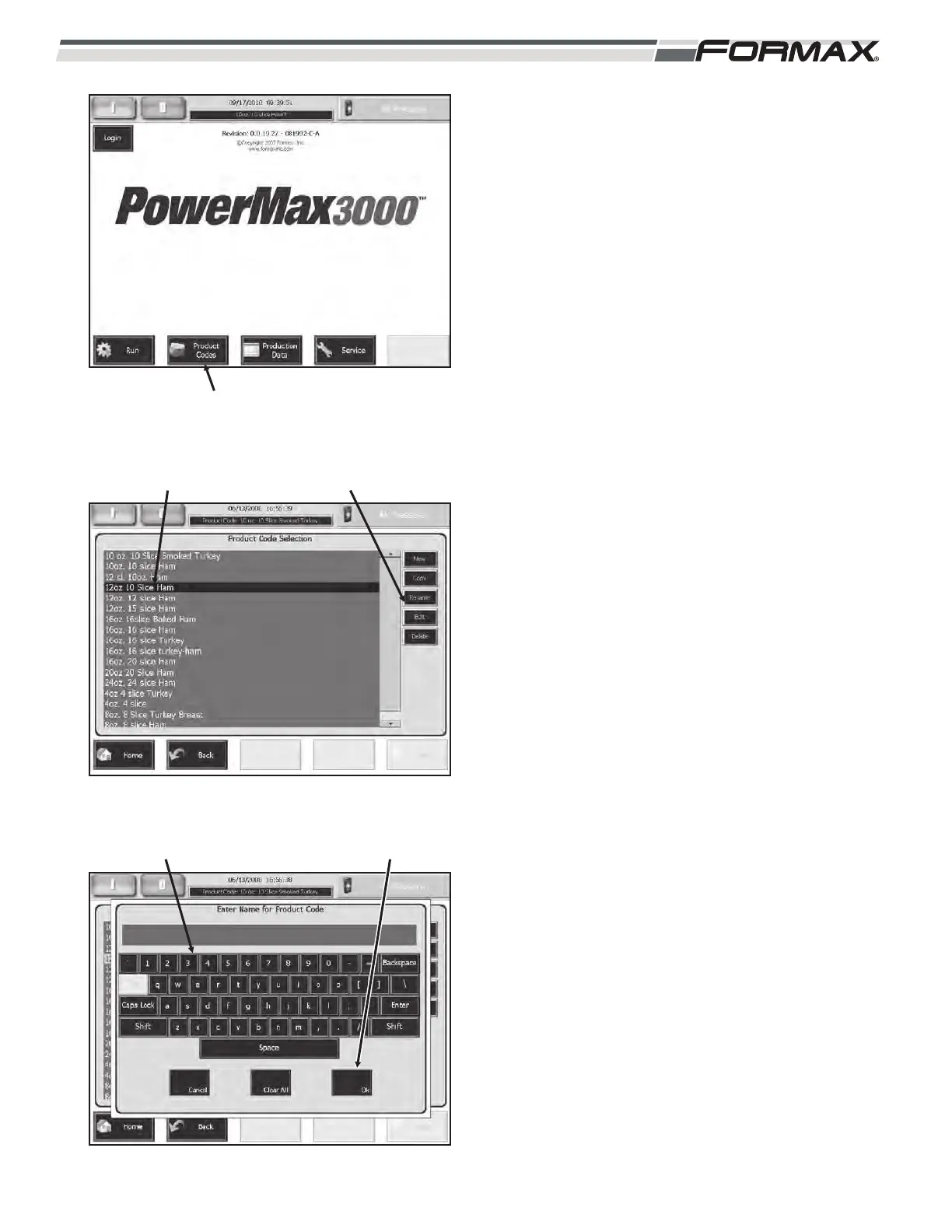
RENAME AN EXISTING PRODUCT CODE
To “Rename” an existing Product Code:
1. Touch the “Product Codes” button on the
“Home” screen. (Illustration 14)
2. Touch and highlight the “Product Code”
that you would like to “Rename.”
(Illustration 15)
3. Touch the “Rename” button to access the
keyboard and rename the Product Code.
4. Type in the name of the new Product
Code and then touch the “OK” button.
(Illustration 16) To “Edit” the Product
Code, refer to the “Editing A Product
Code” procedure on the previous page.
ILLUSTRATION 15
“RENAME” BUTTONSELECT “PRODUCT CODE
ILLUSTRATION 16
“OK” BUTTONKEYPAD
ILLUSTRATION 14
“PRODUCT CODES” BUTTON



 To Next Page