031914 M3-63
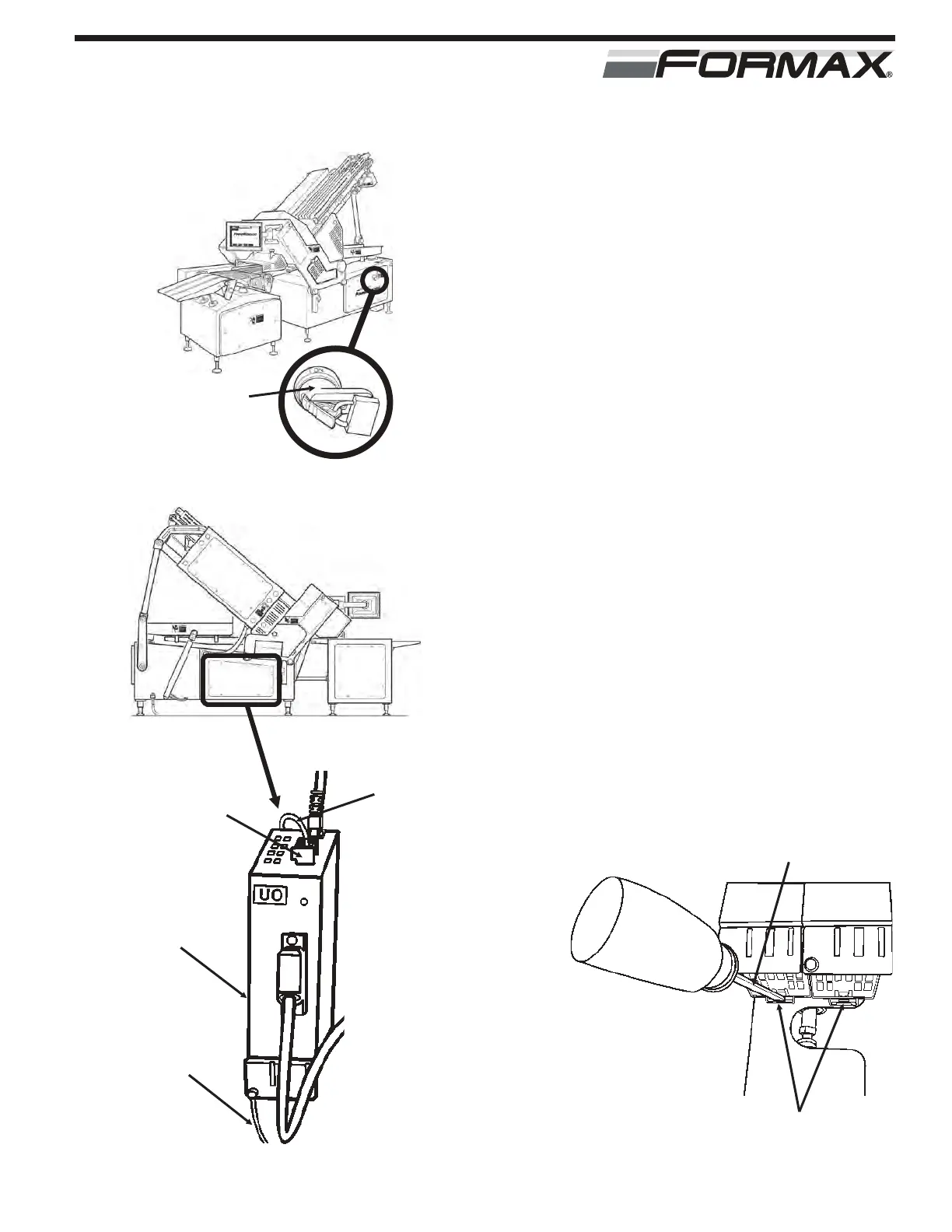
STEP 1 TURN “OFF” THE MAIN POWER AND
AIR
ADANGER!
Follow your company’s Lockout/Tagout
procedures when performing any maintenance
on your Formax machine. (Illustration 1)
STEP 2 REMOVE THE COVER (Illustration 2)
STEP 3 REMOVE THE FEEDBACK
CONVERTER (Illustration 3)
1. Open the feedback cabinet door.
2. Remove the terminal cables. (X500)
3. Remove the power cable. (X524)
4. Remove the grounding lugs. (Torx T20)
5. Loosen the resolver cable plug retaining screw.
6. Remove the cable.
7. Disengage the module from the bracket. (insert
screwdriver into the bottom of the holddown,
pull down and out) (Illustration 4)
FEEDBACK CONVERTER
REPLACEMENT U0
ILLUSTRATION 2
ILLUSTRATION 3
TERMINAL
CABLES
(X500)
POWER
CABLE
(X524)
U0 FEEDBACK
CONVERTER
GROUNDING
LUGS
(TORX T20)
ILLUSTRATION 4
SCREWDRIVER
HOLD DOWN
MAIN POWER
HANDLE WITH
LOCKOUT
DEVICE
ILLUSTRATION 1



 To Next Page